• We’re currently investigating an issue related to the forum theme and styling that is impacting page layout and visual formatting. The problem has been identified, and we are actively working on a resolution. There is no impact to user data or functionality, this is strictly a front-end display issue. We’ll post an update once the fix has been deployed. Thanks for your patience while we get this sorted.

FFS half height arrow keys!!

Redstorm

Senior member
#Start Rant Mode

lenovo-thinkpad-edge-e520_3.jpg


I'm in the market for a new laptop, been holding off as the current batch with half height arrow keys don't cut it for me, I code quite a bit and functional arrow keys are a must.

HP's just anounced Probook 400 G3's with you guessed it half height arrow keys!
Asire r13 r14 v15 and v17 to be released this month with you guessed it half height arrow keys!
Dells current range with you guessed it half height arrow keys!
The list goes on
http://cdn.ultrabookreview.com/wp-content/uploads/2015/09/acer-aspire-r13-2015-1.jpg

IMO their is no excuse on a 14" laptop to not have full sized arrow keys let alone not having them on a 17" model
#End rant mode

Now you say just add an external keyboard, that defeats the purpose of having a laptop. I have a powerful desktop with external keyboard for that.

The best option i can find is the Lenovo T450s has one of the highest rated keyboards in the reviews. but its a bit pricey as i don't need vPro and all the business features.

So if you come across a new skylake laptop with a proper keyboard like the T450s let me know so i can check it out.

And a final message to "Dell, HP, Acer, ASUS, MSI, Lenovo" half height arrow keys - STOP DOING THAT!

Now off to my therapy session.
 
I agree Redstorm. My 2008 Aspire One netbook had full sized arrow keys, then my 2012 Aspire One didn't. Made a world of a difference for games where you're always using the arrow keys to move, and switching to IJKL or whatever is weird because of it's position so your arm is always hitting the edge. The smaller keys felt a lot more flimsy too like they were going to break off. Then they started doing the same for 11.6" laptops as well as 10.1", and now it's looks like they're even doing it on 17"! Lame. At least you can use a keymapper to switch your arrow keys to the number pad on the keyboard in the picture though, I guess.
 
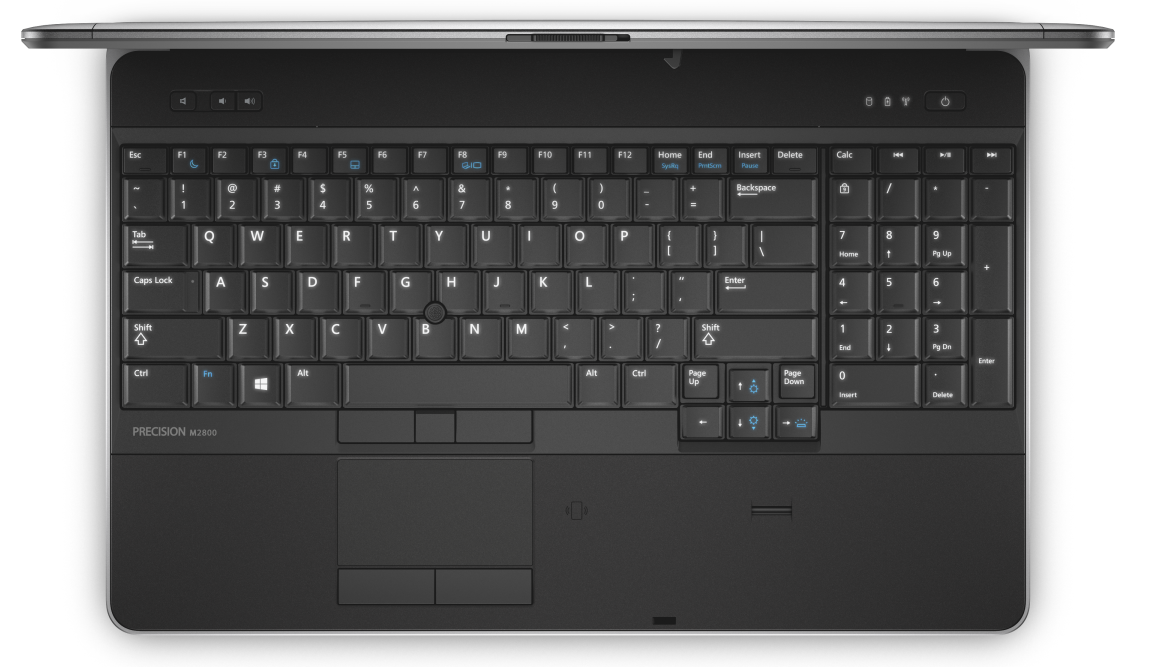
The Dell Precision M2800, 4800, and M6800 still have full-sized arrow keys.

Some current Lenovos still have more or less full-sized arrow keys. Not quite full size like on the Dell Precisions, but better than half-height.

The keyboard on the M2800 looks very similar to the one on my older Latitude E6320 (may even be the same keyboard). IMO it's one of the best laptop keyboards you can get and almost on par with the old-school Thinkpad keyboards before they went to the chicklet design.

MaxPNG%20%283%29.png
 
Last edited:
If this is so important to you, and the price of new hardware is too high, then buy used. It's not like skylake is any giant leap over a good haswell notebook that comes with a great keyboard and a decent price.
 
These just got released in the US so i pulled the trigger as they are not going to make it down here till next year.

lenovo-laptop-ideapad-y700-touch-front-7.jpg


The layout of the Lenovo Y700 15.6 looks identical to the picture above from Sabrewings.

Newegg have a 10% promo on this and a free mouse, its a pretty sharp deal as configured with 16GB ram and the top CPU it comes out to 993US shipped vs 1333USD if you configure it up on Lenovo's web site.

Intel 6700HQ
16GB ram
4GB 960M Nvidia GFX
1TB HDD (ill be swapping in my SSD)
External DVD (don't need it but can't remove it from neweggs bundle)

Notepad is going to scream.
 
What even is that

It's a Canadian bilingual keyboard. A few years back Canadian retailers use to carry separate versions of laptops for both English and French speaking individuals so you were able to get a normal keyboard if you were English. One day some retailer though they could save money and avoid carrying two SKU for each laptop by only carrying one version but with a bilingual keyboard. This is how the bilingual keyboard was born. They split the shift key and Enter key width to make it near impossible for touch typist to use so they could insert keys that nobody uses. All because Quebec (French part of Canada) makes up about 25% of the population, even though only about 5% of Quebec can only speak French.
 
I've been a heavy Macbook user for years. You'll get used to the half-height keys, even if you switch between a desktop and laptop frequently.

What matters is the quality of the KB and pointing device, and Thinkpads typically excel in that area.

Welcome to the universe. Adapt or die.
 
My beef isn't with the half-height keys by themselves, it's when PC vendors put other keys right next to them. It's harder to use the arrow keys by feel as a result.

I say this writing from a newer iMac whose keyboard has half-height up and down keys, but full-size left and right keys. I don't use them much, but the redesign is slightly irksome.
 
I feel your pain in Canada. That thing is horrendous.

Commodus you have a good point, without the free space around the keys finding them without looking will be difficult. should put a mark on them like the 'F' & 'J' for touch typists to find by feel.

Could always glue a little bump to them to help find them without looking.
 
Just received the Y700 and low and behold they put the same nibs on the arrow keys as the touch typing keys "F & J" so well done Lenovo, legend.
 
You guys should be grateful you don't have these monstrosity's
us Canadians have to deal with.

IMG_20130316_160219.jpg

aaaaaaaaaaaaaaaaargh I hate those f'ing keyboards, wish Acer and Toshiba would quit putting those, Canadians aren't idiots. I'm a 75-90wpm typist and these keyboards are a disaster for fast typers.
 
I actually do not mind half height arrow keys at all, provided there is no key above them, like on the machine you posted. That would drive me nuts as I would end up hitting the wrong key half the time. But if there is a blank space above smaller key (Like on my Dell Precision M3800 or rMBP) then they work fine, and I use them a lot.
 
You guys should be grateful you don't have these monstrosity's
us Canadians have to deal with.

IMG_20130316_160219.jpg
The heck? Are they trying to save precious cents eliminating buttons?


It made me think of some industrial controllers where you have to scroll through a vast menu structure using only three or four buttons, and a 7-segment display that isn't able to display most of the alphabet.
Vacuum out every bit of cost and make it impossible to use in the process.


That one does at least appear to have Function keys that default to the normal F1-F12 mode.
As a regular user of F2, F3, F4, F5, and sometimes F6, I usually think of the "Fn" toggle key in a more phonetic sense: It's an Fn pain on some keyboards and laptops.


I also don't care much for the touchpads with no distinct buttons. If I'm operating by touch, I want tactile feedback as to exactly where my fingers are, especially if they may or may not be over a button.


aaaaaaaaaaaaaaaaargh I hate those f'ing keyboards, wish Acer and Toshiba would quit putting those, Canadians aren't idiots. I'm a 75-90wpm typist and these keyboards are a disaster for fast typers.
I had a keyboard that was trying to save on plastic by shrinking the overall size: The Delete/Home/End/PgUp/PgDn (no Insert) was immediately next to the Enter button. The Enter button itself was also an abnormal shape.
(I got the new keyboard because its predecessor kept talking to wireless keyboard's receiver at someone's desk 30ft away. Evidently they built the thing with very few unique channels or codes.)


IT agreed to let me get a different keyboard after I mistakenly deleted three different folders on the server in one day, requiring that the backups be pulled. If I'm typing quickly while navigating folders in Explorer and bump Delete when I'm trying to hit Enter, that of course usually means that the deletion confirmation window gets immediate approval. *poof* folder's instantly gone.
 
Last edited:
Back
Top