
-
We’re currently investigating an issue related to the forum theme and styling that is impacting page layout and visual formatting. The problem has been identified, and we are actively working on a resolution. There is no impact to user data or functionality, this is strictly a front-end display issue. We’ll post an update once the fix has been deployed. Thanks for your patience while we get this sorted.
You are using an out of date browser. It may not display this or other websites correctly.
You should upgrade or use an alternative browser.
You should upgrade or use an alternative browser.
Excel VBA Macros searchbox
- Thread starter mrob
- Start date
I don't think I asked the right question earlier. I have this search box that when I enter the search criteria it will find the row in sheet 2 and return the results in sheet 1 in a list. However, I want that if I enter a misspelled word in the search box and submit a msgbox will appear and ask "Please check your spelling. Is this correct?" and the msgbox will give the user the option of yes, no or cancel. I also want it that if the word is for example "blt" it will return all possible associated words like "belt", "bolt","blot", "but" etc.
Search box code:
Sub SearchParts()
Dim arrParts() As Variant
Range("A7", "B" & Cells(Rows.CountLarge, "B").End(xlDown).Row).Clear
arrParts = FindParts(CStr(Trim(Cells(2, 2))))
Range("A7").Resize(UBound(arrParts, 2), UBound(arrParts)) = _
WorksheetFunction.Transpose(arrParts)
End Sub
Private Function FindParts(PartNumber As String) As Variant
Dim ws As Worksheet
Dim FoundCell As Range
Dim LastCell As Range
Dim rngParts As Range
Dim FirstAddr As String
Dim arrPart() As Variant
Set ws = Worksheets("Data")
Set rngParts = ws.Range("B2:B" & ws.Cells(Rows.CountLarge, "B").End(xlUp).Row)
With rngParts
Set LastCell = .Cells(.Cells.Count)
End With
Set FoundCell = rngParts.Find(What:=PartNumber, After:=LastCell, LookAt:=xlPart)
If Not FoundCell Is Nothing Then
FirstAddr = FoundCell.Address
End If
ReDim arrPart(1 To 2, 1 To 1)
Do Until FoundCell Is Nothing
arrPart(1, UBound(arrPart, 2)) = FoundCell.Offset(0, -1)
arrPart(2, UBound(arrPart, 2)) = FoundCell.Value
ReDim Preserve arrPart(1 To 2, 1 To UBound(arrPart, 2) + 1)
Set FoundCell = rngParts.FindNext(After:=FoundCell)
If FoundCell.Address = FirstAddr Then
Exit Do
End If
Loop
FindParts = arrPart
End Function
Spell Check Code:
Option Explicit
Sub SpellCheck()
'
'
Dim SpellCheck As Excel.Range
Set SpellCheck = ActiveSheet.UsedRange
SpellCheck.SpecialCells(xlCellTypeConstants, 22).Select
Selection.CheckSpelling SpellLang:=2057
Set SpellCheck = Nothing
End Sub
Search box code:
Sub SearchParts()
Dim arrParts() As Variant
Range("A7", "B" & Cells(Rows.CountLarge, "B").End(xlDown).Row).Clear
arrParts = FindParts(CStr(Trim(Cells(2, 2))))
Range("A7").Resize(UBound(arrParts, 2), UBound(arrParts)) = _
WorksheetFunction.Transpose(arrParts)
End Sub
Private Function FindParts(PartNumber As String) As Variant
Dim ws As Worksheet
Dim FoundCell As Range
Dim LastCell As Range
Dim rngParts As Range
Dim FirstAddr As String
Dim arrPart() As Variant
Set ws = Worksheets("Data")
Set rngParts = ws.Range("B2:B" & ws.Cells(Rows.CountLarge, "B").End(xlUp).Row)
With rngParts
Set LastCell = .Cells(.Cells.Count)
End With
Set FoundCell = rngParts.Find(What:=PartNumber, After:=LastCell, LookAt:=xlPart)
If Not FoundCell Is Nothing Then
FirstAddr = FoundCell.Address
End If
ReDim arrPart(1 To 2, 1 To 1)
Do Until FoundCell Is Nothing
arrPart(1, UBound(arrPart, 2)) = FoundCell.Offset(0, -1)
arrPart(2, UBound(arrPart, 2)) = FoundCell.Value
ReDim Preserve arrPart(1 To 2, 1 To UBound(arrPart, 2) + 1)
Set FoundCell = rngParts.FindNext(After:=FoundCell)
If FoundCell.Address = FirstAddr Then
Exit Do
End If
Loop
FindParts = arrPart
End Function
Spell Check Code:
Option Explicit
Sub SpellCheck()
'
'
Dim SpellCheck As Excel.Range
Set SpellCheck = ActiveSheet.UsedRange
SpellCheck.SpecialCells(xlCellTypeConstants, 22).Select
Selection.CheckSpelling SpellLang:=2057
Set SpellCheck = Nothing
End Sub

Tweak155
Lifer
Yeah so can you show me how that works please?
I can show you a real simplistic one:
Code:
Public Sub temp()
Dim strResponse As String, xlWs As Worksheet, curRange As Range

strResponse = InputBox("Enter search term: ", "Search Term")

Set xlWs = ThisWorkbook.Sheets("Sheet1")
Set curRange = xlWs.Range("A1")
If strResponse <> "" Then
    curRange.Value = strResponse
    curRange.CheckSpelling SpellLang:=2057

    strResponse = curRange.Value

    'Let's go searching with strResponse...
End If

End SubMy hope was to make the search box code smarter in that it will prompt a msgbox if the user tried to search for a misspelled word. Earlier you mention that it was only possible with hard coding the macro. Well I will settle for an example of that ....I'm learning this VBA stuff. Thanks.
Search box code:
Sub SearchParts()
Dim arrParts() As Variant
Range("A7", "B" & Cells(Rows.CountLarge, "B").End(xlDown).Row).Clear
arrParts = FindParts(CStr(Trim(Cells(2, 2))))
Range("A7").Resize(UBound(arrParts, 2), UBound(arrParts)) = _
WorksheetFunction.Transpose(arrParts)
End Sub
Private Function FindParts(PartNumber As String) As Variant
Dim ws As Worksheet
Dim FoundCell As Range
Dim LastCell As Range
Dim rngParts As Range
Dim FirstAddr As String
Dim arrPart() As Variant
Set ws = Worksheets("Data")
Set rngParts = ws.Range("B2:B" & ws.Cells(Rows.CountLarge, "B").End(xlUp).Row)
With rngParts
Set LastCell = .Cells(.Cells.Count)
End With
Set FoundCell = rngParts.Find(What:=PartNumber, After:=LastCell, LookAt:=xlPart)
If Not FoundCell Is Nothing Then
FirstAddr = FoundCell.Address
End If
ReDim arrPart(1 To 2, 1 To 1)
Do Until FoundCell Is Nothing
arrPart(1, UBound(arrPart, 2)) = FoundCell.Offset(0, -1)
arrPart(2, UBound(arrPart, 2)) = FoundCell.Value
ReDim Preserve arrPart(1 To 2, 1 To UBound(arrPart, 2) + 1)
Set FoundCell = rngParts.FindNext(After:=FoundCell)
If FoundCell.Address = FirstAddr Then
Exit Do
End If
Loop
FindParts = arrPart
End Function
Sheet 1 has the search box sheet 2 holds the data
Search box code:
Sub SearchParts()
Dim arrParts() As Variant
Range("A7", "B" & Cells(Rows.CountLarge, "B").End(xlDown).Row).Clear
arrParts = FindParts(CStr(Trim(Cells(2, 2))))
Range("A7").Resize(UBound(arrParts, 2), UBound(arrParts)) = _
WorksheetFunction.Transpose(arrParts)
End Sub
Private Function FindParts(PartNumber As String) As Variant
Dim ws As Worksheet
Dim FoundCell As Range
Dim LastCell As Range
Dim rngParts As Range
Dim FirstAddr As String
Dim arrPart() As Variant
Set ws = Worksheets("Data")
Set rngParts = ws.Range("B2:B" & ws.Cells(Rows.CountLarge, "B").End(xlUp).Row)
With rngParts
Set LastCell = .Cells(.Cells.Count)
End With
Set FoundCell = rngParts.Find(What:=PartNumber, After:=LastCell, LookAt:=xlPart)
If Not FoundCell Is Nothing Then
FirstAddr = FoundCell.Address
End If
ReDim arrPart(1 To 2, 1 To 1)
Do Until FoundCell Is Nothing
arrPart(1, UBound(arrPart, 2)) = FoundCell.Offset(0, -1)
arrPart(2, UBound(arrPart, 2)) = FoundCell.Value
ReDim Preserve arrPart(1 To 2, 1 To UBound(arrPart, 2) + 1)
Set FoundCell = rngParts.FindNext(After:=FoundCell)
If FoundCell.Address = FirstAddr Then
Exit Do
End If
Loop
FindParts = arrPart
End Function
Sheet 1 has the search box sheet 2 holds the data
Last edited:
Tweak155
Lifer
So you want it to individually ask if a word is spelled correctly? Unfortunately your flow chart makes no sense to me. Why if they select "No" to check spelling would I ask them if a word is spelled correctly?
Try the following code and see if this suits your needs (put this on a blank sheet as I wipe all formatting and text on the existing sheet, suit this to your needs):
Try the following code and see if this suits your needs (put this on a blank sheet as I wipe all formatting and text on the existing sheet, suit this to your needs):
Code:
Private Sub CommandButton1_Click()
Columns("A:A").NumberFormat = "@"
Columns("A:A").ClearContents
Columns("A:A").Interior.Color = vbWhite
Columns("A:A").Borders.LineStyle = xlNone
With Columns("A:A").Interior
    .Pattern = xlNone
    .TintAndShade = 0
End With

'ActiveWindow.DisplayGridlines = True

Dim response As String, curRow As Long

response = "go"

curRow = 1
While response <> ""
    response = InputBox("Enter a word: ")
    If response <> "" Then
        Cells(curRow, "A") = response
        curRow = curRow + 1
    End If
Wend

If curRow = 1 Then
    MsgBox "No words entered, ending macro."
    Exit Sub
End If

If MsgBox("Check spelling?", vbYesNo) = vbNo Then Exit Sub

Dim curCell As Range, badValues As String

curRow = 1

badValues = ""
While curRow <= Range("A65535").End(xlUp).Row
    Set curCell = Cells(curRow, "A")
    If curCell.Value <> "" Then
        If MsgBox("Is '" & curCell.Value & "' spelled incorrectly?", vbYesNo) = vbYes Then
            curCell.Interior.Color = vbYellow
            curCell.Font.Color = vbRed
            badValues = badValues & curCell.Address & ","
        End If
    End If
curRow = curRow + 1
Wend

If badValues = "" Then Exit Sub

badValues = Left(badValues, Len(badValues) - 1)
Range(badValues).CheckSpelling

End Sub
Last edited:
Tweak155
Lifer
I want to ask if the word is spelled correctly because the data may have acronyms (e.g., BLT, KSC etc..) which appear to be misspelled words when in actuality they are just acronyms and is spelled correctly.
Try the code I put in... I *think* it might fit what you're looking for.
Sort of...I want when it the user inputs a word the cells are highlighted like in this code:
Sub find_highlight()
Dim W As String, rng As Range
W = InputBox("What to find?")
For Each rng In ActiveSheet.UsedRange
If rng.Value = W Then
rng.Select
With Selection.Interior
.ColorIndex = 6
.Pattern = xlSolid
.PatternColorIndex = xlAutomatic
End With
End If
Next rng
End Sub
If the user inputs a misspelled word then it ask if the word is spelled correctly if no highlight cell and give user choice to correct words....see flow chart
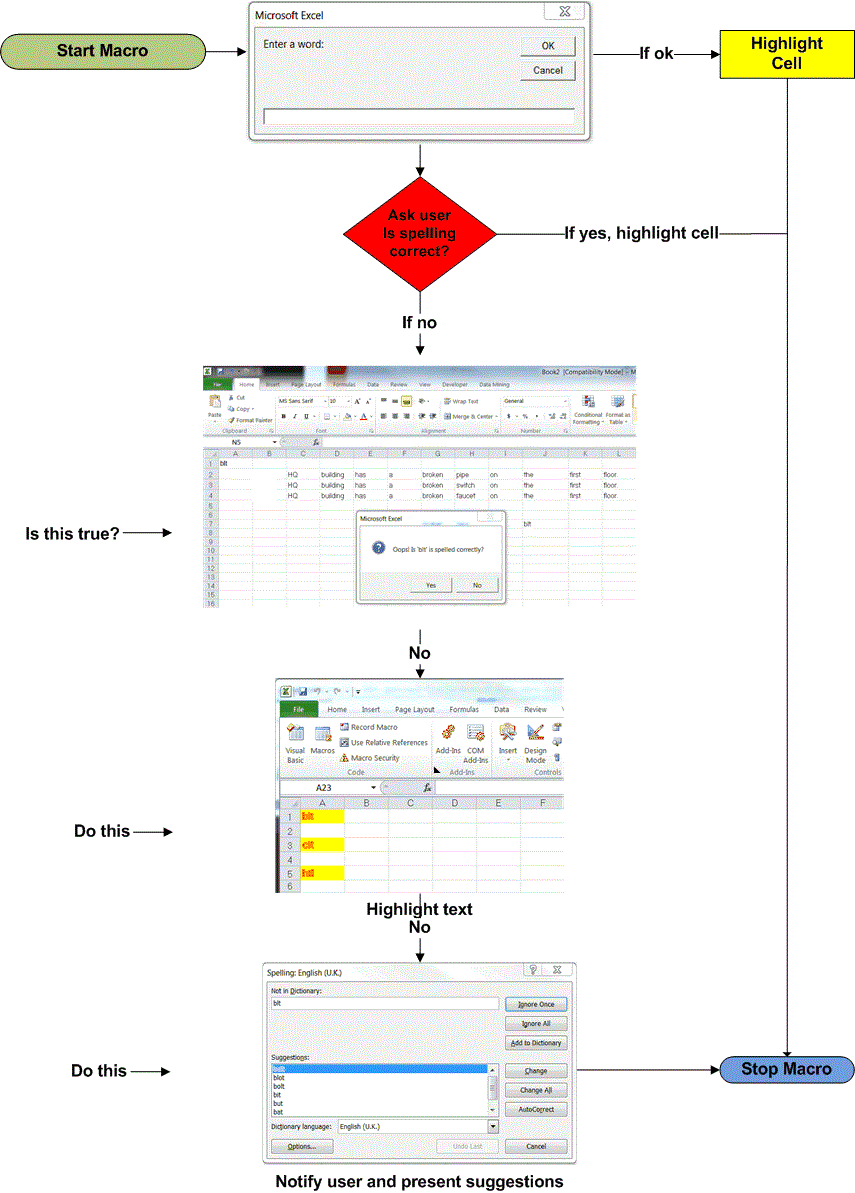
Sub find_highlight()
Dim W As String, rng As Range
W = InputBox("What to find?")
For Each rng In ActiveSheet.UsedRange
If rng.Value = W Then
rng.Select
With Selection.Interior
.ColorIndex = 6
.Pattern = xlSolid
.PatternColorIndex = xlAutomatic
End With
End If
Next rng
End Sub
If the user inputs a misspelled word then it ask if the word is spelled correctly if no highlight cell and give user choice to correct words....see flow chart
Last edited:
Tweak155
Lifer
In otherwords you want the spellcheck to be silent? I don't know of a way to do that with the built-in spellcheck. You might have a windows DLL available if you look for one that provides additional functions.
I don't see how what you're looking for is any different than just running a spellcheck on all the words. You're basically adding an additional step with your request (you found a possible mispelled word and THEN ask to spell check rather than just spell check and letting the user hit cancel if all the words are fine), and then replacing the word "ignore all" with "No", and if they hit "Yes" (to spell check) you then add another prompt AFTER that where they can just hit ignore all! It's just baffling.
I don't see how what you're looking for is any different than just running a spellcheck on all the words. You're basically adding an additional step with your request (you found a possible mispelled word and THEN ask to spell check rather than just spell check and letting the user hit cancel if all the words are fine), and then replacing the word "ignore all" with "No", and if they hit "Yes" (to spell check) you then add another prompt AFTER that where they can just hit ignore all! It's just baffling.
Tweak155
Lifer
It sure is when you have 200K-2 million rows, or 200 pages - 500 pages of data in different file formats (i.e. word, pdf, text files etc.).
It's not any different. The spellcheck doesn't pop up if any words aren't misspelled. So your suggested process is (at least) an additional step. You can also choose to spellcheck chunks of rows at a time.
If a lot of rows are the problem, you break it down.

Tweak155
Lifer
Hey MRob,
I'm not trying to be a jerk about this (I hope it is obvious I'm trying to help) but that flow chart doesn't make sense either. I've tried providing an example of something that might work for your application but you stated it "sort of" is what you are looking for, indicating to me I am not even close to what your big picture is. Unfortunately this new diagram does not help. In a flow diagram you should be covering all possible consequences of doing all the available actions and also depicting where actions can be repeated (how did you get 3 words in your list that are highlighted if as soon as you click OK it highlights the words? Doing this action on the first "OK" allows for only one word to be entered).
It may be easier to describe what is wrong with my suggested solution, but I have a feeling I'm not actually helping you - just doing the work. If you want to continue building a project out of this, I suggest using the elements of my code that worked for you and see if you can generate the solution.
One way to see what the code is doing is to put the word "Stop" at the beginning or end of a code segment. The interpreter will stop on that line and highlight it in yellow. You can then press F8 to go line by line and see what is stored in variables. You can do this by hovering over the variable if it is a single value or use the immediate window (CTRL-G) to look at arrays or object values.
Example:
Run this, and when it stops, down in the immediate window type the following:
And hit enter. Then do:
And hit enter.
I hope this helps. I will address any specific questions about small chunks of code, but I should probably stop writing entire subs / functions as it could be a detriment to learning.
I'm not trying to be a jerk about this (I hope it is obvious I'm trying to help) but that flow chart doesn't make sense either. I've tried providing an example of something that might work for your application but you stated it "sort of" is what you are looking for, indicating to me I am not even close to what your big picture is. Unfortunately this new diagram does not help. In a flow diagram you should be covering all possible consequences of doing all the available actions and also depicting where actions can be repeated (how did you get 3 words in your list that are highlighted if as soon as you click OK it highlights the words? Doing this action on the first "OK" allows for only one word to be entered).
It may be easier to describe what is wrong with my suggested solution, but I have a feeling I'm not actually helping you - just doing the work. If you want to continue building a project out of this, I suggest using the elements of my code that worked for you and see if you can generate the solution.
One way to see what the code is doing is to put the word "Stop" at the beginning or end of a code segment. The interpreter will stop on that line and highlight it in yellow. You can then press F8 to go line by line and see what is stored in variables. You can do this by hovering over the variable if it is a single value or use the immediate window (CTRL-G) to look at arrays or object values.
Example:
Code:
Dim someArr(1 to 2) as String

someArr(1) = "Hello"
someArr(2) = "World"

Stop
Run this, and when it stops, down in the immediate window type the following:
Code:
?someArr(1)And hit enter. Then do:
Code:
?someArr(2)And hit enter.
I hope this helps. I will address any specific questions about small chunks of code, but I should probably stop writing entire subs / functions as it could be a detriment to learning.
Ooooh Noooo! I don't think you're being a jerk...I understand what you're saying...no worries.... the flow chart may not make sense to you or anyone else because you can't actually see the data I'm working with and also I'm just testing these macros not really expecting them to function to perfection at this time. I really appreciate your help with this but I probably should leave you alone LOL...thanks!
Tweak155
Lifer
Ooooh Noooo! I don't think you're being a jerk...I understand what you're saying...no worries.... the flow chart may not make sense to you or anyone else because you can't actually see the data I'm working with and also I'm just testing these macros not really expecting them to function to perfection at this time. I really appreciate your help with this but I probably should leave you alone LOL...thanks!
I don't mind trying to help, but I should better direct my efforts so you can carry the skills forward.
TRENDING THREADS
-
 Discussion Zen 5 Speculation (EPYC Turin and Strix Point/Granite Ridge - Ryzen 9000)
- Started by DisEnchantment
- Replies: 25K
-
Discussion Intel Meteor, Arrow, Lunar & Panther Lakes + WCL Discussion Threads
- Started by Tigerick
- Replies: 25K
-
 Discussion Intel current and future Lakes & Rapids thread
- Started by TheF34RChannel
- Replies: 24K
-

-
