

Einstein ignoring memory limits and using all RAM! - Fixed

Assimilator1

Elite Member
Nov 4, 1999
24,185
528
126
Been running Einstein for months on this run (for years in total) without problems, but in recent days I've noticed sudden and massive system lag. Turns out Einstein was using all of the RAM!

I set lower memory limits in BOINC, but no change, then I checked the online preferences and the % is already far below what is actually been used. Only seen suspended WU due to memory limits once when it had used all RAM!

Atm what I have to done to kerb RAM usage is to reduce CPU % usage from 100% down to 75% (although I'm still getting some lag, so will have to reduce it further), but this means some cores are going unused and other projects aren't getting any WUs. TM shows RAM usage atm as 84%. Currently 12 tasks running (out of a possible 16). Run times are predicted to be over 2 days! Wth??
WU type MGDW O4 data.

Going to experiment with lowering E@H online CPU preferences so that only real cores are used, but I don't understand why BOINC isn't suspending tasks that would cause the memory limits to be breached.

Any ideas anyone?
Btw I've posted at the Einstein forum too, but thought I'd ask here too :), haven't been here in a while! (or other forums).

[update] Now fixed, see here.
 
Last edited:
mmonnin03

Senior member
Nov 7, 2006
363
284
136
There are multiple threads there and its been known from the start that O4 tasks will use a lot of memory, both system memory for CPU and GDDR for GPU tasks. Reduce the number of tasks or set a max_concurrent in an app_config. 2d with all tasks seems normal.
 

Assimilator1

Elite Member
Nov 4, 1999
24,185
528
126
I went there first and didn't see any threads titling memory (system RAM) usage.
As per my op I don't want to set a global limit to reduce the tasks limit as that will affect all projects.

I've just forced E@H to use online preferences, and it's now adhering to memory limits.
It doesn't explain why it was ignoring the global limits though.
Also, it appears it's applying these limits to all projects? If I click on another project in the projects lists, then comp preferences it still shows E@H link at top and saying its using those preferences, is it really using those globally now??
Or is that because no others are running atm it's not showing the global client settings for them?

Well, I've now re-applied global limits (after clicking on WCG project), but despite the E@H link at the top it seems to apply it to all projects.
Strange, but good, the (global) memory limit is now working!
 
Last edited:
  • Like
Reactions: TennesseeTony

Skillz

Golden Member
Feb 14, 2014
1,227
1,237
136
Using web preferences from any projects will be the new global preferences for that host.

An easy, albeit slightly inconvenient is to use an app_config for E@H to only allow a set number of concurrent tasks to run for that project only.

This will guarantee that only an X number of E@H tasks will run, while leaving the other cores/resources available for other projects to use them.

Code:
<app_config>
<project_max_concurrent>2</project_max_concurrent>
</app_config>

Saving this file as app_config.xml in the projects/einsteinathome.org/ directory.

I think that's the correct name. Full path depends on where you installed BOINC.
For Windows its usually C:\ProgramData\BOINC\projects
For Linux it varies wildly. Mine for example are /var/lib/boinc-client/projects
However, newer installs of BOINC on Linux I think install it in a completely different location.

Once you do this, it's easier to restart the computer. As the methods to restart BOINC also widely differ based on the install.
Common approach for Linux would be
Code:
sudo systemctl restart boinc-client

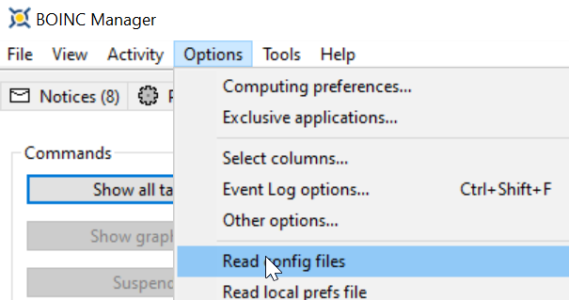
You can also re-read config files come to think of it which is probably the easiest solution.
1765034266984.png

In the example above Einstein@home will only run 2 tasks from the project at the same time. Change that 2 to any number you need to. You can also set it for specific apps/sub_projects, but it gets a bit more complicated.
 
  • Like
Reactions: Assimilator1

Assimilator1

Elite Member
Nov 4, 1999
24,185
528
126
Re online pref's, oh that's a pain! You would think setting the pref's for that project would stay with that project only!
Ok, I'll have to mess around with the config, thanks for the info :)
Running windows 10 here (sorry, thought I had that in my sig, it's only in my E@H sig).

Pages of people talking about memory
app_config is local to a project and can be local to a specific app.
I always use local preferences
I normally use local (global) preferences too, but it wasn't working with E@H, but after switching to online pref, then back to local, it seems to be working now!
I was searching thread titles (mostly) for memory issues, I haven't got time to search through 9 pages of a thread ;).
 

Assimilator1

Elite Member
Nov 4, 1999
24,185
528
126
I was about to apply the config file you showed (with max 8 instead), but found that BOINC is now applying the memory limits :), so I'll leave it run as is, if E@H task memory usage drops in the future then it can use more threads automatically.
 

Assimilator1

Elite Member
Nov 4, 1999
24,185
528
126
Although I'm wondering if I should set lower thread numbers to cut WU times, currently at over 2 days!! (I assume calculated where it was running nearer 16 threads, now at 9, perhaps the times will drop with that number anyway?). Current estimates are from 2d 8hrs to 2d 12hrs!

Roughly what sort of WU times should I get with my CPU and these WUs?
If estimates can't be given, then I'll experiment as per this thread.
 
Last edited:

mmonnin03

Senior member
Nov 7, 2006
363
284
136
On a 7945HX its 1d17 to 1d22 hours running 16 tasks and 2x MW at 8 threads each. I'm not controlling which threads they go to, I just want the hours for each project. I'm only running it on that PC as these tasks absolutely kill any GPU performance as they require a lot of memory bandwidth..
 
  • Like
Reactions: Assimilator1

Assimilator1

Elite Member
Nov 4, 1999
24,185
528
126
Not familiar with a 7945HX, need to Google it......, ah AMD, Zen 4, 16C/32T, 2.5/5.4 GHz, L1/2/3 cache 1/16/64 MB nice! :cool:
Mine's Zen 3, 8C/16T, 3.8/4.7 GHz, cache ?/4/32 MB. Looking at the Tjunc max (90C) for my cpu I see I hit that the other day!:grimacing:
I noticed CPU temps creeping a couple of months ago, I really must clean out the HSF! lol.

Anyway, I'm still getting some system lag, despite only 1/2 the RAM being used, perhaps memory bandwidth is being saturated?
I'm going to try running less E@H tasks in parallel and compare the times, although I don't know how much times vary between the same applications tasks.
Looking at pending tasks (I only have valid tasks from ~1 month ago!🤔, none in 'error'), the last 8 tasks reported times between 160-172k s, which is 44.4-47.8 hrs, so yea, about 2 days! Just switched from 8 to 6 tasks simultaneously.

I see you said "Yes, they will be slow. Running several at once will be much slower even prior to running out of system memory." and Archea86 said "I think if you suspended all BOINC tasks except for one of these, you would find your CPU is capable of running one in a few hours--not a few days. You probably have resource conflict, possibly starvation for CPU RAM." in the E@H forum.
You've not tried running fewer tasks to see if it's quicker overall?
 
Last edited:

mmonnin03

Senior member
Nov 7, 2006
363
284
136
I literally don't care what the run time is. The credit is worthless compared to GPU tasks. I only want the run time for WUProp hours. 16 tasks is a safe amount with a bit of memory headroom. I'm only running it on this PC as it has no dGPU.

 
  • Wow
Reactions: Assimilator1

Assimilator1

Elite Member
Nov 4, 1999
24,185
528
126
I hadn't realised GPU tasks were available again, will give that ago again when my lounge needs extra heating ;).
 

Assimilator1

Elite Member
Nov 4, 1999
24,185
528
126
Just thought I'd post an update about this, it's now fixed, turns out their were multiple problems.
My BOINC client was ignoring the locally set RAM limits, and hence didn't suspend tasks (until all the RAM was being used!). I don't know why it was ignoring those limits, but I found out by fluke that switching to online preferences and back to local fixed it.

MGDW O4 project uses very large amounts of RAM and very large amounts of RAM bandwidth, hence it used all my main rig's RAM! (see sig for specs). (Additionally their apparently is a bug where the MGDW O4 app mis-predicts the amount of RAM needed for some tasks). Hence very long WU times. I gradually found out that running 3 of this project's tasks concurrently was the optimum. WU times came down to about 10 hrs, from 2 days!

System lag wasn't just down to the amount of RAM being used, but also the amount of RAM bandwidth being used (as measured using HWiNFO). It wasn't until I got down to 3 tasks concurrently that the entire b/w wasn't being used and system response returned to normal.

I restricted the MGDW O4 app to 3 tasks concurrently by editing the app_config, but allowing other E@H apps to use all cores (rather than restricting the whole project), as per Beko Pharm's post here.
