Dragon Age 3

Page 2 - Seeking answers? Join the AnandTech community: where nearly half-a-million members share solutions and discuss the latest tech.

Lepton87

Platinum Member
Jul 28, 2009
2,544
9
81
That's not how SLI scaling works. If both cards are doing work (ideally 98% or so) then SLI is functioning properly.

index.php


Both Maxwell and Hawaii scale perfectly(like they should). But why did nobody test Titans in SLI or 780TI SLI?
 
Last edited:

Lepton87

Platinum Member
Jul 28, 2009
2,544
9
81
What res are you playing at? My performance is fine on a single card, maxed out, 2xAA, 2560x1080.

Fine? GTX980 averages under 40fps and you call that fine? And mind you that's not even max-out, subtract at least 5fps from that. I guess we have just different standards. The game just needs M-GPU, period. But why no one checked if 780Ti/Titans scale similarly to 980s? Also GK110 is generally pathetic in this game with tahiti hot on its heels. Even Maxwell isn't that much faster...

UPDATE: I'm getting frustrated I can't find any test with kepler in SLI or even tahiti in CF. Only Maxwell and Hawaii I'm pretty sure there are more owners of Keplers in SLI than the above mentioned groups combined. If anyone manages to find such a test please link it can be even in Chinese.
Also no 3-way 980/Titans, that game could use that much graphics power yet one one tested it. Maybe Kepler scales terribly and it was NV recommendation no to test it?
 
Last edited:

Lepton87

Platinum Member
Jul 28, 2009
2,544
9
81
Anyone with two kepler cards can check scaling? Both GK104 and GK110 would be fine, R290X CF and 980SLI scale by over 80%.
 

cmdrdredd

Lifer
Dec 12, 2001
27,052
357
126
Do I need to break out my tin foil hat now?

Did you even see his resolution? 2560x1080 That's lower than 1440p so saying it "averages under 40fps" might not be correct. Also if you're one of those who expects every game to run 60fps locked at maxed settings I hate to break it to you, that's not happening. Dragon Age doesn't require 100fps to be enjoyable either. The gameplay is much slower paced than Battlefield for example.
 

Lepton87

Platinum Member
Jul 28, 2009
2,544
9
81
Do I need to break out my tin foil hat now?

Did you even see his resolution? 2560x1080 That's lower than 1440p so saying it "averages under 40fps" might not be correct. Also if you're one of those who expects every game to run 60fps locked at maxed settings I hate to break it to you, that's not happening. Dragon Age doesn't require 100fps to be enjoyable either. The gameplay is much slower paced than Battlefield for example.

I thought he just mistyped but still that's maybe 30% more fps. I need 60fps 90% of the time and I can tolerate occasional dips to 50 fps. I want to know how kepler scales because I might just buy a third one or sell my cards and buy 4x290. Why they bother to test nearly identical cards but fail to provide such vital information is beyond me. Why do we need to know how both 670, 680 and 770 perform? One would be enough, it's the same architecture and we know relative performance between those cards. BTW. What I always said in the past is that an oced Asus matrix 7970 might compete with the Titan but nobody believed me. I would buy two if only they weren't so limited edition cards. I always thought those cards are better than GK104 and regular Tahitis are almost on par with 780s in many games. Sometimes even 970 doesn't provide better game-play experience. I can still add two cards so if NV didn't slacked on kepler scaling I cans still increase my performance significantly but 4x290 seems like a more sensible buy but I don't like the hassle of selling my old hardware. I often lose the orginal boxes and accessorize. Next time I'm going to carefully just take out the card and hide all the rest. Not to mention I always lose warranties. I'm so absent-minded.
 
Last edited:

Bubbleawsome

Diamond Member
Apr 14, 2013
4,834
1,204
146
-GameTime.MaxSimFps 60 -GameTime.ForceSimRate 60+
IIRC that causes game-time slowdowns if you drop below 60fps. Same thing in NFS Rivals (piece of crap, locked to 30fps, game doesn't work, multiplayer is iffy at best, multiple game breaking bugs. I got it for $2 though) if you use that it will slow down if you drop. And you will drop below 60fps. I usually use -GameTime.MaxSimFps 45 -GameTime.ForceSimRate 45+ in Rivals.
 

cmdrdredd

Lifer
Dec 12, 2001
27,052
357
126
-GameTime.MaxSimFps 60 -GameTime.ForceSimRate 60+
IIRC that causes game-time slowdowns if you drop below 60fps. Same thing in NFS Rivals (piece of crap, locked to 30fps, game doesn't work, multiplayer is iffy at best, multiple game breaking bugs. I got it for $2 though) if you use that it will slow down if you drop. And you will drop below 60fps. I usually use -GameTime.MaxSimFps 45 -GameTime.ForceSimRate 45+ in Rivals.

That's to help with the cutscene stuttering. It helps a bit. During gameplay with my 670SLI setup I did not experience any more stuttering than I otherwise expect due to the nature of mGPU. The game played perfectly fine. I ran it with ultra everything and 2x MSAA at 1080p.

Note: I was spending my time playing and enjoying the game rather than staring at an FPS counter analyzing every fps drop.
 
Last edited:

bystander36

Diamond Member
Apr 1, 2013
5,154
132
106
680SLI shouldn't be much faster than a single overclocked Titan sometimes even the same. So I don't know how can you get 80-120 fps. Do you played the game maxed out? not ultra but custom settings maxed out?

80-120? HOW? that's not even maxed out. I can't believe I can't find a single benchmark with GK110 or even GK104 in SLI, Maxwell and Hawaii scales very well but it doesn't mean that the same is true for Kepler. Anyone found a test with kepler in SLI?

Reread the quote. I said I have to lower a few settings due to my VRAM limitations. The problem is, if I go all out ultra, my 2Gb of VRAM chokes the game. I lower a few settings, and get massive FPS instead. I mostly play on high, with several Ultra settings, and one medium setting (tessellation).
 

Lepton87

Platinum Member
Jul 28, 2009
2,544
9
81
Reread the quote. I said I have to lower a few settings due to my VRAM limitations. The problem is, if I go all out ultra, my 2Gb of VRAM chokes the game. I lower a few settings, and get massive FPS instead. I mostly play on high, with several Ultra settings, and one medium setting (tessellation).

I specifically read ultra settings.
UPDATE: sorry not you wrote that
 

bystander36

Diamond Member
Apr 1, 2013
5,154
132
106
I specifically read ultra settings.

Here is what you quoted:

I also get noticeably higher FPS with 680 SLI. Much higher. My only problem is the 2Gb's of Vram requires me to lower some settings, which results in my getting 80-120 FPS, or some major FPS drops. As a 120hz monitor user, that is ok with me.

UPDATE: sorry not you wrote that
Np, and one more note of importance. I play at 1080p@120hz. You posted 1600p results.
 
Last edited:

Lepton87

Platinum Member
Jul 28, 2009
2,544
9
81
Here is what you quoted:


Obviously emotions jumped in before you read through my post.

http://www.purepc.pl/karty_graficzn...a_wymagania_jak_smok_test_wydajnosci?page=0,4

No, just mistook you for someone else but I corrected myself as quickly as I could.

Here's how settings affect the FPS, they tank very fast above medium. Well, I have to search thru pages in all languages to find some information and still I don't find everything. Keppler SLI scaling test is my first priority. Did you find what's the biggest devourer of FPS especially something that doesn't give much IQ if at all sometimes it happens in games where one settings lowers fps by half and you can't even see what it does without a magnifying loop.
ps. This game is an outlier how can the 770 almost keep up with the 780? Maybe drivers will change that as a whole this game doesn't act like other games. the differences between cards are very small.
 
Last edited:

bystander36

Diamond Member
Apr 1, 2013
5,154
132
106
I think I found a good balance. I can run some of settings on Ultra (textures and mesh, less than I thought), most on High (no MSAA), and need to put Tessellation at medium, and I get great FPS.
 
Last edited:

bystander36

Diamond Member
Apr 1, 2013
5,154
132
106
Here is what I use, but keep in mind, I only have 2Gb of Vram, so some of the setting drops are a result of that.

Mesh: Ultra
Tessellation: medium
Texture: Ultra
Shadow: High
Terrain: High
Vegetation: High
Water: High
Post-Processing: medium (I can use what ever, but I don't like high levels of this)
Ambient Occlusion: SSAO (I haven't experimented with this since launch day)
Effects: High
PostProcess AA: High
Multisampling AA: Off

Note: The Hinterlands is the first zone, and also the most demanding zone in the game. You might be able to up some settings after you move on.
 
Last edited:

Lepton87

Platinum Member
Jul 28, 2009
2,544
9
81
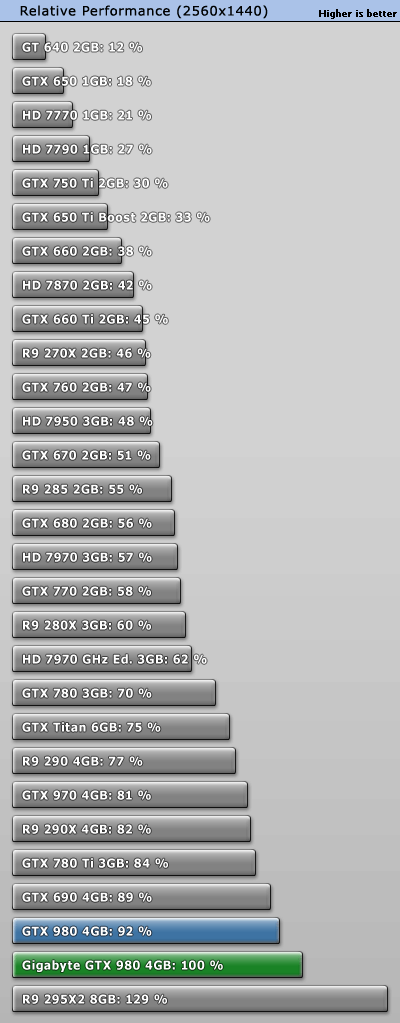
Why do you think all the better cards are clustered together? 770, 7970, Titan, 780Ti, 970... Something is wrong with the game, maybe they will patch it. 780Ti is just 40% faster than 770, that really doesn't happen in other games, not to mention 7970 almost on par with Titan and 970. Slight OC and it would overtake both, but I'm wondering how they tested for example the Titan, if they warmed it up and tested at default then it explains everything, treating it like that results in 25% less performance. I never let my Titans get below 1050MHz. Without exact testing methodology like average clocks its hard to tell anything.
 
Last edited:

bystander36

Diamond Member
Apr 1, 2013
5,154
132
106
Why do you think all the better cards are clustered together? 770, 7970, Titan, 780Ti, 970... Something is wrong with the game, maybe they will patch it.

I thought it was because there isn't a big difference in performance between them. It isn't like there is no difference.
 

Lepton87

Platinum Member
Jul 28, 2009
2,544
9
81
I thought it was because there isn't a big difference in performance between them. It isn't like there is no difference.

770 and 780Ti similar, no way? There's over 50% difference in performance in many games, 780Ti end up faster than 690 in some games.
perfrel_2560.gif


44% faster

http://www.computerbase.de/2014-08/...sgabe/2/#diagramm-rating-2560-1600-4xaa-16xaf

50% or 58 unthrottled it's so much more than 980 brings over both Titan and 780Ti or even 780

That's a lot. People were very excited about the 680 when in fact it only improved the performance by 35%.
 
Last edited:

bystander36

Diamond Member
Apr 1, 2013
5,154
132
106
770 and 780Ti similar, no way? There's over 50% difference in performance in many games, 780Ti end up faster than 690 in some games.
perfrel_2560.gif


44% faster

http://www.computerbase.de/2014-08/...sgabe/2/#diagramm-rating-2560-1600-4xaa-16xaf

50% or 58 unthrottled it's so much more than 980 brings over both Titan and 780Ti or even 780

That's a lot. People were very excited about the 680 when in fact it only improved the performance by 35%.

Did you look back at the chart you listed?

The 770 was at 23 FPS, the 780ti was at 33.
 
Last edited:

Deders

Platinum Member
Oct 14, 2012
2,401
1
91
Fine? GTX980 averages under 40fps and you call that fine? And mind you that's not even max-out, subtract at least 5fps from that. I guess we have just different standards. The game just needs M-GPU, period. But why no one checked if 780Ti/Titans scale similarly to 980s? Also GK110 is generally pathetic in this game with tahiti hot on its heels. Even Maxwell isn't that much faster...

UPDATE: I'm getting frustrated I can't find any test with kepler in SLI or even tahiti in CF. Only Maxwell and Hawaii I'm pretty sure there are more owners of Keplers in SLI than the above mentioned groups combined. If anyone manages to find such a test please link it can be even in Chinese.
Also no 3-way 980/Titans, that game could use that much graphics power yet one one tested it. Maybe Kepler scales terribly and it was NV recommendation no to test it?

It's not a mistype, it's ultrawide. The game does average above 45fps for me, and I agree if it goes below 40fps it isn't as good an experience.

If I were you I would wait and see what happens with the next driver update. I expect Nvidia were prioritising Maxwell for the Christmas time game releases, then there would be holidays. They should be working on Kepler driver performance for the next update.

Have you tried using the SLI monitor bar along the side of the screen to tell you whether the game is CPU or GPU limited. IIRC if the bar is full it's GPU limited, if it's closer to the centre it is CPU limited.
 

bystander36

Diamond Member
Apr 1, 2013
5,154
132
106
Btw, did you download the latest beta drivers? They came out a few weeks ago, and they made a big difference in performance.
 

Deders

Platinum Member
Oct 14, 2012
2,401
1
91
As for the flickering Ungine Valley had similar issues a while back, it was fixed a couple of driver updates later.
 

Carfax83

Diamond Member
Nov 1, 2010
6,841
1,536
136
The latest 347.09 drivers really improved the flickering in DAI for me. Now it very rarely flickers, and if it does, reloading gets rid of it.

Also, if you're on Windows 7, your performance is going to be less. Frostbite 3 uses the DX11.1 render path for improved performance, but you need Windows 8.1 to use it..

DX11.1 is significantly faster than the standard DX11 in Frostbite 3 games, at least on Nvidia hardware.
 

cmdrdredd

Lifer
Dec 12, 2001
27,052
357
126
Why do you think all the better cards are clustered together? 770, 7970, Titan, 780Ti, 970... Something is wrong with the game, maybe they will patch it. 780Ti is just 40% faster than 770, that really doesn't happen in other games, not to mention 7970 almost on par with Titan and 970. Slight OC and it would overtake both, but I'm wondering how they tested for example the Titan, if they warmed it up and tested at default then it explains everything, treating it like that results in 25% less performance. I never let my Titans get below 1050MHz. Without exact testing methodology like average clocks its hard to tell anything.


You are deliberately looking for foul play here. Play the game and stop looking at FPS counters. You will enjoy it much more. Your system is plenty for the game
 
Last edited:

Lepton87

Platinum Member
Jul 28, 2009
2,544
9
81
You are deliberately looking for foul play here. Play the game and stop looking at FPS counters. You will enjoy it much more. Your system is plenty for the game
No foul play, foul play would be deliberately hindering performance. I just think they didn't bother with making SLI work as well as it should on kepler or at least the titan.

Btw, did you download the latest beta drivers? They came out a few weeks ago, and they made a big difference in performance.

What beta? I thought WHQL was the newest drivers.
Version: 347.09 WHQL
Release Date: 2014.12.23
Did you look back at the chart you listed?

The 770 was at 23 FPS, the 780ti was at 33.

I thought about 7970GHz, 780, 780ti and 970 performing so close I didn't think about 770 I thought its piss poor performace might be due to 2GB of RAM as I often see RAM usage around 4GB. 29 vs 33 is just 13% more for a significantly faster card but those are completely different architectures, maybe AMDs card are much better for it, but it doesn't matter much with overclocked Titan in SLI I should see performance close to 980SLI but I see performance that's about the same as a single card which is unacceptable. I'm pissed about no benchmarks of M-GPU systems other than the newest, like everybody with a m-GPU would rush for a side grade that the 980 is to the GK110. I'd like to see how the 690, the 7990 and the GK110 in SLI perform but there are no tests yet they test cards at ultra that provide 12fps pathetic.
 

Lepton87

Platinum Member
Jul 28, 2009
2,544
9
81
You are deliberately looking for foul play here. Play the game and stop looking at FPS counters. You will enjoy it much more. Your system is plenty for the game
No foul play, foul play would be deliberately hindering performance. I just think they didn't bother with making SLI work as well as it should.

Btw, did you download the latest beta drivers? They came out a few weeks ago, and they made a big difference in performance.

What beta? I thought WHQL was the newest drivers.
Version: 347.09 WHQL
Release Date: 2014.12.23
Did you look back at the chart you listed?

The 770 was at 23 FPS, the 780ti was at 33.

I thought about 7970GHz, 780, 780ti and 970 performing so close I didn't think about 770 I though its piss poor performance might be due to 2GB of RAM as I often see RAM usage around 4GB. 29 vs 33 is just 13% more for a significantly faster card but those are completely different architectures, maybe AMDs cards are much better for it, but it doesn't matter much with overclocked Titans in SLI I should see performance close to 980SLI but I see performance that's about the same as a single Titan which is just unacceptable and what's more important unplayable I'm pissed about no benchmarks of M-GPU systems other than the newest, like everybody with a M-GPU would rush for a side grade that the 980 is to the GK110. I'd like to see how the 690, the 7990 and the GK110 in SLI perform but there are no tests yet they test cards at ultra that provide 12fps pathetic. Also I'd like to see how last gen cards perform, 580(3GB version would be nice to see in tests, I'm curious how fermi fares) and 6970 and also 590 and 6990 but the press acts like they no longer exist and everybody has to have the newest hardware.

I want to build my brother a computer from my old hardware and I have 2x5870 and 6970 and I would like to know if it makes sense. He has PS4 but I have no way of knowing if recommending him PC version would be wise because there are no tests.
 
Last edited:

tential

Diamond Member
May 13, 2008
7,348
642
121
I'm guessing not every reviewer has access to GTX Titan's... Let alone two of them.

Maybe it has something to do with the price tag?

Also, did you get SLI working?

Finally, I applaud Nvidia for how well the GTX Titan has held up with it's age... Definitely worth it.