• We’re currently investigating an issue related to the forum theme and styling that is impacting page layout and visual formatting. The problem has been identified, and we are actively working on a resolution. There is no impact to user data or functionality, this is strictly a front-end display issue. We’ll post an update once the fix has been deployed. Thanks for your patience while we get this sorted.

Do I have to remove this motherboard's backplate? (Solved)

Rayniac

Member
I'm in the process of installing my Cooler Master Seidon 240V AIO cooler and I just wanted to make sure of one thing before I proceed.

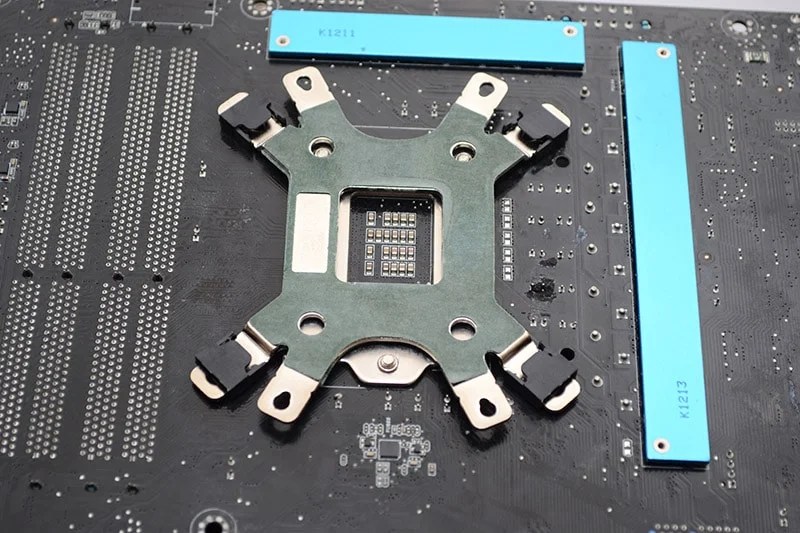
It's about the backplate that I'm supposed to install under the motherboard.
Y8F3oZ5.jpg


The Seidon 240V's backplate touches those screws that hold the retention bracket in place. Is that bad or OK? Do I have to remove the motherboard's backplate? The installation manual doesn't mention this but then again this drawing doesn't have it either:

z0k0WVD.jpg


Confused. Advice? 🙁
 
what's your mobo model?

It's likely those screws are holding the CPU retention mechanism to the board, make sure you're orientating the HSF bracket the right way.
 
This type of Coolers are based on hardware that is screwed to a special retainer installed under the Mobo.

If you currently you have such type of Cooler installed it might be that you can screw the new Cooler into the existing retainer.

Otherwise, you have to be able to reach the Bottom side of the Mobo to place the retainer.. In most cases it means taking carefully the Mobo out of the case, placing the retainer under, screw in the Cooler and installing the Mobo into the case.


😎
 
Some motherboards have a sort of heat spreader thing underneath the CPU socket. Do not attempt to remove it. The HSF retention bracket should install over that.
 
The mobo is Asus P8 Z77-V LX

That's kinda along the lines of what I thought as well. I really don't want to remove the CPU backplate because the retention mechanism is holding my delidded i5-3570K in place. Basically what my worries boil down to is: Does it matter if there's a connection between the CPU backplate and the CPU heatspreader on the top? Because normally the standard intel push pins would isolate them from each other.
 
Nevermind. I got it. There were holes in the backplate that align with the CPU backplate's screws. I blame the manual here since it told me to install it the wrong way. 🙄 I just had to turn it 90 degrees and voilà!

It was supposed to go like this:
DSC_0556.jpg
 
Back
Top