• We’re currently investigating an issue related to the forum theme and styling that is impacting page layout and visual formatting. The problem has been identified, and we are actively working on a resolution. There is no impact to user data or functionality, this is strictly a front-end display issue. We’ll post an update once the fix has been deployed. Thanks for your patience while we get this sorted.

Question Cpu usage question

jamesdsimone

Golden Member
I have a question about CPU usage. I am using a 5900X to transcode with Handbrake. I check the CPU usage in Task Manager and usage never went above 60% usually hovering around 55%. Question is why it not utilizing more CPU power? I wondering if there is some setting in BIOS I'm not setting correctly. The MB is an MSI X470 gaming Plus Max with 32 GB of ram. The ram usage is below 3 gb.
 
Handbrake won't be able to use all of the 24 threads the 5900x has available. Usage could range from 30% - 70% depending on what codec you are using and the resolution. This is normal.
 
Yes using x264 and yes transcoding 2 DVD's at the same time.

Not sure what to say. When I transcode HEVC to x264 it makes my CPU burn. Maybe the MPEG 2 decoder isn't well threaded?

Edit, I take that back. I just tried using a DVD rip to x264 and it went to 100%. I assume you are ripping the DVD's to a hard drive first? What settings are you using? I can try to duplicate it.
 
Last edited:
Not sure what to say. When I transcode HEVC to x264 it makes my CPU burn. Maybe the MPEG 2 decoder isn't well threaded?

Edit, I take that back. I just tried using a DVD rip to x264 and it went to 100%. I assume you are ripping the DVD's to a hard drive first? What settings are you using? I can try to duplicate it.
Yes ripping directly to local hard drive. I'll double check the CPU usage. I might have only been ripping one DVD.
I'm using Handbrake 1.1.2 since they removed the advanced setting tab after that, God knows why they would do that. They literally say that using the advanced tab is "deperacated". Anyway I use the default dimensions, Lapsharp medium film, constant quality setting 12 and audio 5.1 at 768 bits if available. On the advanced tab reference and B frames both 8. CABAC, 8x8 transform, and weighted B frames are all enabled. Pyramidal B frames strict. Analysis is optimal, spatial, Uneve Multi hex, 24, all and always. Psychovisual 1,1,.1. Deblock 2,2.
 
Yes ripping directly to local hard drive. I'll double check the CPU usage. I might have only been ripping one DVD.
I'm using Handbrake 1.1.2 since they removed the advanced setting tab after that, God knows why they would do that. They literally say that using the advanced tab is "deperacated". Anyway I use the default dimensions, Lapsharp medium film, constant quality setting 12 and audio 5.1 at 768 bits if available. On the advanced tab reference and B frames both 8. CABAC, 8x8 transform, and weighted B frames are all enabled. Pyramidal B frames strict. Analysis is optimal, spatial, Uneve Multi hex, 24, all and always. Psychovisual 1,1,.1. Deblock 2,2.

Are you sure about that version? I tried installing 1.1.2 and don't see any of that under "advanced".
 
Problem solved. Transcoding 2 DVD's and getting CPU usage pushing 100%. I must have only had one going when I checked the first time. The 5900x is really a beast.
 
have a question about CPU usage. I am using a 5900X to transcode with Handbrake.


The hardware you run on can have a large effect on performance. HandBrake can scale well up to 6 CPU cores with diminishing returns thereafter.

Handbrake depending on codec will not go past 6 cores.
And then it will like sort of Float between cores, but i have never seen it use 100% unless your on a 6 core system.


If you use handbrake a lot, your best using Quicksync (Intel Arc GPU) or NVEC (RTX 3060 or better) especially if your ripping DVD's.
GPU encoding vs CPU encoding is litterally night vs day in terms of speed.


Handbrake depending on codec will not go past 6 cores.
And then it will like sort of Float between cores, but i have never seen it use 100% unless your on a 6 core system.


If you use handbrake a lot, your best using Quicksync (Intel Arc GPU) or NVEC (RTX 3060 or better) especially if your ripping DVD's.
GPU encoding vs CPU encoding is litterally night vs day in terms of speed.
When I transcoded on my FX8350 it used all eight cores. That was using Linux though. I'll check if Windows does the same thing. I have an AMD GPU so not going to swap that out just to transcode. Besides if I put 2 DVD's in to transcode by the time I think about it again they are both done. I was mostly asking to make sure there wasn't something wrong with my set up.
 
Last edited:
I have a 5950X and mostly do h264 to h265 at 720p and 1080p. It rarely goes over 50% utilization.

I did some test 4K files with AV1 recently and THAT make the 5950X sweat. It's all about the encoder and the resolution.
 
When I transcoded on my FX8350 it used all eight cores.
Even if these two CPUs were similar in architecture, we'd still be talking about an 8 core / 8 thread CPU vs. 12 core / 24 thread CPU. Handbrake would leave considerably less resources available on a 8c/8t processor.

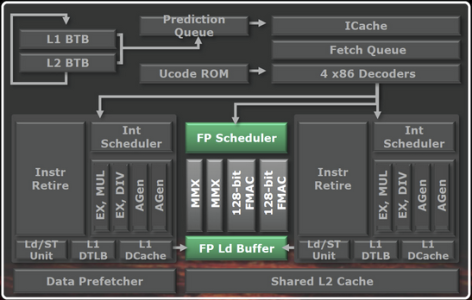
That being said, in your particular case, the Bulldozer / Piledriver architecture had 8 cores grouped in 4 modules. Each 2 cores in a module shared their FP unit, thus the cores were partially fused together. This meant that for some workloads the 8350 behaved more like a 4 core CPU, and AFAIK this included vectorized workloads used by software such as Handbrake. That is probably why you saw 100% utilization.

Here's a module diagram, an image is quicker to convey the situation here:

1703309254846.png

The AMD FX (Bulldozer) Scheduling Hotfixes Tested


Handbrake depending on codec will not go past 6 cores.
And then it will like sort of Float between cores, but i have never seen it use 100% unless your on a 6 core system.


If you use handbrake a lot, your best using Quicksync (Intel Arc GPU) or NVEC (RTX 3060 or better) especially if your ripping DVD's.
GPU encoding vs CPU encoding is litterally night vs day in terms of speed.

I can see it do 100% on 8 cores. Also, CPU transcoding is still king in quality and file size. Quicksync works very well too. I haven't used NVEC in some time but I hear good things in speed. AMD's VCE is crap at h.264 but seems solid with HEVC.

For archival purposes I perfer CPU. For a quick transcode to a phone or tablet to watch on the road or plane, I am OK with GPU encoding.
 
Last edited:
I can see it do 100% on 8 cores. Also, CPU transcoding is still king in quality and file size. Quicksync works very well too. I haven't used NVEC in some time but I hear good things in speed. AMD's VCE is crap at h.264 but seems solid with HEVC.

For archival purposes I perfer CPU. For a quick transcode to a phone or tablet to watch on the road or plane, I am OK with GPU encoding.
All of these MP4's go on my servers so size is not a priority but quality is so a lot of the settings are "insane" according to Handbrake. Of course they haven't edited that wording in 10+ years so the quality settings woud have been insane 10 years ago. The FX8350 struggles a bit with about 16fps with all cores at 100%. Not a big deal since I usually let it run in the background while I stream something. I can't watch an MP4 at the same time though, the video gets choppy and freezes. With the 5900x transcoding 2 DVD's at the same time I get about 90fps fps total with all 12 cores at 100%. One DVD, all 12 cores only run at about 55% and about 65fps. File sizes average about 5GB but some are as large as 9GB. As long as my CPU's are running the way they are supposed to that's the important part. I was checking to make sure I wasn't missing something. Case in point I was trouble shooting the FX8350 and noticed that BIOS had defaulted memory to 1333mhz instead of 1866mhz. Probably not a huge difference but probably 1-2%.
 
Last edited:
Back
Top