• We’re currently investigating an issue related to the forum theme and styling that is impacting page layout and visual formatting. The problem has been identified, and we are actively working on a resolution. There is no impact to user data or functionality, this is strictly a front-end display issue. We’ll post an update once the fix has been deployed. Thanks for your patience while we get this sorted.

Counter Strike GO

steve wilson

Senior member
Hi Guys,
I just wanted to know if Counter strike GO is more CPU or GPU intensive? I have an i5 2500k with a GTX 770 and a 144hz monitor. I want a minimum of 150 FPS. Both GPU and CPU have small overclocks and I'm willing to overclock further.

Or is there a way I can find this out myself using some software tools?

Sorry if this is the wrong forum, I wasn't sure which was the best one for this question.
 
Yup, Counter Strike is real intensive. I'd expect you to need at least an i7-4960X and Quadfire 290X, though you may need to wait for Haswell-E before you can really get playable framerates.

...what?! It's freaking Counterstrike! You can run it on an Atom!
 
Yup, Counter Strike is real intensive. I'd expect you to need at least an i7-4960X and Quadfire 290X, though you may need to wait for Haswell-E before you can really get playable framerates.

...what?! It's freaking Counterstrike! You can run it on an Atom!

This is not Counter strike 1.6 it's CS GO...also I'm wanting 150 Minimum fps. I think it uses the same engine as Half life 2/Portal.
 
Maybe you can tell us your current hardware setup. From the looks of it, CS:GO doesn't gain much from more cores.
 
My rig is in the first post, here it is again

i5 2500k
gtx 770 2GB
144hz BenQ monitor
8GB ram
120gb SSD

My game settings are mostly medium or low (at work can't remember) resolution is 1600x900. I don't really want to change the settings any lower really. It makes it a bit harder to see players at long distances.

What I would really like to know is how I can tell if it's the CPU or GPU that is holding the framerate back a little so I can overclock it further.
 
You can easily use something like MSI Afterburner or GPU-Z to monitor your GPU load when you're seeing your framerate dip. But it's almost certainly your CPU. Source engine games do not hit modern GPUs very hard.
 
Uh, use MSI afterburner or similar software to track GPU usage. If it isn't close to 99% its generally a good indication of a CPU bottleneck.
 
You can't run CS:GO on an atom if it doesn't a proper graphics card/chip. It's not the most graphics intensive game, but it won't run well on old hardware. It's basically as heavy as Left 4 Dead or something like that.

And it's, of course, more GPU dependent than CPU dependent.
 
You can't run CS:GO on an atom if it doesn't a proper graphics card/chip. It's not the most graphics intensive game, but it won't run well on old hardware. It's basically as heavy as Left 4 Dead or something like that.

And it's, of course, more GPU dependent than CPU dependent.

I was talking Bay Trail.
 
This game isn't super intensive but I haven't seen any benchmarks out there. What is your current FPS? Reduce the graphics settings and see if it improves FPS.
 
Expecting any game to go above 150FPS and stay there 100% of the time is asking for quite a bit. I'd say just look for a CPU-intensive setting that doesn't really affect visuals and turn it down.
 
This game isn't super intensive but I haven't seen any benchmarks out there. What is your current FPS? Reduce the graphics settings and see if it improves FPS.

I don't really want to reduce the setting any further as all the ones I've tried make it difficult to see targets at long distance.
 
Or perhaps increase to 1920x1080 and see if FPS fall a lot or not at all. That would be an indication for the GPU or CPU, not?
 
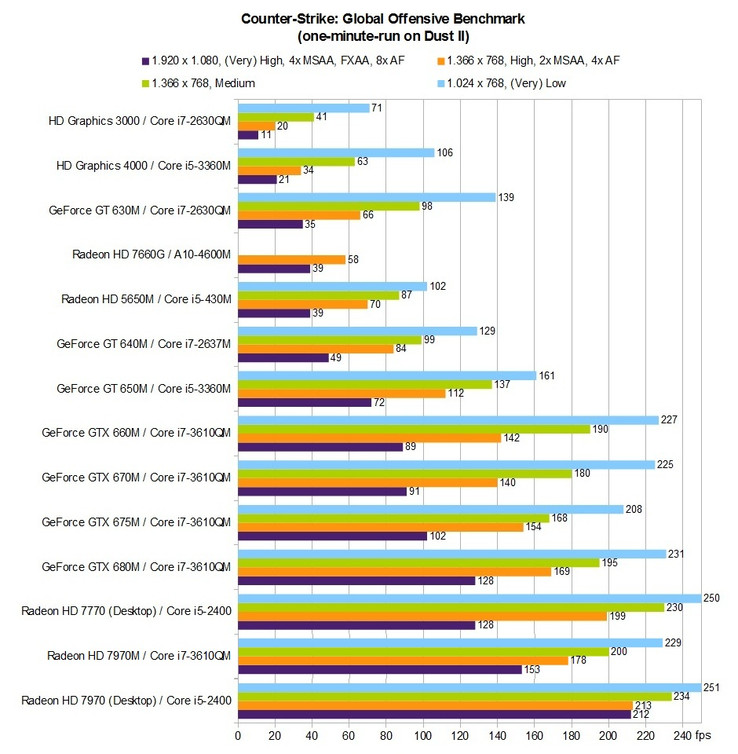
Here are some notebook setups and one desktop card for comparison. I would say you should be more than OK:

csm_tabelle2_06_d50de321db.jpg


http://www.notebookcheck.net/Counter-Strike-Global-Offensive-Benchmarked.81183.0.html
 
Back
Top