• We’re currently investigating an issue related to the forum theme and styling that is impacting page layout and visual formatting. The problem has been identified, and we are actively working on a resolution. There is no impact to user data or functionality, this is strictly a front-end display issue. We’ll post an update once the fix has been deployed. Thanks for your patience while we get this sorted.

copper ramsinks

Soulkeeper

Diamond Member
What are you all using ?
I just purchased 4 evercool EC-MC-CO and i'm not sure if I want to install them.
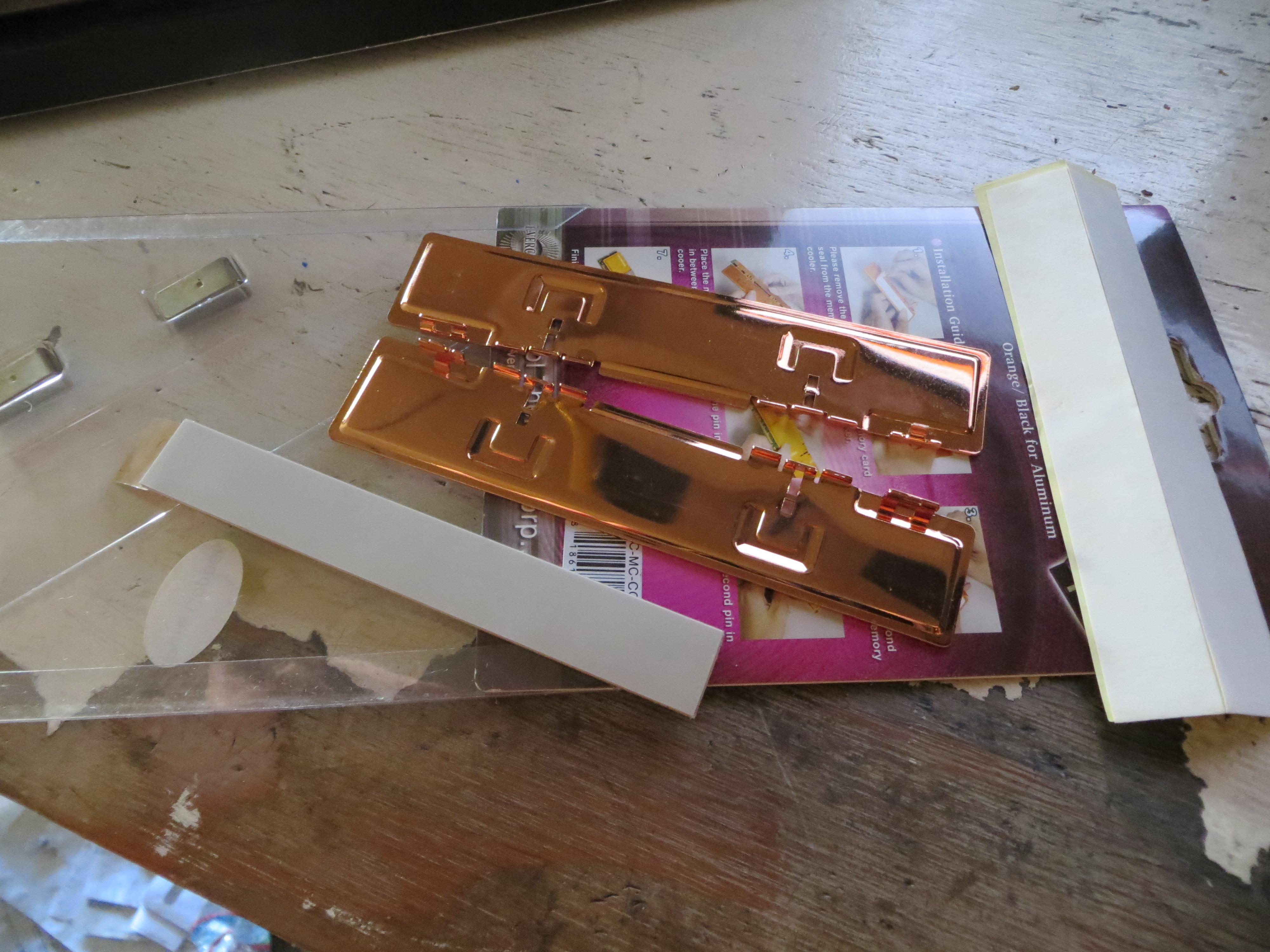
IMG_0801.JPG

The inside surface has two indentations to press the metal out for the clips not to slide on the outside. So this creates empty air for two unlucky memory chips on each side.
 
Anyone know if the Akasa AK 171 does the same thing with the indentations on the contact area ?
I can't find any pictures showing if it does online.
 
Your ram will run the coolest with no heat sinks installed. Just be sure they have some airflow going over them.
 
My RAM hits 48C, is that bad? I know Intel CPUs can go up to 85C, and my Ryzen 5 1600 goes up to 84C Package Temp. in HWMonitor 1.31, on the stock air cooler, crunching 11 threads of PrimeGrid (AVX), at stock speeds.
 
My question is, do you really need them? :S

I ran most of my DDR4 RAMs at around 1.45 volts, 24/7 and i barely get above 31C with them, which is very, very good. Even got a quad band 32Gig set (4x8) running at 3400, same voltage, literally all day long; same temps again.
What modules are we talking about, what voltage do you run them at and how good is your case's airflow is what you should be focusing on. This is really superfluous if you've done your "job" right.

(as always, just my opinion)
 
I ran most of my DDR4 RAMs at around 1.45 volts, 24/7 and i barely get above 31C with them, which is very, very good. Even got a quad band 32Gig set (4x8) running at 3400, same voltage, literally all day long; same temps again.
What modules are we talking about, what voltage do you run them at and how good is your case's airflow is what you should be focusing on. This is really superfluous if you've done your "job" right.
Idle temps on RAM, are mostly irrelevant. What are the temps, running 11 threads of PrimeGrid, for example?

If my DDR4-2400 RAM, running at only 1866 speed @ 1.200V, hits 48C, there's no way your RAM does 31C @ 1.45V under load.
 
My RAM hits 48C, is that bad? I know Intel CPUs can go up to 85C, and my Ryzen 5 1600 goes up to 84C Package Temp. in HWMonitor 1.31, on the stock air cooler, crunching 11 threads of PrimeGrid (AVX), at stock speeds.

Samsung states 85c for normal. So I think you are safe (it's a PDF data sheet to download). If you don't trust the download link I provided, you can also Google "safe temperature for ddr4", and it's on the 2nd page of results.

http://www.samsung.com/semiconductor/global/file/productlanding/2016/04/DDR4_Device_Operations_Rev11_Oct_14-0.pdf
 
I'm just surprised it's so hard to find a good set of ramsinks.
Even if nobody needs them, us enthusiasts, are known for going overboard.
 
there's no way your RAM does 31C @ 1.45V under load.

.. not sure how to respond to that .. 🙂
But, again, highest they get is around 31C. They're at 1.452volts (LLC included), they run 24/7, in a rig meant for work. Which it is doing even as we speak, it's not 'idle'.

Here:

Untitled.png


And in all honesty? I've no reason to lie, you know..?

edit: So next time, again; what modules is one talking about. What voltage they're run in. How good is one's case's airflow. The rest is superfluous, RAM heatsinks included.🙂
 
I'm just surprised it's so hard to find a good set of ramsinks.
Even if nobody needs them, us enthusiasts, are known for going overboard.

We just don't need them in today's computers. I like the aesthetics, but it's like putting a wing on ricer. Not a lot of function.

Just what is your case's airflow. I don't have a fan directly on my ram, but that shouldn't be a problem if you got airflow going from front-bottom to back-top. This pic shows two Noctua case fans moving air over my components. There are also two more intake fans on to the right of those hard drives that are pictured.

fFe1XYE.jpg


vaJj77f.jpg


Those ramsinks sure are pretty!
d3Qklcr.jpg


KsUi6Z0.jpg
 
Last edited:
not needed, just snake oil. Will run coolest without them. Rams good up to 80-85C and ive never seen DDR3 or DDR4 hit over 50c under load.
 
That's the problem, there is no room for a fan in the area of the ram.
It goes over 50c easily
If there's no air moving over them, I don't think it'll make a difference whether there's copper heatsinks or not beyond the copper being able to dump the heat inside the case quicker. If you want to go Enthusiast, go with waterblocks on your RAM.
 
Back
Top