• We’re currently investigating an issue related to the forum theme and styling that is impacting page layout and visual formatting. The problem has been identified, and we are actively working on a resolution. There is no impact to user data or functionality, this is strictly a front-end display issue. We’ll post an update once the fix has been deployed. Thanks for your patience while we get this sorted.

CM960 II Advanced USB Ports?

bristow84

Member
How many ports does this case have with it? Cause I have a USB Keyboard/mouse and this will be my main computer so I will need more then 2. Can anyone tell me how many it has?
 
I can't say I remember making that topic. But I must have. Sorry about that. How easy is it to plug them into the USB on the Motherboard and how much of a chance is there of something going wrong?
 
Have you ever owned a computer before?

Have you ever plugged a mouse or keyboard into the back of the computer before?

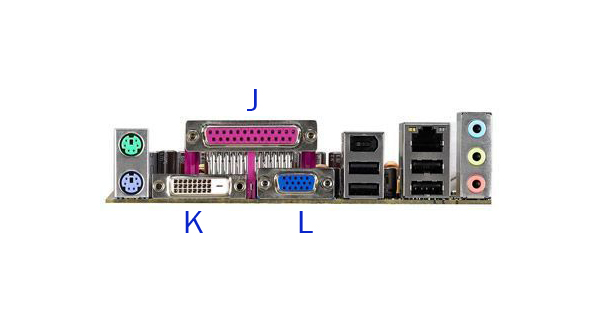
That piece on the back of the computer with all the various ports/connectors that looks like this:

back-panel03.jpg


That IS the motherboard's rear panel...it's the default point of connection for keyboard/mouse/USB. those are built into the motherboard. In order to use the ports on a case, you have to physically connect wires to the motherboard during assembly.

Have you ever built a computer before? While it's not terribly difficult...it is detail-oriented work...and based on this last question, MAY be above your skill set.
 
I can't say I remember making that topic. But I must have. Sorry about that. How easy is it to plug them into the USB on the Motherboard and how much of a chance is there of something going wrong?

Easy as plugging your monitor or anything else electrical powered into the wall. Just take the usb, and try plugging it in, if it doesn't work, spin it 180 and it will work!

Good luck!
 
I have owned a PC but I have had a laptop for about 2-3 years. And when I did own the desktop, I didn't know a whole lot about it. And I'm having the PC built by someone else
 
Easy as plugging your monitor or anything else electrical powered into the wall. Just take the usb, and try plugging it in, if it doesn't work, spin it 180 and it will work!

Good luck!
Based on the apparent skill level of the OP, I would revise this to say --- If the USB plug doesn't want to go in - don't force it - try flipping it 180 ..

If you manage to plug it in 180-out --- something's probably broke ..
 
Back
Top