• We’re currently investigating an issue related to the forum theme and styling that is impacting page layout and visual formatting. The problem has been identified, and we are actively working on a resolution. There is no impact to user data or functionality, this is strictly a front-end display issue. We’ll post an update once the fix has been deployed. Thanks for your patience while we get this sorted.

changed hardware and windows 10 will not boot

Page 4 - Seeking answers? Join the AnandTech community: where nearly half-a-million members share solutions and discuss the latest tech.
The easiest way would be to download the windows 11 iso to the desktop, mount in explorer and run setup. That'll also fix the recovery options from pic 1 in your last post.
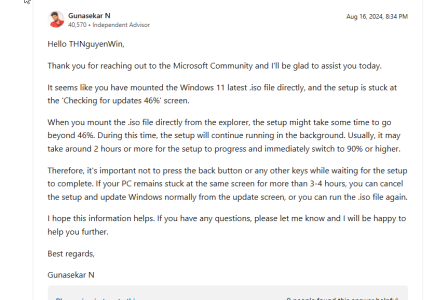
OK, I did that, mounted it, and running it. Stuck on "checking for updates" at 46$ for over an hour.

Is that normal ??
 
OK, I did that, mounted it, and running it. Stuck on "checking for updates" at 46$ for over an hour.

Is that normal ??
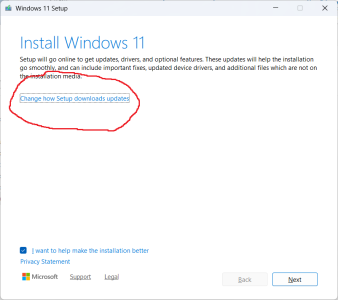
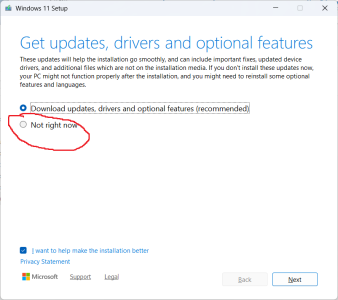
I'd abort. Restart, click change how setup downloads updates (1st option) and change to not right now.
 
I'd abort. Restart, click change how setup downloads updates (1st option) and change to not right now.
well, I did that, but there was no option to do it differently. Here is something I found using google:
1759884982146.png

2 Hours ? Thats insane, but I am letting it do that now.

damn windows crap.
 
well, I did that, but there was no option to do it differently. Here is something I found using google:
View attachment 131606

2 Hours ? Thats insane, but I am letting it do that now.

damn windows crap.
I'd also uncheck the box about I want to help... underneath it.
 

Attachments

  • 2025-10-07.png
    2025-10-07.png
    31.5 KB · Views: 4
  • 2025-10-07 (1).png
    2025-10-07 (1).png
    37.1 KB · Views: 4
Back
Top