• We’re currently investigating an issue related to the forum theme and styling that is impacting page layout and visual formatting. The problem has been identified, and we are actively working on a resolution. There is no impact to user data or functionality, this is strictly a front-end display issue. We’ll post an update once the fix has been deployed. Thanks for your patience while we get this sorted.

changed hardware and windows 10 will not boot

Markfw

Moderator Emeritus, Elite Member
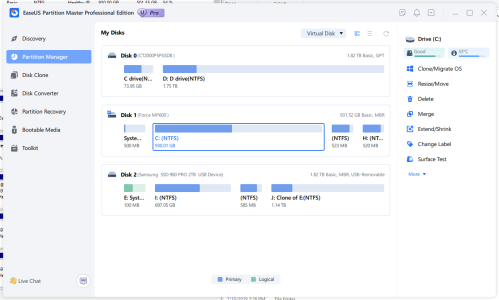
I went from a Intel 4930 to a AMD 5950x . I cloned all the disks using partition magic. bios set to UEFI. Would not boot, get a blue screen, inaccessible device. Put a windows 10 install USB stick in. boot OK, but will not repair startup. Tried upgrade, only works from a booted win 10. Tried install feature upgrades, says its MGR and can't do it. Upgraded disks to GPT. still will not do anything.

Any way to save installed programs and data ?
 
If you'd used mbr2gpt.exe, it would've installed the necessary partition and boot files for you.
Boot from a Win install USB. When you get to the first install screen, press shift-F10 and run diskpart. List the volumes by typing list volume and then hitting enter. Do you see a small fat32 partition?
 
in list disks, the 2 tb nvme is disk 1.so si tried
mbr2gpt /validate|convert /disk:1
and it said "failed to get geometry for disk -1
 
Probably not with Windows 10. With 11, there would be a good chance you were without realizing it. The first command to execute is
Code:
mbr2gpt.exe /validate /disk:(x)
where x is the disk number listed when you listed the disks in diskpart
 
in list disks, the 2 tb nvme is disk 1.so si tried
mbr2gpt /validate|convert /disk:1
and it said "failed to get geometry for disk -1
You always want to validate before converting. It doesn't like something about your disk. If Partition Magic already converted it, mbr2gpt can't convert it. Personally, I would use PM to convert it back to MBR first.
 
I remember the error now. It said "not enough free space" but there was plenty.
 
maybe I will take it apart, and put it back in the adapter to use PM so I give screen copies
 
well, it worked this time...\

from the conversion computer, not its "home". Now to put it back
 
Back
Top