No, unfortunately, it is Version 21H1. My version is Windows Pro. Should that also be Version 22H2? Strange thing is it just installed a big update, but still is not the latest version. Like I said, (see post 21) when I click on the "check for updates" button, all that shows up are those optional updates (post 22), but nothing to update Windows.Please also run winver and check your version of Win10. It should be 22H2.

-
We’re currently investigating an issue related to the forum theme and styling that is impacting page layout and visual formatting. The problem has been identified, and we are actively working on a resolution. There is no impact to user data or functionality, this is strictly a front-end display issue. We’ll post an update once the fix has been deployed. Thanks for your patience while we get this sorted.
You are using an out of date browser. It may not display this or other websites correctly.
You should upgrade or use an alternative browser.
You should upgrade or use an alternative browser.
Cant update to Win 11
Page 2 - Seeking answers? Join the AnandTech community: where nearly half-a-million members share solutions and discuss the latest tech.
Yea, I am beginning to think that is the answer. Only thing is, if I have to start over from scratch, not sure if I shouldn't just get a new computer. They are pretty expensive right now, but they could get even worse with tariffs now being extended to computer chips.Just do clean install bro. Backup yo stuff, start anew. To use the words of the great philosopher and sometimes actor appearing in Alka-Seltzer adverts, Jack Aaron...."Try it, you'll like it!"
Last edited:

Getting MBR to GPT while everything else stay the same take few minutes with this.
 www.partitionwizard.com
Then Download the 24H2 ISO from Microsoft.
Get a 16GB USB Flash Drive and using Rufus Install the Win 11 ISO to the Flash Drive.
To perform an in-place upgrade, you'll need to use:
Rufus to create the bootable USB, then run the setup.exe from the USB drive within your existing Windows 10 installation
😎
Free Download MiniTool Partition Wizard for Windows PC and Server
Free download the partition magic alternative - MiniTool Partition Wizard to move/resize/convert/copy/recover disk partitions in Windows PC and Windows Server.
Then Download the 24H2 ISO from Microsoft.
Get a 16GB USB Flash Drive and using Rufus Install the Win 11 ISO to the Flash Drive.
Rufus - Create bootable USB drives the easy way
Rufus: Create bootable USB drives the easy way
rufus.ie
To perform an in-place upgrade, you'll need to use:
Rufus to create the bootable USB, then run the setup.exe from the USB drive within your existing Windows 10 installation
😎
Yea, I am beginning to think that is the answer. Only thing is, if I have to start over from scratch, not sure if I shouldn't just get a new computer. They are pretty expensive right now, but they could get even worse with tariffs now being extended to computer chips.
C'mon a whole new PC? That almost as laborious having to uninstall all the OEM bundled bloat.

mikeymikec
Lifer
No, unfortunately, it is Version 21H1. My version is Windows Pro. Should that also be Version 22H2? Strange thing is it just installed a big update, but still is not the latest version. Like I said, (see post 21) when I click on the "check for updates" button, all that shows up are those optional updates (post 22), but nothing to update Windows.
I personally haven't tried in-place upgrading from 21H1 to Win11, only 22H2 to Win11 (which I have done many times).
Well, here is the latest. They system totally crashed. I couldnt boot from C:, even into safe mode. I could not even boot from a clone of C I made a few months ago. System recovery or system restore also crashed. Repair disk also didnt work.
Finally, I was able to get the machine to boot from the original Win 10 DVD. Unfortunately that is a very old version of Windows. I cant even install my gpu drivers because it is so old. I am running update after update, hoping to finally get to 22H2. (I had to reformat C: to get Windows to reinstall from the DVD). So we will see. Still hoping to get Win 22H2 to install and decide what to do from there.
Finally, I was able to get the machine to boot from the original Win 10 DVD. Unfortunately that is a very old version of Windows. I cant even install my gpu drivers because it is so old. I am running update after update, hoping to finally get to 22H2. (I had to reformat C: to get Windows to reinstall from the DVD). So we will see. Still hoping to get Win 22H2 to install and decide what to do from there.
mikeymikec
Lifer
download and run the Windows 10 Update Assistant from Microsoft to hop straight up to the latest version.
I finally got to 22H2. Going to give up for the day, see what I can do tomorrow.download and run the Windows 10 Update Assistant from Microsoft to hop straight up to the latest version.

bba-tcg
Golden Member
Why not just install Windows 11 instead since that's what you're trying for?Well, here is the latest. They system totally crashed. I couldnt boot from C:, even into safe mode. I could not even boot from a clone of C I made a few months ago. System recovery or system restore also crashed. Repair disk also didnt work.
Finally, I was able to get the machine to boot from the original Win 10 DVD. Unfortunately that is a very old version of Windows. I cant even install my gpu drivers because it is so old. I am running update after update, hoping to finally get to 22H2. (I had to reformat C: to get Windows to reinstall from the DVD). So we will see. Still hoping to get Win 22H2 to install and decide what to do from there.

Indus
Lifer
Well, here is the latest. They system totally crashed. I couldnt boot from C:, even into safe mode. I could not even boot from a clone of C I made a few months ago. System recovery or system restore also crashed. Repair disk also didnt work.
Finally, I was able to get the machine to boot from the original Win 10 DVD. Unfortunately that is a very old version of Windows. I cant even install my gpu drivers because it is so old. I am running update after update, hoping to finally get to 22H2. (I had to reformat C: to get Windows to reinstall from the DVD). So we will see. Still hoping to get Win 22H2 to install and decide what to do from there.
What a f'ing nightmare!
I know you don't want to hear this but it could save you $$$$.
Since you don't have the latest and greatest hardware you can extend the life of them under linux distros and still manage to use all your data/ files and even games. I did it.. it's in my other thread but basically while windows sees NTFS and linux prefers ext4/ btrfs.. they BOTH see ex-fat just fine.
So if you want.. you can just take a stable linux distro.. install steam and play your games and still have access to all your data. I've only found 2 instances of where I could not do something in linux..
#1 Battlefront 2 - that game's EA launcher seems to bug out
#2 Avery design label print software..
So I have to dual boot into windows 10 to do that but other than that I'm completely able to do everything I need. I don't know how much a new pc would cost but it would not be cheap so just think about it and I wish you all the best with whatever you decide!
Thanks for all the time and advice. Win 10 is working now, and it updated to 22H2. I had to format the C: drive and do a clean install from the original Windows DVD though, so I lost save games, passwords, nearly everything in the computer. I did a backup before all this happened, but haven't tried to restore anything yet. I reinstalled Steam and my games were on a different SSD so I didn't have to download them again. Only major loss is I cant seem to reinstall Game Pass, as the account information is fouled up from some earlier installations. (Its a long story, related to some mix up in the user accounts a long time ago.) I have family visiting out of town and a lot of other things going on the next couple of weeks, so I probably will just go with Win 10 until I have more time to devote to possible changes.What a f'ing nightmare!
I know you don't want to hear this but it could save you $$$$.
Since you don't have the latest and greatest hardware you can extend the life of them under linux distros and still manage to use all your data/ files and even games. I did it.. it's in my other thread but basically while windows sees NTFS and linux prefers ext4/ btrfs.. they BOTH see ex-fat just fine.
So if you want.. you can just take a stable linux distro.. install steam and play your games and still have access to all your data. I've only found 2 instances of where I could not do something in linux..
#1 Battlefront 2 - that game's EA launcher seems to bug out
#2 Avery design label print software..
So I have to dual boot into windows 10 to do that but other than that I'm completely able to do everything I need. I don't know how much a new pc would cost but it would not be cheap so just think about it and I wish you all the best with whatever you decide!
mikeymikec
Lifer
I'm curious about why the install went titsup and whether the cause has any bearing on the situation in general.
IDK. However, since my machine was not updating properly before all this started, it makes me think my OS was corrupted somehow. I have used it since 2018 without any re-installs, so there could have been registry keys corrupted or something. I had to format the C: drive before I could reinstall from the Windows disk. My wife has a laptop even older than my desktop, so we will have to hope that update goes smoothly. I may just have to replace it. She does not game on it, so it would be a relatively cheap replacement compared to replacing this desktop.I'm curious about why the install went titsup and whether the cause has any bearing on the situation in general.
BTW, thanks to everyone who made suggestions. I am not sure what I am going to do about this comp. I am hoping that maybe since the Updates seem to be working now, it will update to Win 11 at some point. But like I said above, my time is tied up for the next couple of weeks, so I am not doing anything else right now, as long at it is working.
Indus
Lifer
IDK. However, since my machine was not updating properly before all this started, it makes me think my OS was corrupted somehow. I have used it since 2018 without any re-installs, so there could have been registry keys corrupted or something. I had to format the C: drive before I could reinstall from the Windows disk. My wife has a laptop even older than my desktop, so we will have to hope that update goes smoothly. I may just have to replace it. She does not game on it, so it would be a relatively cheap replacement compared to replacing this desktop.
BTW, thanks to everyone who made suggestions. I am not sure what I am going to do about this comp. I am hoping that maybe since the Updates seem to be working now, it will update to Win 11 at some point. But like I said above, my time is tied up for the next couple of weeks, so I am not doing anything else right now, as long at it is working.
Hey on that old laptop.. if she's up for it.. give her LMDE (linux mint - debian based) as a test and see if she can get by with it.
Because my wife loved not having headaches with windows anymore or the code being so bad it overheated her laptop and stuttering. No such issues with LMDE.. it fixed everything. I had to tinker in themes a tad though but thankfully there's windows 7 and 10 themes in linux. Mac ones too.
Thanks for the suggestion. She doesn't play games, per se, in the way that we think of them. She does play some hidden object, city building type games though. Not sure those would work.Hey on that old laptop.. if she's up for it.. give her LMDE (linux mint - debian based) as a test and see if she can get by with it.
Because my wife loved not having headaches with windows anymore or the code being so bad it overheated her laptop and stuttering. No such issues with LMDE.. it fixed everything. I had to tinker in themes a tad though but thankfully there's windows 7 and 10 themes in linux. Mac ones too.
Indus
Lifer
Thanks for the suggestion. She doesn't play games, per se, in the way that we think of them. She does play some hidden object, city building type games though. Not sure those would work.
If it's on steam.. it's likely compatible.. or you can use Lutris and Wine as a fallback.
Even if you give her a standard version of linux mint.. gaming on it is still very possible..
Well, here is the latest update (pun intended) on my Win 11 odyssey. After a clean install of Win 10, and installing the updates, Windows Update said Win 11 was ready to install. I simply hit the install tab and the installation (in place) went without a hitch. Win 11 is now installed, and I lost no information from the latest Win 10 clean install. Didnt have to burn the ISO to a flash drive or anything. I'm not sure yet if I like the Win 11 interface, but all the games I have tried so far work, and I probably will get used to the slightly different interface eventually. Win 11 does seem pretty snappy performance wise, but so did my clean install of Win 10 compared to the original 6 year old Win 10 install.
So thanks to everyone for the advice, I appreciate it. Next comes my wife's older laptop. I have to check it, it may not even be compatible with Win 11. I think it is Kaby Lake generation.
So thanks to everyone for the advice, I appreciate it. Next comes my wife's older laptop. I have to check it, it may not even be compatible with Win 11. I think it is Kaby Lake generation.

Quintessa
Member
Glad you got it sorted, sometimes a clean Win10 install is the easiest path to trigger the Win11 upgrade prompt.
For your wife's Kaby Lake laptop, officially unsupported, but you can bypass checks with the registry tweak or Rufus if you want; just know you won't be "officially" supported on updates.I think it is Kaby Lake generation.
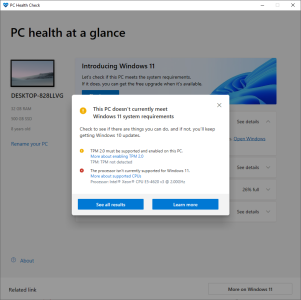
(The CPU is too old, and TPM is a requirement.) So you'll need to use Rufus.Trying to update to win 11, it says can't on a 4620V3 Xeon. Its in red, and says no TPM ? and its in Red. Is it the CPU ? after updates, I will try and get a screen copy/

How to upgrade your 'incompatible' Windows 10 PC to Windows 11 - for free
Microsoft really doesn't want customers to upgrade older PCs to Windows 11, but there are workarounds for all but the oldest devices. Now that Windows 10 support has officially ended, here's everything you need to know.
 www.zdnet.com

Markfw
Moderator Emeritus, Elite Member
Thanks for the reply. This user is a CPU that I have not seen for 7 years, and may not see again for 7 more. They also don't like the weight of the current box. The hard drive is a spinner, and they are going to a NVME. it has a CDrom drive and a floppy that will be removed. They are going to a 7950x. Not sure they would be comfortable with hacks, and they have the money to upgrade. I just need to use easeus partition magic to copy everything over, so they don't lose anything, then update to win 11. At least thats the current plan. I just wanted to verify that its true that the CPU was too old.(The CPU is too old, and TPM is a requirement.) So you'll need to use Rufus.
How to upgrade your 'incompatible' Windows 10 PC to Windows 11 - for free
Microsoft really doesn't want customers to upgrade older PCs to Windows 11, but there are workarounds for all but the oldest devices. Now that Windows 10 support has officially ended, here's everything you need to know.
Thanks for the info !
Last edited:
That's Haswell? I've had no troubles with W11 running on a few Haswell systems using Rufus to disable/bypass hardware compliance check. You could probably run it as an upgrade, too, using the registry mod on the existing system if you use an older ISO of 24H2 from 2024, before MS patched that in later ISO builds released in 2025. Disconnect from the internet, select 'don't get latest updates'.
How are they going with 7950x if they have no money?
How are they going with 7950x if they have no money?
Markfw
Moderator Emeritus, Elite Member
I looked and I can't find where I said that. If I did it must have been a typo. She is an MBA and has $$$$That's Haswell? I've had no troubles with W11 running on a few Haswell systems using Rufus to disable/bypass hardware compliance check. You could probably run it as an upgrade, too, using the registry mod on the existing system if you use an older ISO of 24H2 from 2024, before MS patched that in later ISO builds released in 2025. Disconnect from the internet, select 'don't get latest updates'.
How are they going with 7950x if they have no money?
I looked and I can't find where I said that. If I did it must have been a typo. She is an MBA and has $$$$
I read "and they have to money to upgrade" as they have "no" money to upgrade. My brain tried to anticipate a typo or unintended auto-correct. 😛
TRENDING THREADS
-
 Discussion Zen 5 Speculation (EPYC Turin and Strix Point/Granite Ridge - Ryzen 9000)
- Started by DisEnchantment
- Replies: 25K
-
Discussion Intel Meteor, Arrow, Lunar & Panther Lakes + WCL Discussion Threads
- Started by Tigerick
- Replies: 25K
-
 Discussion Intel current and future Lakes & Rapids thread
- Started by TheF34RChannel
- Replies: 24K
-

-
