• We’re currently investigating an issue related to the forum theme and styling that is impacting page layout and visual formatting. The problem has been identified, and we are actively working on a resolution. There is no impact to user data or functionality, this is strictly a front-end display issue. We’ll post an update once the fix has been deployed. Thanks for your patience while we get this sorted.

Question Can't format my 4gb pendrive

RiseTheS33D

Junior Member
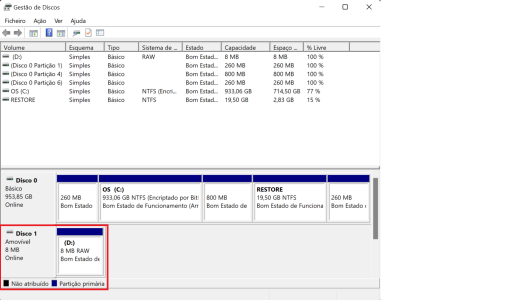
So i was trying to do a Fedora live USB and i used a third party program in windows to achieve it, named rufus. For some reason it failed and after that my pendrive shrinked to 8mb. I already tried several methods to recover the original size but couldn't find a solution. Could someone help me please?
pen1.png

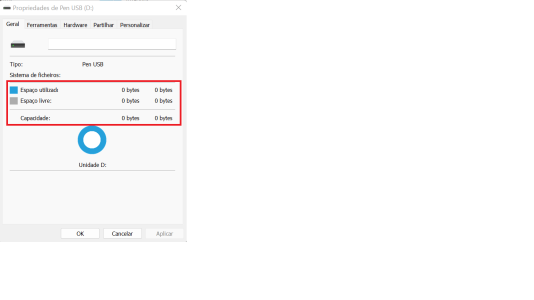
pen2.png
For the RAW USB recovery, i used Disk Drill but it didnt find any file to recover.

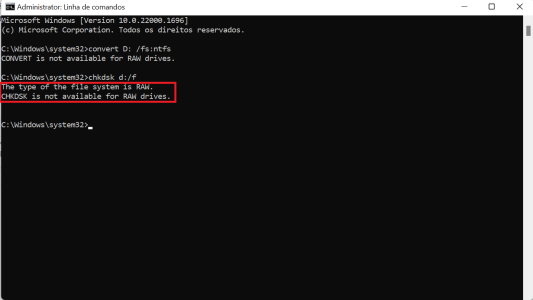
To fix the USB drive in the RAW format i tried the chkdsk d:/f

pen3.png

The above didn't work so i tried this:
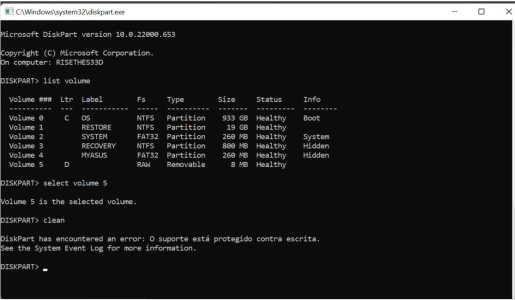
pen4.png

It says the disk is write protected but doesnt have any kind of button in the USB to unprotect.
 
Try this series of commands after starting Diskpart in Administrator mode.

"List Disk" to see the disk drives.

Select Disk X (X being the USB Disk)

Then command it to "clean"

** that way you are doing the entire disk and not just a partition.
 
Did you know it failed because rufus said so? Or because you could not boot from the USB drive?

I always try quick and dirty first, so here's what I'd do. Download https://www.balena.io/etcher and try to write the .iso to the USB drive like everything is normal.
 
+1 to pcgeek11.

You trying to clean the partition vol. and not the actual disk partitions.
Its saying its protected, because you can not have a volume absent partition.

Follow his instructions.
You want the "Clean" command to apply to disk, and not Vol.
 
Did you know it failed because rufus said so? Or because you could not boot from the USB drive?

I always try quick and dirty first, so here's what I'd do. Download https://www.balena.io/etcher and try to write the .iso to the USB drive like everything is normal.
It failed because rufus said. It stucked at 95.6 and then showed an error. Tried to use that thrid party program but it doesnt let me select the usb because it says that is to small (8mb). The pendrive shrinked from 4gb to 8mb.
 
It failed because rufus said. It stucked at 95.6 and then showed an error. Tried to use that thrid party program but it doesnt let me select the usb because it says that is to small (8mb). The pendrive shrinked from 4gb to 8mb.

This is because you have a hidden vol. or a incompatiable vol taking up the rest of the partition.
This happens when you try to load a installer / ISO of Linux, or FREEBSD with Rufus or Yumi via ISO.

Follow pcgeek's advice in using diskpart and using select disk command instead of select vol command.
 
This is because you have a hidden vol. or a incompatiable vol taking up the rest of the partition.
No, it's because the USB controller detects a failure condition, and reverts to "firmware / factory-programming mode". The 8MB size is a dead giveaway. OCZ Sandforce SSDs used to fail in a similar fashion.

OP, you might be able to recovery the drive with a factory flash program, but that's a long shot.
 
Try this series of commands after starting Diskpart in Administrator mode.

"List Disk" to see the disk drives.

Select Disk X (X being the USB Disk)

Then command it to "clean"

** that way you are doing the entire disk and not just a partition.
I fixed the write protection by changing the attributes of the pendrive, but it still doesn't let me format.

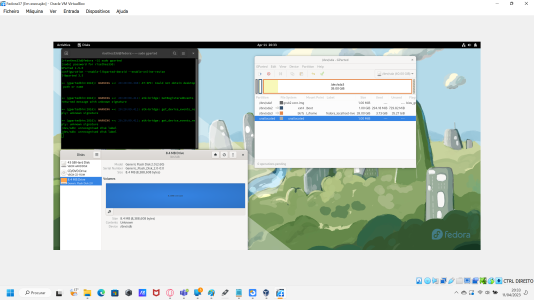
I'm trying to use gparted in a fedora virtual machine but it doesn't find it but the Disks program of fedora can find it.

imagem_2023-04-11_203521660.png
 
It's junk. Spend the $5 and buy another one.
After reading the OP's replies, yup. Not worth any more time or effort. Unless your time is worthless and you enjoy a challenge I suppose. I have never had Rufus or Etcher have issues either.
 
I fixed the write protection by changing the attributes of the pendrive, but it still doesn't let me format.

I'm trying to use gparted in a fedora virtual machine but it doesn't find it but the Disks program of fedora can find it.

View attachment 79345

But it is still showing as an 8 MB disk .... instead of 4 GB Disk.

Did you try what I suggested? If that didn't work toss it and get a new drive.
 
Last edited:
No, it's because the USB controller detects a failure condition, and reverts to "firmware / factory-programming mode". The 8MB size is a dead giveaway. OCZ Sandforce SSDs used to fail in a similar fashion.

OP, you might be able to recovery the drive with a factory flash program, but that's a long shot.

I have recovered many USB Sticks with this same issue using Diskpart and clean... That being said a defective disk may not be recoverable, but you will never know until you try.

One thing is for sure he did it the wrong way by attempting to clean a Partition and not the entire Disk.
 
I use Windows "Diskpart" at a Admin Command Prompt to create a live bootable USB.

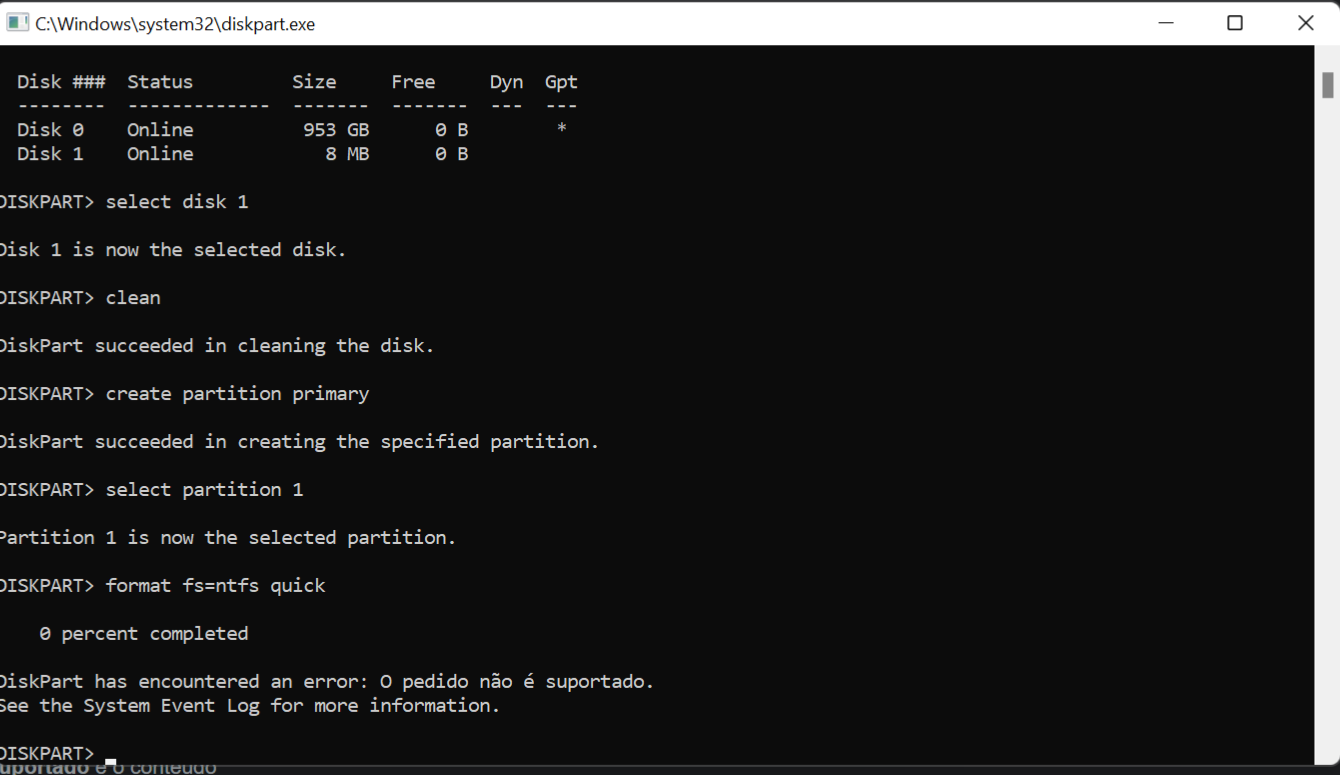
I tried but it say "DiskPart has encountered an error: request not supported"
Rvp5t9.jpg
 
I tried but it say "DiskPart has encountered an error: request not supported"
Rvp5t9.jpg


After this did you remove and reinsert then list disk again?
If so and it still shows 8 MB - Toss it, not worth the effort to continue.

If you didn't try again, try again and see what happens.
 
After this did you remove and reinsert then list disk again?
If so and it still shows 8 MB - Toss it, not worth the effort to continue.

If you didn't try again, try again and see what happens.
I tried, time to give a honorable burial after being used 2 times.
R.I.P Kingston DataTraveler G4 4gb

Thanks alot to every "pendriver's specialist doctor" that contributed to revive this piece of metal.
 
theres your problem feller. Kingston is junk now a days. you can get a multi pack of decent sandisk thumb sticks for $20 and each one will hold 16 gb. Even these aren't needed now a days.
 
theres your problem feller. Kingston is junk now a days. you can get a multi pack of decent sandisk thumb sticks for $20 and each one will hold 16 gb. Even these aren't needed now a days.
Merely 16GB? With prices the way they are, might as well go for 64GB drives. They're dirt cheap at the moment.
If anyone wishes to object, you may do so now or forever hold your peace.

EDIT: Wait. What am I doing? No. I will not buy. Better to get a single 1 TB SSD. Damn, I was so tempted back there.
Check price on the 256GB version. I've just ordered 2 for almost nothing. The 128GB is pocket money cheap right now. Costs less then a 32GB pendrive last year.

Why? can always use some extra cheap storage.
 
theres your problem feller. Kingston is junk now a days. you can get a multi pack of decent sandisk thumb sticks for $20 and each one will hold 16 gb. Even these aren't needed now a days.
Nothing wrong with Kingston, it's a pressure of the entire product segment. How much margin do you think there is on ANY brand's $8 ~ $13 flash drives to support randomly pulling and testing better than 1 : 1000+ units? Kingston is in a better position than most to have higher QC/QA. It actually designs or manufactures much of it's product line in own facilities, has own IC and wafer packaging (buying the IC and wafers from Samsung, Toshiba, Micron, Intel, or other), rather than just straight-up private labeling.
 
Last edited:
Why? can always use some extra cheap storage.
I changed my mind coz it's NEVER fun to lose hundreds of GBs of stuff in a pendrive, most of that not backed up coz life is so busy. In real life, it's hard to keep track of unbacked files. Wish Windows would keep track of personal files and BUG users, telling them, "Hey! These files have a single copy. Insert drive now to make a duplicate copy for DR purposes".
 
I changed my mind coz it's NEVER fun to lose hundreds of GBs of stuff in a pendrive, most of that not backed up coz life is so busy. In real life, it's hard to keep track of unbacked files. Wish Windows would keep track of personal files and BUG users, telling them, "Hey! These files have a single copy. Insert drive now to make a duplicate copy for DR purposes".
Oh, I'd never use pendrives for storage as such, and never ever for backup, but they're pretty handy when you just need to move things around several locations. One 256GB can hold f.x. 5-6-7 bluray rips easily, without resorting to extra compression. Or an awful lot of pictures in a very handy format.

I'd still not trust them with anything important.
 
I changed my mind coz it's NEVER fun to lose hundreds of GBs of stuff in a pendrive, most of that not backed up coz life is so busy. In real life, it's hard to keep track of unbacked files. Wish Windows would keep track of personal files and BUG users, telling them, "Hey! These files have a single copy. Insert drive now to make a duplicate copy for DR purposes".
I've used USB flash drives for years to make weekly backups of a few hundred MB at a time. Larger data sets go elsewhere.

Never lost any data from using flash drives, though I do have two redundant copies and one of those on an MLC based flash drive so unlikely I'd run into endurance issues any year soon. Main risk in my use case would be if the flash drive was sticking out and got bumped and broke the connector off. I should mention that I also avoid using the tiny USB flash drives barely bigger than a USB A connector because they tend to have heat and performance issues.

I set Windows Task Scheduler to display a reminder once a week (or whatever reminder interval works for you, can still plug in the flash drive at any time if you just did a lot of work and want it backed up immediately using the method below), then have Freefilesync/Realtimesync installed and it puts a config file on each drive, so you simply plug it in and FFS/RTS notices and automates making the backup of whatever you want to that flash drive.

The key then is getting into the habit of putting such files in specific folders on your HDD/SSD so when those entire folders are sync'd to the flash drives, you've got it all. You can set it up to sync as many folders as you want. You can also use an external HDD or SSD instead of a USB flash drive, just keep it offline then when it goes online, RTS sees it and starts FFS to do the backup. With an external USB flash, HDD, or SSD, it's very convenient to have a USB hub with a switch to activate each port, then just flip the switch.


Of course there are other options like sync to Google Drive or some other cloud, but I'd still want a 2nd redundant backup in case the cloud account has some problem, or any other random problem.

 
Last edited:
Back
Top