• We’re currently investigating an issue related to the forum theme and styling that is impacting page layout and visual formatting. The problem has been identified, and we are actively working on a resolution. There is no impact to user data or functionality, this is strictly a front-end display issue. We’ll post an update once the fix has been deployed. Thanks for your patience while we get this sorted.

can anyone beat 11ms ping time on speedtest.net

Page 5 - Seeking answers? Join the AnandTech community: where nearly half-a-million members share solutions and discuss the latest tech.
I dont' think its possible to beat this. Well ping anyways.
3482589367.png

*spits coffee into monitor*

😱
 
Holy necro batman.

My home internet

My phone tethered to my computer

To be fair, my dad is also using the home internet and he's using a lot of the speed. And most of the time I can't even use my home internet because my brother uses all the bandwidth with videos (stupid router prioritizes videos over regular shit)
 
Last edited:
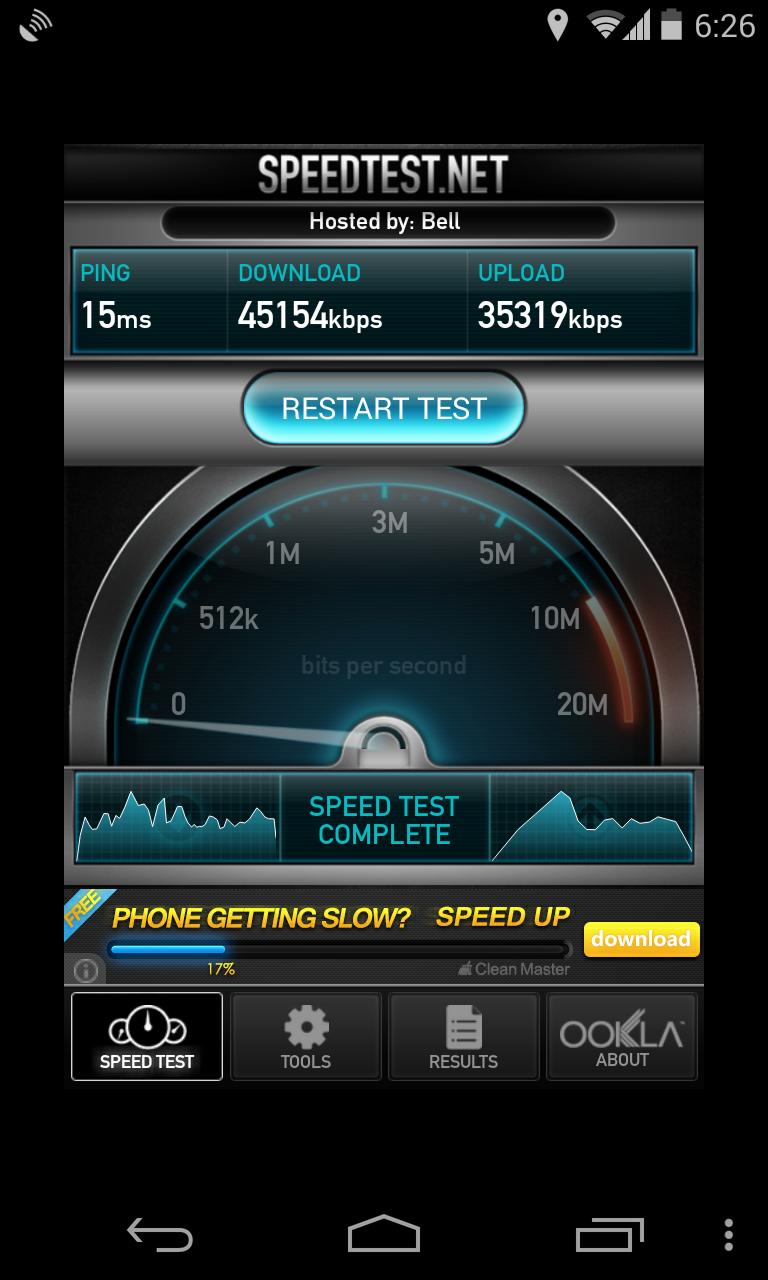
For what it's worth, over wireless. Not quite 11 but fairly close.


Though not sure how accurate the android app is, my upload is actually 30 and it says 35. Though I have seen it go to like 31, so maybe it can burst for a bit to higher speeds.


Oddly if I ping my phone, it's quite terrible LOL.

Code:
root@falcon:~# ping 10.11.10.100
PING 10.11.10.100 (10.11.10.100) 56(84) bytes of data.
64 bytes from 10.11.10.100: icmp_seq=1 ttl=63 time=150 ms
64 bytes from 10.11.10.100: icmp_seq=2 ttl=63 time=71.5 ms
64 bytes from 10.11.10.100: icmp_seq=3 ttl=63 time=298 ms
64 bytes from 10.11.10.100: icmp_seq=4 ttl=63 time=219 ms
64 bytes from 10.11.10.100: icmp_seq=5 ttl=63 time=140 ms
64 bytes from 10.11.10.100: icmp_seq=6 ttl=63 time=61.4 ms
64 bytes from 10.11.10.100: icmp_seq=7 ttl=63 time=285 ms
64 bytes from 10.11.10.100: icmp_seq=8 ttl=63 time=206 ms
64 bytes from 10.11.10.100: icmp_seq=9 ttl=63 time=131 ms
64 bytes from 10.11.10.100: icmp_seq=10 ttl=63 time=52.5 ms
64 bytes from 10.11.10.100: icmp_seq=11 ttl=63 time=276 ms
64 bytes from 10.11.10.100: icmp_seq=12 ttl=63 time=201 ms
64 bytes from 10.11.10.100: icmp_seq=13 ttl=63 time=120 ms
64 bytes from 10.11.10.100: icmp_seq=14 ttl=63 time=39.9 ms
64 bytes from 10.11.10.100: icmp_seq=15 ttl=63 time=575 ms
64 bytes from 10.11.10.100: icmp_seq=16 ttl=63 time=192 ms
64 bytes from 10.11.10.100: icmp_seq=17 ttl=63 time=112 ms
64 bytes from 10.11.10.100: icmp_seq=18 ttl=63 time=33.6 ms
64 bytes from 10.11.10.100: icmp_seq=19 ttl=63 time=257 ms
64 bytes from 10.11.10.100: icmp_seq=20 ttl=63 time=487 ms
64 bytes from 10.11.10.100: icmp_seq=21 ttl=63 time=104 ms
64 bytes from 10.11.10.100: icmp_seq=22 ttl=63 time=24.6 ms
64 bytes from 10.11.10.100: icmp_seq=23 ttl=63 time=250 ms
64 bytes from 10.11.10.100: icmp_seq=24 ttl=63 time=170 ms
64 bytes from 10.11.10.100: icmp_seq=25 ttl=63 time=397 ms
64 bytes from 10.11.10.100: icmp_seq=26 ttl=63 time=323 ms
64 bytes from 10.11.10.100: icmp_seq=27 ttl=63 time=244 ms
64 bytes from 10.11.10.100: icmp_seq=28 ttl=63 time=162 ms
64 bytes from 10.11.10.100: icmp_seq=29 ttl=63 time=88.0 ms
64 bytes from 10.11.10.100: icmp_seq=30 ttl=63 time=309 ms
64 bytes from 10.11.10.100: icmp_seq=31 ttl=63 time=233 ms
64 bytes from 10.11.10.100: icmp_seq=32 ttl=63 time=154 ms
64 bytes from 10.11.10.100: icmp_seq=33 ttl=63 time=79.0 ms
64 bytes from 10.11.10.100: icmp_seq=34 ttl=63 time=307 ms
64 bytes from 10.11.10.100: icmp_seq=35 ttl=63 time=222 ms

Going to have to try a laptop to see if it's my wifi.
 
Last edited:
So apparently the Wireless at the office sucks bigtime:

3796232299.png


If I go from one of our servers thats actually on wired:

3796240833.png
 
So apparently the Wireless at the office sucks bigtime:

3796232299.png


If I go from one of our servers thats actually on wired:

3796240833.png

unless your device and router are setup for 802.11AC what did you expect from wifi?

802.11N might have gotten you up to 40-50% of wired, but for anything more than that, higher end 802.11AC devices would be needed. And those aren't exactly cheap. Your wireless as it is, is standard, i'd even say it's above average seeing as you saw NO improvement to ping when switching to wired. On wifi at my house I get 35 download and 50 upload with a 20ms ping. On wired I get 80Mbps download and 92Mbps upload with a 9ms ping.
 
Last edited:
It just means a major backbone to the internet was upgraded.
Or for some reason many people are not on the internet today.
 
unless your device and router are setup for 802.11AC what did you expect from wifi?

802.11N might have gotten you up to 40-50% of wired, but for anything more than that, higher end 802.11AC devices would be needed. And those aren't exactly cheap. Your wireless as it is, is standard, i'd even say it's above average seeing as you saw NO improvement to ping when switching to wired. On wifi at my house I get 35 download and 50 upload with a 20ms ping. On wired I get 80Mbps download and 92Mbps upload with a 9ms ping.

Alright, I suppose I should've used the /sarcasm tag. Sorry for setting you off....


EDIT: After looking at it again, I worded it really poorly, lmao. No, thats totally inline with wifi (and I'm not complaining in the slightest...except for the fact that my ethernet jack at my desk doesn't function, super!)
 
Last edited:
100mbps on wifi? I did not even think that was possible. That's pretty awesome. I get about 30mbps both ways sitting under my unifi AP. Also mine is on a 10/100 connection so I'd be limited by that anyway even if the wifi was faster. Though the only N wifi device I have to test is my phone (Nexus 4) so not sure if that is my limiting factor. Was using FTP to test, I don't trust the speedtest app on the phone, it runs too fast, does not get a good enough data sample and the numbers are too high. The test I did was ftp to a local server in case I'd get speeds higher than 50/30 which is what my internet is. If I do speed test it gives me 50/39 as a result, 9mbps faster than my upload actually is. 😛
 
17ms here...50+ miles away...but it has to go through a few roundabout hops due to routing. It's probably actually traveling 800+ miles round trip.
 
I get 12ms so can't quite beat it. Distance to the server and number of hops is a pretty big factor for most people. If you happen to be very close then you get lower ping.


This is a traceroute to the actual server:

Code:
traceroute to 142.166.129.36 (142.166.129.36), 30 hops max, 60 byte packets
 1  internet.firewall.loc (10.1.1.1)  0.338 ms  0.311 ms  0.293 ms
 2  gw.fibreop.loc (192.168.2.1)  0.670 ms  0.800 ms  1.131 ms
 3  nrbaon0436w-047055016001.dhcp-dynamic.FibreOp.on.fibreop.ca (47.55.16.1)  10.074 ms  10.371 ms  10.507 ms
 4  irb-82.dr02.nrba.on.aliant.net (142.166.129.210)  37.780 ms  37.784 ms  37.771 ms
 5  xe-0-0-0.dr02.sdbr.on.aliant.net (142.166.149.69)  45.705 ms  45.838 ms  45.983 ms
 6  fost-on00.FibreOP.ca (142.166.129.36)  11.011 ms  8.816 ms  8.759 ms

Actually way less hops than I figured. It's only 3 hours from here though. Though I think my connection is muxed all the way to nrba (North Bay) which is 4 hours from here. So basically the first layer 3 equipment I hit is 4 hours from here (hop 3) then another router in that town then sdbr (Sudbury) which is 3 hours from here.
 
Back
Top