• We’re currently investigating an issue related to the forum theme and styling that is impacting page layout and visual formatting. The problem has been identified, and we are actively working on a resolution. There is no impact to user data or functionality, this is strictly a front-end display issue. We’ll post an update once the fix has been deployed. Thanks for your patience while we get this sorted.

Camping - Wifi to collect photos

Cienja

Senior member
What do you propose is the best way to setup a Wifi intranet at a remote campsite so everyone can wirelessly upload their photos to a hard drive? It's four days and I know my phone will run out of space due to photos, and I anticipate that the other 30 people will have the same problem, thus I want to make it so Wifi will be available in the mornings and evenings, enabling anyone to connect and upload their photos to make room on their phones, if they want.

I have:

Laptop & extra storage
Selection of routers
Power (truck has an outlet, we have generators, plus cigarrette lighter power for recharging, etc.)

I figure my laptop can host a page with a Browse or Upload button, but I am not certain how to set it all up. I don't want to be screwing with it during the trip, so I want to set it all up at home first.

How would you set this up, including firmware for the router (I have several I can use) and any software you know of that would work for this situation?

I am not unfamiliar with networking, but I'm not a pro either, thus I'm asking you all.

Thanks!
 
I believe by trying to make it as easy as possible at the same time you're making it more difficult as most of the image hosting website packages like Koken and a few others also require that you're running Apache, MySQL, etc. Since both Android and iOS have easy to use SMB clients (I use ES File Explorer on my Droid Turbo) the easy way to do this is to setup a shared folder on the external drive of the laptop and then allow the wireless clients to connect to it by setting up a wireless ad hoc network. That's going to vary a little bit between windows 7 and windows 8 on the GUI side but command line wise it should be the same. So from a command prompt you'll want to enter: netsh wlan set hostednetwork mode=allow ssid=wirelesstransferapp key=12345678 and then enter netsh wlan start hostednetwork .
 
Last edited:
Make your Laptop Hot spot using this Software.

https://virtualrouter.codeplex.com/

Nothing else is needed, when the hotspot software is Not started everything will work as usually.

Make a Directory on the HD with sub-directory to each user.

You can protect/privatize (or not ) these directories through Windows Sharing to what ever you need.

Otherwise, if The phones are working as Phones (i.e., there viable phone signals) in your neck in the woods people can use Free Google acounts and Upload the pics to Google Drive or as attachment to gmail.

Google apps to do so are avail for all types of Phones.


😎
 
Last edited:
If the laptop happens to be a Mac it's pretty simple to set up an ad hoc network. Click the wifi icon, click "create network" and that's about it. Then just share out the drive. People can then connect to the laptop directly and use the hard drive as a network drive to upload photos.
 
Bittorrent Sync or some other "local cloud" system. It would require downloading an app to each phone, but should work well over wifi and without internet.
 
Cheaper on the power button and easiest is just setup a router that can support an attached hard drive. Then plug the hard drive in, ensure the SSID and password is something people can easily use and then they can just connect to the wireless network, connect to the drive and drop their pictures there.

Not sure how much experience you have on router management, but I think it might take me...5 minutes? tops to configure your typical consumer router to do this.

Uses less power than just leaving your laptop plugged in all of the time.

No need to get in to anything fancy here. Just about any router newer than about 5 years old probably has a USB port and can do router attached network storage. Sounds like all you need to do is either let users create their own folder or drop them all in a community folder.
 
Oh, to add, most routers support HTTP and/or WebDAV based storage too, so even folks with a phone can upload and download pictures from it (just point them at the IP address of the router in a web browser, generally with :8080 added to the end of the IP, that way they don't go to the admin page).
 
I'm not a pro at this also but I suggest that you try to use VPN over the area. MAybe it would be helpful and make your browser fast.
 
OP hasn't responded in a few days, so I don't know if it's solved or not, but a Piratebox sounds like a great fit for this use case. I haven't looked into how it stores photos and how easy it is to retreive them, but it's intended use fits OPs scenario really well.
 
I just don't get why no one is going "oh, yeah a cheap router, an external hard drive and 5 minutes or less of setup and you are done"...

Let's not reinvent the wheel here.
 
I just don't get why no one is going "oh, yeah a cheap router, an external hard drive and 5 minutes or less of setup and you are done"...

Let's not reinvent the wheel here.

In my experience cheap router and attached storage doesn't work very well. Even with a pretty nice consumer router I've never had it work reliably.
 
In my experience cheap router and attached storage doesn't work very well. Even with a pretty nice consumer router I've never had it work reliably.

I don't know how low qualifies as "cheap", but at the consumer level my WRT1900AC loves my WD 4TB external HDD for NAS. No problems.
 
I don't know how low qualifies as "cheap", but at the consumer level my WRT1900AC loves my WD 4TB external HDD for NAS. No problems.

A $200+ router is far from what is considered cheap... The router I had troubles with was a Netgear R6300, but that router also fell flat on it's face trying to handle a real gigabit internet connection. I just don't have much confidence in consumer routers that are using 1.xGhz dual cores (or less than 1Ghz) trying to run a router, switch, and wireless, let alone throw NAS duty on top of that.
 
Err, I don't really user routers for storage, but I've run a TP-Link WDR3600 with it's built in storage for testing and it worked just fine. Not super fast, only about 10MB/sec, but should be way more than enough for what OP is intending. I think I bought both of mine for about $35 used and aren't much more new currently.

I did use a Netgear 3500L for several years as my only network storage and that was rocksteady, though only about 2MB/sec writes and 4MB/sec reads. Might be a little slower than wanted, but you can find them for $20 these days. Storage works perfectly on my Archer C5 and C8 with no hiccups. Though, again, only really testing on those (because I want to make sure how well all of the functions on my routers work). I am running a windows box as a file/application server currently.
 
On the "not much faith", keep in mind, most of the functionality is offloaded. Most routers have hardware acceleration for NAT, the switching is done by a switch module and not hitting the actual router CPU at all and most of the wireless is handled by it's own application specific processor too. The CPU is there mostly for storage, applications and non-hardware accelerated routing (though the hardware acceleration is an ASIC on the CPU itself, not physically separated like most router's wireless radio processor and switch modules are).
 
Hi. I was without Internet service for the past while, thus I haven't responded.

@azazel1024 your thought is what I went with; I have two routers with USB 2 for two external drives each.

I am not even a networking novice, but it only took about 20 minutes.

It worked well and did exactly what I wanted, unfortunately, after everyone's phone batteries died, so did the pictures. I hadn't thought that without cell or Internet service, we wouldn't care whether our phone is charged or not. It never mattered. 🙂

Lots of good ideas about the software choices and the local hotspot, which was my second go to, if the router didn't workout.

Thanks!!
 
Last edited:
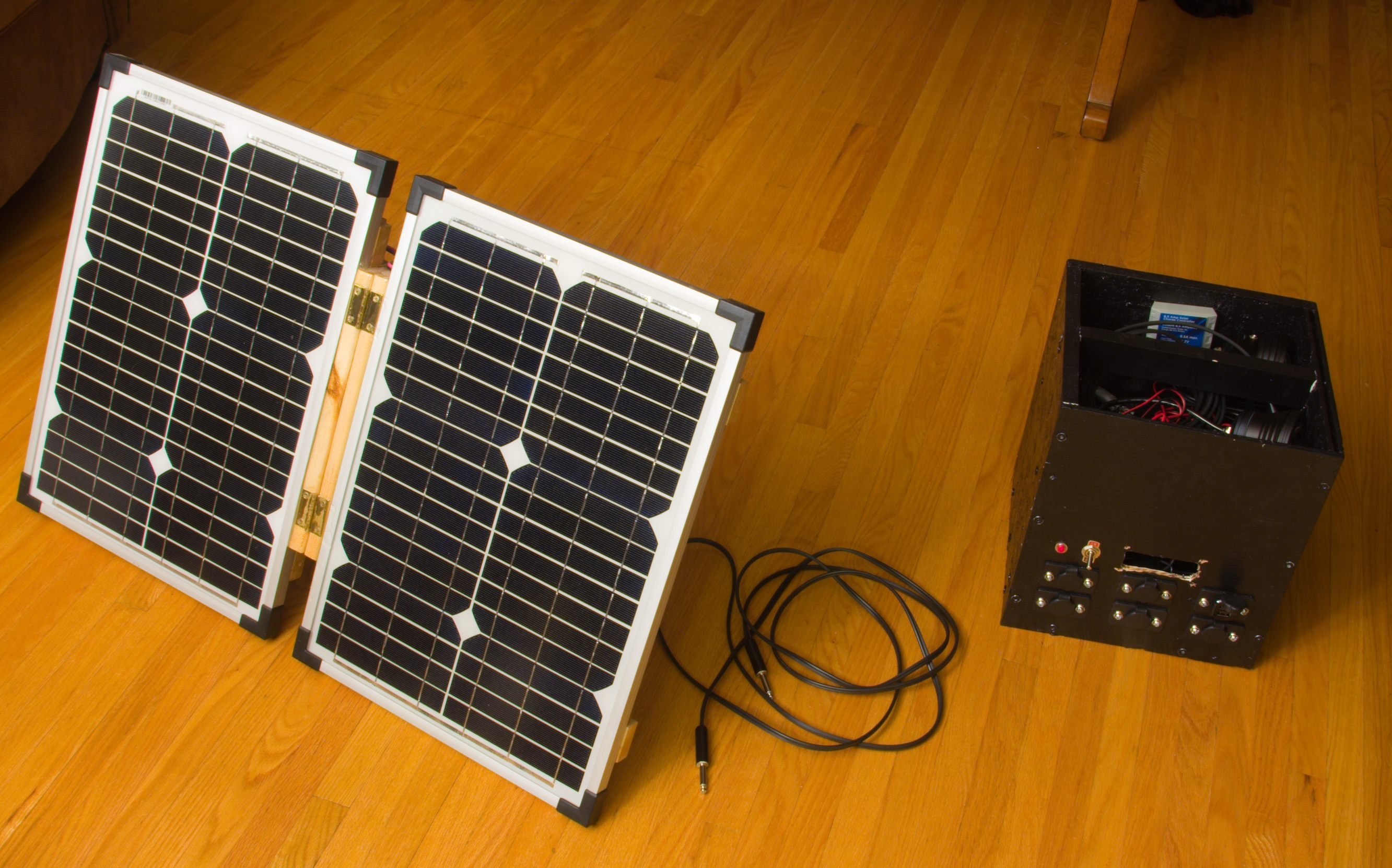
I would try to find a router that runs on 12 volts and supports connecting a hard drive to act as NAS and a portable hard drive enclosure that also runs on 12 volts. Run that off a deep cycle marine battery and a small solar panel and charge controller. The solar setup could also be used for people to charge their phones.

I made this recently when I went camping:


I ran out of time so had to hard wire everything but I will eventually add a micro controller board and LCD to display voltage, amperage being drawn/put in system and maybe misc info like temperature.

Had some flood lights for lighting in the tent and USB plugs for our phones. It's kinda anti-camping to have electronics like that, but it's kinda fun when you have it on solar as there is still that sense of self sufficiency.
 
Back
Top