• We’re currently investigating an issue related to the forum theme and styling that is impacting page layout and visual formatting. The problem has been identified, and we are actively working on a resolution. There is no impact to user data or functionality, this is strictly a front-end display issue. We’ll post an update once the fix has been deployed. Thanks for your patience while we get this sorted.

Brand New Lithium Cell at 0%? Tablet shipped with depleted battery

reallyscrued

Platinum Member
I recently purchased a Winbook tablet from Microcenter and couldn't immediately turn it on, the thing was completely dead right out of the box.

I checked the manual and it said plainly that the tablet "needs to be charged before its first use". I charged it, and it works, but this is the first device with a lithium-based battery that I've purchased to come with a completely dead battery from the manufacturer.

Isn't it harmful for these batteries to reach 0% at any time? Doesn't that begin to chip away at its full capacity capabilities? I've typically had devices shipped with at least 40% charge which I believe is the recommended state for prolonged storage.
 
Last edited:
Harmful? In theory yes, in practice you have to deplete it to zero many time to have functional affect.

That said it could also bad battery to begin with.

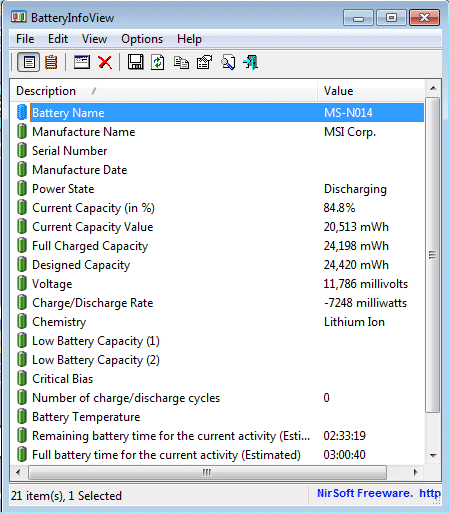
This Free/Portable APP can tel you what is the current status of the Battery.

http://www.majorgeeks.com/files/details/batteryinfoview.html

batteryinfoview.gif


As you can see in the screen shoot the:

Designed Capacity of the Battery in the example is 24,420 mWh.

Full charge Capacity is 24,198 mWh

I.e, the battery lost 222 mWh form its original Full capacity.

That is a lose of less then 1%.


😎
 
Thanks for the info Jack, I'll run this utility tonight on the tablet and see what, if any, damage was done to the battery.
 
My ASUS Transformer was shipped with an apparently dead battery.

I also wonder if the BIOS could be configured to think a less-than-dead battery is initially dead until it's charged?
 
There's a critical low battery level that if crossed, will convert your battery into a brick. Charging requires some level of regulation from the battery itself, and the battery itself must have a minimum charge in order for the internal electronics to stay active. Storing a battery at 0% is a bad idea because all lithium-ion/poly batteries have a (very low) standby drain, and at 0%, there is a risk that you can cross the critical threshold and render your battery useless.
 
There's a critical low battery level that if crossed, will convert your battery into a brick. Charging requires some level of regulation from the battery itself, and the battery itself must have a minimum charge in order for the internal electronics to stay active. Storing a battery at 0% is a bad idea because all lithium-ion/poly batteries have a (very low) standby drain, and at 0%, there is a risk that you can cross the critical threshold and render your battery useless.

That makes sense...then I shudder for the individual who buys one of MicroCenter's Winbooks after it's been sitting on the shelf for a few months at 0% to find that his battery won't hold a charge at all.
 
There's a critical low battery level that if crossed, will convert your battery into a brick. Charging requires some level of regulation from the battery itself, and the battery itself must have a minimum charge in order for the internal electronics to stay active. Storing a battery at 0% is a bad idea because all lithium-ion/poly batteries have a (very low) standby drain, and at 0%, there is a risk that you can cross the critical threshold and render your battery useless.

the battery is analog, it can't exactly be "damaged" by being at a low voltage, unless it drops to 2.5-2.7v at which point it completely chemically deactives. Normally your phone/ipad get to 3.4/3.5v and that's 0%

Just charge it back up and forget.
 
Hm.

battery_Level.png


Something's very odd with the numbers. The "Full Charged Capacity" keeps rising as I'm charging the tablet. It started at 18,xxx and now it's there.

Plus the battery wear level is at 100%...weird.

I'm going to exchange this unit for another one. It's got a very noticeable dead pixel that's going to bug me for as long as I own it.

I'll be interested to see what the battery situation is on the new one.
 
Hm.

Something's very odd with the numbers. The "Full Charged Capacity" keeps rising as I'm charging the tablet. It started at 18,xxx and now it's there.

Plus the battery wear level is at 100%...weird.

This is actually completely normal and expected. The thing to realize is that a lithium-ion battery has a complete microcontroller on it that manages the battery's charge/discharge as well as the statistics that it reports back to the computer.

When the battery level reads 0%, that does not mean 0V, that means that the battery's controller has decided that it has reached a low enough voltage that it's going to stop allowing for discharge in order to keep the battery in a healthy state.

The reason that the Full Charged Capacity kept rising is that batteries do degrade over time, and the battery's microcontroller has no way of knowing what the full charge state is until it calibrates itself. It got back up to what it is coded in as the maximum design capacity, and that's why the battery's wear level is 100%; it's at 100% of its designed capacity.

So in short, your battery is fine. The dead pixel is a separate issue of course.
 
Last edited:
Is there a utility like this for apple? (Including jailbroken?) My iPhone seems to like to turn off at 20-45% and I'm wondering what is wrong. Might get it replaced.
 
1) you get what you pay for

2) lithium battery management is not a fickle task

3) it is easy and cheap to not manage lithium batteries well
 
This is actually completely normal and expected. The thing to realize is that a lithium-ion battery has a complete microcontroller on it that manages the battery's charge/discharge as well as the statistics that it reports back to the computer.

When the battery level reads 0%, that does not mean 0V, that means that the battery's controller has decided that it has reached a low enough voltage that it's going to stop allowing for discharge in order to keep the battery in a healthy state.

The reason that the Full Charged Capacity kept rising is that batteries do degrade over time, and the battery's microcontroller has no way of knowing what the full charge state is until it calibrates itself. It got back up to what it is coded in as the maximum design capacity, and that's why it sear the battery's wear level is 100%; it's at 100% of its designed capacity.

So in short, your battery is fine. The dead pixel is a separate issue of course.

Thanks for explaining this in a way that is understandable.

That changes my preconceptions of how to care for lithium batteries though - does that mean that a full "0%" discharge on my cell phone is not more damaging in the long run than a 50% discharge?

Or is it still a function of how deeply depleted the battery is on the impact of it's lifespan?

And further, seeing as how these are stored at a level where the battery microcontroller considers its charge to be 0% - if these Winbooks sit on the shelf for say, a year, before someone buys one, would it be possible that standby discharge could lower its voltage to the point of damage?

The reason that the Full Charged Capacity kept rising is that batteries do degrade over time, and the battery's microcontroller has no way of knowing what the full charge state is until it calibrates itself. It got back up to what it is coded in as the maximum design capacity, and that's why it sear the battery's wear level is 100%; it's at 100% of its designed capacity..

EDIT: Oh, and confused about the bolded - If it was a perfectly healthy battery, wouldn't 'Battery Wear' be at 0%?
 
Last edited:
Okay I have a question about batteries too. I was just running my laptop on battery power. The battery got low(~7%) and Windows gave me a notification asking me to shut down or it'll hibernate. I shut down.

But as my work wasn't finished, I powered up the laptop again. After the boot up, i checked the battery and it showed 2%(2 minutes). However the laptop ran for 20 minutes, and after that all of a sudden with no warning, it turned off, as if someone had removed the battery.

My question is- Can things like this damage the battery? I have heard about deep discharge and am worried about it happening to it.
 
the battery is analog, it can't exactly be "damaged" by being at a low voltage, unless it drops to 2.5-2.7v at which point it completely chemically deactives. Normally your phone/ipad get to 3.4/3.5v and that's 0%

Just charge it back up and forget.
The battery itself is analogue, but the microcontroller that keeps track of voltages, that manages charging and discharging and overall keeps lithium ion-batteries happy is not, and it does drain your battery (very, very slowly). Normally it isn't a significant factor, but when your battery is already at 0%, then the self-discharge actually represents a not-insignificant risk compared to normal.

BatteryUniversity said:
Li-ion should never be discharged too low, and there are several safeguards to prevent this from happening. The equipment cuts off when the battery discharges to about 3.0V/cell, stopping the current flow. If the discharge continues to about 2.70V/cell or lower, the battery’s protection circuit puts the battery into a sleep mode. This renders the pack unserviceable and a recharge with most chargers is not possible. To prevent a battery from falling asleep, apply a partial charge before a long storage period.
...
Do not recharge lithium-ion if a cell has stayed at or below 1.5V for more than a week. Copper shunts may have formed inside the cells that can lead to a partial or total electrical short.
 
But as my work wasn't finished, I powered up the laptop again. After the boot up, i checked the battery and it showed 2%(2 minutes). However the laptop ran for 20 minutes, and after that all of a sudden with no warning, it turned off, as if someone had removed the battery.

As you see in the App posted above there are many variables there.

The regular OS notification is collapsed into one (or two) numbers.

This number many time take into consideration the current load of the computer on the Battery at time of measuring.

So, if the measure is done while the computer is, or was, working "Hard" the expectancy of viable usage would be low as oppose to a computer that basically is idling.

As for worry about Drain to zero.

It is like Alcohol consumption, if you drink a lot too ofen you shorten you live span.

Drinking here and there in Moderation is not considered a big deal.


😎
 
Is there a utility like this for apple? (Including jailbroken?) My iPhone seems to like to turn off at 20-45% and I'm wondering what is wrong. Might get it replaced.

No idea about iOS, but CoconutBattery gives equivalent information on a Mac.
 
That changes my preconceptions of how to care for lithium batteries though - does that mean that a full "0%" discharge on my cell phone is not more damaging in the long run than a 50% discharge?

Correct. In fact, if you never do a full discharge, the battery's microcontroller will lose calibration and "forget" what a full discharge is like, leading to unfortunate surprise!

Or is it still a function of how deeply depleted the battery is on the impact of it's lifespan?

You can't deplete the battery to the point of damage on a modern Lithium Ion battery simply by using the device normally.

And further, seeing as how these are stored at a level where the battery microcontroller considers its charge to be 0% - if these Winbooks sit on the shelf for say, a year, before someone buys one, would it be possible that standby discharge could lower its voltage to the point of damage?

Not after a year, no. Maybe if it sat on the shelf for 3 years, but who's going to buy a 3 year-old laptop?

EDIT: Oh, and confused about the bolded - If it was a perfectly healthy battery, wouldn't 'Battery Wear' be at 0%?

You can chalk that up to the author of BatteryInfoView not being a native English speaker. The software is calculating the ratio based on the two numbers I mentioned above.
 
Something's very odd with the numbers. The "Full Charged Capacity" keeps rising as I'm charging the tablet. It started at 18,xxx and now it's there.

Plus the battery wear level is at 100%...weird.

I'm going to exchange this unit for another one. It's got a very noticeable dead pixel that's going to bug me for as long as I own it.

I'll be interested to see what the battery situation is on the new one.
Since mfenn and JackMDS told you basically not to worry....why are you continuing to make a mountain out of a mole hill?

Recharge the thing and use it!! Enjoy!!
 
You can chalk that up to the author of BatteryInfoView not being a native English speaker. The software is calculating the ratio based on the two numbers I mentioned above.

Yeah, Nir Sofer is an Israeli who wrote the Biggest and the Best collection of Free Portable Apps concerning Windows Networking and few other Apps like the one mentioned above.

see here - http://www.nirsoft.net/


😎
 
Last edited:
I bought a new iPhone 5S from Microcenter and the battery was so low that it wouldn't even show the "battery is too low to power on" image until I had charged it for a few minutes. It has worked fine since.
 
Correct. In fact, if you never do a full discharge, the battery's microcontroller will lose calibration and "forget" what a full discharge is like, leading to unfortunate surprise!
.......

The website below says lithium ion batteries last longer if they are topped off regularly for devices that are in use(not stored) instead of waiting until doing full recharges.
http://batteryuniversity.com/learn/articlehow_to_prolong_lithium_based_batteries
A couple of full discharges a year should be enough to keep the battery calibrated.
 
The website below says lithium ion batteries last longer if they are topped off regularly for devices that are in use(not stored) instead of waiting until doing full recharges.
http://batteryuniversity.com/learn/articlehow_to_prolong_lithium_based_batteries

A couple of full discharges a year should be enough to keep the battery calibrated.

You should do a full discharge once per ~40 partial cycles. If you're constantly plugging and unplugging the phone all day, you can easily hit this threshold in a week. Which is why I said "if you never do a full discharge".
 
The battery itself is analogue, but the microcontroller that keeps track of voltages, that manages charging and discharging and overall keeps lithium ion-batteries happy is not, and it does drain your battery (very, very slowly). Normally it isn't a significant factor, but when your battery is already at 0%, then the self-discharge actually represents a not-insignificant risk compared to normal.

you're talking and worrying about basically nothing. if the battery charges to full capacity it's fine. If it doesn't, it's either asleep or dead. If it's asleep, you can still wake it up with the right 'alarm clock', and it will be fine.

If it's dropped down to 2.7v, it will be dead, and you'll have to get a new one. I have never seen this happen anywhere in consumer electronics. People worry about everything these days...
 
i picked up the winbook 10" (open box discount!) and it's pretty great for a whole computer under $200. put in a good 64GB microSD and you've got plenty of space. only 2 issues: battery life on standby sucks (my dell v8p lasts about 2x as long) and it keeps dropping the connection to my bluetooth keyboard (just when i think i have it figured out, i.e. leave the keyboard on and use it to resume, it stops working again). apparently the keyboard issue is a backward compatibility thing with the bluetooth 4.0 tablet and a bluetooth ?.0 keyboard.

will buy the pogo pin keyboard if it ever comes back in stock.

/tangent
 
i picked up the winbook 10" (open box discount!) and it's pretty great for a whole computer under $200. put in a good 64GB microSD and you've got plenty of space. only 2 issues: battery life on standby sucks (my dell v8p lasts about 2x as long) and it keeps dropping the connection to my bluetooth keyboard (just when i think i have it figured out, i.e. leave the keyboard on and use it to resume, it stops working again). apparently the keyboard issue is a backward compatibility thing with the bluetooth 4.0 tablet and a bluetooth ?.0 keyboard.

will buy the pogo pin keyboard if it ever comes back in stock.

/tangent

There was a BIOS fix for Bluetooth dropping issues on the 800 and 801 models. I don't know about the 10" one.
 
Back
Top