
• We’re currently investigating an issue related to the forum theme and styling that is impacting page layout and visual formatting. The problem has been identified, and we are actively working on a resolution. There is no impact to user data or functionality, this is strictly a front-end display issue. We’ll post an update once the fix has been deployed. Thanks for your patience while we get this sorted.

Biostar TZ68A+... not bad at all

Rvenger

Elite Member <br> Super Moderator <br> Video Cards
I bought this board to replace my MSI P67A-C43 (B3) Didn't like the board because I was walled at 4.2ghz (CPU, Vcore throttling) unless I wanted to stay at the same speed 24/7. It was on sale at newegg for 105 with free shipping so I thought I'd give it a shot.


The Bios was very buggy since I was using the initial release. The Vcore would just change on it's own depending on how it felt. After I updated the bios to the 2nd release, everything started working great. The options on this board are pretty good with a lot of voltage adjustments similar to the Gigabyte boards. I managed to get it to 4.5ghz @ 1.36v with throttling enabled. (I have a weak 2500k)


This was before I updated the bios from the initial release.
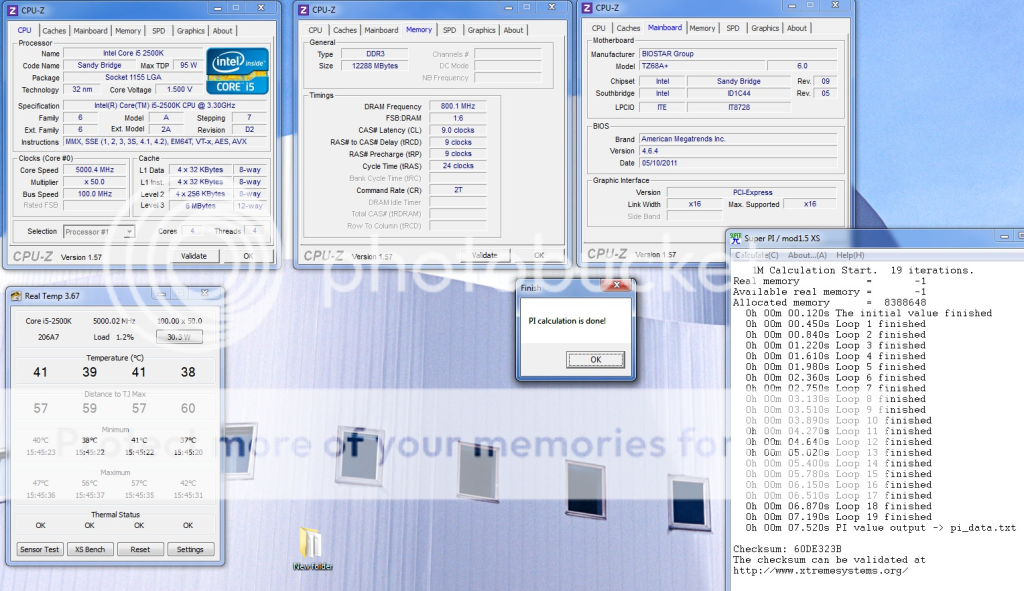
Captuire23.png
 
Last edited:
You may want to be careful running that kind of voltage through your 2500K. 32nm parts tend to degrade very quickly at high voltages.
 
I only had it at 1.5v for about 10 minutes tops and never put a full load on the processor other than super PI.
 
You really shouldnt need close to those volts for 4.2ghz on a 2500k.
It should easily do 4.2ghz in the 1.2xx volt range or less.
 
You really shouldnt need close to those volts for 4.2ghz on a 2500k.
It should easily do 4.2ghz in the 1.2xx volt range or less.


I have it running 4.2ghz @ 1.28v and it throttles back to under 1.00v at idle which is good enough for me. In the Winter ill kick it up to 4.5 @ 1.36 - 1.38v

This chip cannot do 4.2ghz under 1.28v... As soon as i go to 4.3ghz I get 0x124 BSOD, never did and never will.. it likes high volts it seems.
 
I have it running 4.2ghz @ 1.28v and it throttles back to under 1.00v at idle which is good enough for me. In the Winter ill kick it up to 4.5 @ 1.36 - 1.38v

This chip cannot do 4.2ghz under 1.28v... As soon as i go to 4.3ghz I get 0x124 BSOD, never did and never will.. it likes high volts it seems.
Well that sucks.
Anyway, its not like 4.2ghz isn't fast enough, that's plenty fast for anything nowadays.
 
Well that sucks.
Anyway, its not like 4.2ghz isn't fast enough, that's plenty fast for anything nowadays.

I can probably get 4.6 to 4.7 under 1.4v which is actually pretty average. The lower speeds like higher voltage which I find strange. The CPU behaves the same way with the old MSI P67 as with this new Biostar z68 one as well. If I had a better chip I would probably end up scaling it back to 4.2ghz for 24/7 use anyways... just would be at cooler load temps. Oh well. I managed to achieve 5ghz out of it and that is pretty good in my books. 🙂

On a side note, this board is quicker than my old MSI P67A-C43 (B3) according to superPI. And I can run tighter memory timings at lower voltage.
 
Last edited:
If that cpu did that to me, id run it at around 4.6ghz and dare it to die on me. LMAO


The funny thing is... I thought it was a great chip until I started seeing everyone else post their voltages. lol
 
I just got the same board. Newegg had the combo deal for a 2500k + the board for ~305 shipped. Hell of a deal! I was a little apprehensive of the board at first, but it turned out fine. I hit 4.0Ghz on stock cooling with around 1.23v. I set everything back to stock speeds until I get my Tuniq fitted tomorrow. Can't beat a z68 for ~100 bucks.
 
I just got the same board. Newegg had the combo deal for a 2500k + the board for ~305 shipped. Hell of a deal! I was a little apprehensive of the board at first, but it turned out fine. I hit 4.0Ghz on stock cooling with around 1.23v. I set everything back to stock speeds until I get my Tuniq fitted tomorrow. Can't beat a z68 for ~100 bucks.

Definitely a good deal and a great board for the price. Once I updated the bios it fixed all the bugs I had with the turbo settings and 'request Vcore'. I bet I could squeeze 5.2ghz out of this chip but I need water cooling. I have been using Biostar for all my builds the last 5 years and they are great solid boards.
 
The funny thing is... I thought it was a great chip until I started seeing everyone else post their voltages. lol

It could be any reason why other people are reporting lower voltages.

They may indeed have a CPU that can OC with lower voltages, and thus are posting here to essentially "brag" about it, while other people who can't OC as high or can't get as low voltages are not posting about how low voltage they are getting (or are whining about it).

They may have other settings like LLC enabled.

They may be using a motherboard that cost twice yours and with a gazillion power phases.

They may be using a PSU that cost four times yours, with near unmeasurable ripple.

They may be misreporting (yes, has happened :hmm: ).

Their software may be misreporting.

Their definition of "stable" may be different than yours (amazing how that works!).
 
It could be any reason why other people are reporting lower voltages.

They may indeed have a CPU that can OC with lower voltages, and thus are posting here to essentially "brag" about it, while other people who can't OC as high or can't get as low voltages are not posting about how low voltage they are getting (or are whining about it).

They may have other settings like LLC enabled.

They may be using a motherboard that cost twice yours and with a gazillion power phases.

They may be using a PSU that cost four times yours, with near unmeasurable ripple.

They may be misreporting (yes, has happened :hmm: ).

Their software may be misreporting.

Their definition of "stable" may be different than yours (amazing how that works!).


Very good point Zap. When I go into the BIOS i have my Vcore set to offset with LLC. In the Bios it reports 1.20v.
 
It could be any reason why other people are reporting lower voltages.

They may indeed have a CPU that can OC with lower voltages, and thus are posting here to essentially "brag" about it, while other people who can't OC as high or can't get as low voltages are not posting about how low voltage they are getting (or are whining about it).

They may have other settings like LLC enabled.

They may be using a motherboard that cost twice yours and with a gazillion power phases.

They may be using a PSU that cost four times yours, with near unmeasurable ripple.

They may be misreporting (yes, has happened :hmm: ).

Their software may be misreporting.

Their definition of "stable" may be different than yours (amazing how that works!).

I just got my new browser online had it up and running last week . Nice fast browser. But we have Faster PCs.

As I am typing This is what my pc is settup at

MSI Z68A-GD65
Intel 2500k O/Ced to 4.5 ghz. When it turbos for a short time it hits just at 5ghz.

Setting here idling at 40c 45ghz throttling back to 1.6ghz . Very neat. I left all the Ce and c states on and the spread spectrum. So its very decent O/C . Comes out of sleep state wonderfully. Benching Cineabeanch 64 bit gets to 70c . Cineabench 11.5 x86 64 bit Cpu score 7.14

Using Virtu in iMode along side a NV 560Ti

Using 1 SSD drive Intel 510 120G SataIII 6ghz. Now that Intel is releasing trim for Raid I will add the 1tb. Digital western Black SataIII

I have the ports settup for hotswap so just plug in .And either copy whats on the SSD or do a clean install. Likely a clean install . and than wipe the SSD clean and plug it in and setup SRT.

Cpu temp right now 40C
Vcore set at 3.800 running @ 1.368

Core 1 42c core2 41c core3 40c core4 38c

Cpu ratio X45

Base Clock MHz 100

CPU IO(v) .09500

cpu sa(v) .9300

Cpu pill 1.800 (v)

PCH 1.5(v) 1.0500

Dram timing

Command rate T1
tCL 9
tRCD 9
tRP 9
tRAS 24
tRFC 110

Rated memory Voltage 1.5 using 1.56

LG BD-ROM/DVD Rewriter.

Power Supply 850watt Black Widow.

Its a fast browser but its not fast fast. So yawn.
 
Last edited:
Very good point Zap. When I go into the BIOS i have my Vcore set to offset with LLC. In the Bios it reports 1.20v.
Taking into account what Zap posted. (because its true)

I can tell you most of us on here report the voltages at the desktop with the cpu under full load with prime 95 or other
.
And monitor the voltages with at least two programs like cpuz and whatever else they like.(i usually use what software that comes with my board to verify volatges in cpuid)
And usually go with whatever bios settings are needed to prevent large voltage fluctuations under load.

Yeah, you always have some that for some reason like everyone to think they have that "golden chip" that does 6ghz on stock air cooling and barely gets above idle temps, but those are usually pretty easy to spot and ignore.

Me personally, i have a 2600k not a 2500k.
I wasnt trying to state you must have a poor cpu.
(if that is what Zap was insinuating)
If so, that just comes down to text on a forum doesnt accurately convey what kind of a person someone is.
Of course I was actually just joking around when i said i'd run it at 4.6ghz and dare it to die.
Judging by your reply, im sure you knew that already. :biggrin:

I was just stating that after doing much research b4 buying my cpu, the majority of 2500k's i saw on here usually do 4.2ghz at around the 1.266/1.288 range.

Was just trying to help ya out there, certainly dont wanna see someone fry his hardware and your 1.50v caught my eye pretty quickly.
So i ended up reading your thread.

Anyway, like we said earlier, its not like 4.2ghz isnt more than fast enough already, anything after 4ghz is just icing on the cake nowadays.
 
Last edited:
Very good point Zap. When I go into the BIOS i have my Vcore set to offset with LLC. In the Bios it reports 1.20v.

I'm running prime stable at 4.2Ghz. I've noticed my board has substantial vcore drop when underload. It will drop a good .06v, so from something like 1.35 to 1.29. Do you mind posting your ONE screen settings to compare to mine?

Thanks a lot!
 
I'm running prime stable at 4.2Ghz. I've noticed my board has substantial vcore drop when underload. It will drop a good .06v, so from something like 1.35 to 1.29. Do you mind posting your ONE screen settings to compare to mine?

Thanks a lot!

Suby,

Mine goes from 1.27 to 1.32 depending on the load cycles of Prime. You are experiencing normal fluctuation based on the CPU's usage.


Ignore the other voltages, they are misreads.
w222.png
 
Last edited:
Taking into account what Zap posted. (because its true)

I can tell you most of us on here report the voltages at the desktop with the cpu under full load with prime 95 or other
.
And monitor the voltages with at least two programs like cpuz and whatever else they like.(i usually use what software that comes with my board to verify volatges in cpuid)
And usually go with whatever bios settings are needed to prevent large voltage fluctuations under load.

Yeah, you always have some that for some reason like everyone to think they have that "golden chip" that does 6ghz on stock air cooling and barely gets above idle temps, but those are usually pretty easy to spot and ignore.

Me personally, i have a 2600k not a 2500k.
I wasnt trying to state you must have a poor cpu.
(if that is what Zap was insinuating)
If so, that just comes down to text on a forum doesnt accurately convey what kind of a person someone is.
Of course I was actually just joking around when i said i'd run it at 4.6ghz and dare it to die.
Judging by your reply, im sure you knew that already. :biggrin:

I was just stating that after doing much research b4 buying my cpu, the majority of 2500k's i saw on here usually do 4.2ghz at around the 1.266/1.288 range.

Was just trying to help ya out there, certainly dont wanna see someone fry his hardware and your 1.50v caught my eye pretty quickly.
So i ended up reading your thread.

Anyway, like we said earlier, its not like 4.2ghz isnt more than fast enough already, anything after 4ghz is just icing on the cake nowadays.

Mtdew,

Just wanted to update you. I was able to get the chip to 4.3ghz at the stock voltage setting in the bios. It stays in the 1.28v range at this speed as well. Once I push it to the 4.4 it will BSOD with x0124.


Btw - I knew you were just kidding and Zap was being completely logical. I still like this chip and I will be dropping an IvyBridge chip when they are released anyways. 🙂
 
HI, I am very interested in getting this board, I currently already have two biostar systems in the house, one is a ta890 fxe, and the other (htpc) is running a a880g board. I like both of these boards, and I agree biostar is a great value for the money! HOwever, a couple of things that have bugged me,is on the 890fxe, the smart fan controls in the bios do not work. The fan on the hyper 212 basically spins full blast,and i am unable to control it even with speedfan under windows. Also on the a880g, if any of the voltage or bus speed settings are changed, or the system is overclocked, it will always fail to come back out of s3 standby no matter what. It is not a stability issue, even if you overlcock the bus speed by 1 mhz it will mess it up. I know most probably only care how high these will overclock, but I was wondering if you could test these two issues and let me know how yours does before I spring for one myself. thanks!
 
HI, I am very interested in getting this board, I currently already have two biostar systems in the house, one is a ta890 fxe, and the other (htpc) is running a a880g board. I like both of these boards, and I agree biostar is a great value for the money! HOwever, a couple of things that have bugged me,is on the 890fxe, the smart fan controls in the bios do not work. The fan on the hyper 212 basically spins full blast,and i am unable to control it even with speedfan under windows. Also on the a880g, if any of the voltage or bus speed settings are changed, or the system is overclocked, it will always fail to come back out of s3 standby no matter what. It is not a stability issue, even if you overlcock the bus speed by 1 mhz it will mess it up. I know most probably only care how high these will overclock, but I was wondering if you could test these two issues and let me know how yours does before I spring for one myself. thanks!

Sorry for the late response.

For the one time I used S3 standby, it worked until I disabled it. I was overclocked at 4.2ghz. My CM Hyper 212+ does not run at full blast. The fan runs at around 1000 RPMs at idle, and when the CPU goes over 55c it will spin up. The last 2 Biostar boards I had, the fan calibration worked just fine.
 
Nice! Thanks for the update. I am glad to hear that biostar has fixed some of their previous issues. The issues I spoke of were on my two amd boards, so maybe that is part of the difference also.
 
Anyone know if this thing will support Ivy Bridge? I know they're socket compatible, but I haven't heard anything about Z68 support.
 
I've got to say, Biostar make some fantastic products. Maybe not feature rich but still great for overclocking and stability. Such a shame they are rare here in Europe.
 
Back
Top