• We’re currently investigating an issue related to the forum theme and styling that is impacting page layout and visual formatting. The problem has been identified, and we are actively working on a resolution. There is no impact to user data or functionality, this is strictly a front-end display issue. We’ll post an update once the fix has been deployed. Thanks for your patience while we get this sorted.

Bios update appears to work but Abit IP35 Pro

Gerardjg

Senior member
I am trying to update the Bios on an older Abit IP 35 pro. I have the latest official Abit Bios v17 and awdflash from the Abit FTP site, I also have several other bios versions for the board. When I run award flash in DOS everything appears to work as it should the write was successful next the screen goes blank and nothing happens. Power and reset buttons do not work, The diagnostic screen reads C1, I turn off the power supply and reboot and everything works fine but I still have Bios V6. I have tried the update many times with the same results.

 
Thanks I will try the optimized. settings tonight. I have tried to clear the CMOS also I
Removed the battery for awhile before a flash attempt.
 
Does the board have a BIOS lock or protect jumper? You might have to move the jumper to a BIOS flash mode. I had the board and I remember something peculiar about it. I might be remembering wrong, though.
 
Pretty sure that motherboard did not have BIOS lock. I had that mobo, it was an excellent motherboard at the time, diagnostic LED, power/reset buttons directly on board, and bios reset switch on the back panel in case you pushed the board too far and it wouldn't boot - no more having to open the case to move the BIOS reset jumper - just flip the reset switch on the back. Perhaps you're thinking of that reset switch on the back panel?
 
I have tried all of the great suggestions but still have no bios update, I even tried using Abit uguru in windows which also showed as a successful write to v17 rebooted and i still have V6. I just ordered a new Bios Chip will update again when that arrives.
 
I have tried all of the great suggestions but still have no bios update, I even tried using Abit uguru in windows which also showed as a successful write to v17 rebooted and i still have V6. I just ordered a new Bios Chip will update again when that arrives.
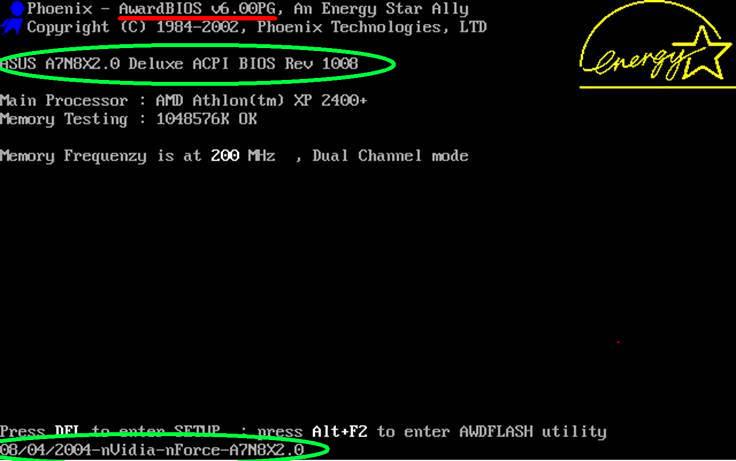
Use Windows system information (msinfo32.exe) to check the BIOS version and date. Sounds like you may be seeing "AwardBIOS V6" during POST, which is not the customized ROM version specific to the motherboard but rather the BIOS vendor's software used to produce it. e.g.

Here is an example/representative POST screen. The line in red indicates the AwardBIOS version used. The green circles are where you want to confirm your mobo BIOS ROM version:

award.jpg
 
Last edited:
Thank you TCSENTER, I am a little embarrassed you were right but CPU Z which I was using to determine the BIOS version and msinfo32 both show what it says on the top line of the starting bios screen V6.
 
Thank you TCSENTER, I am a little embarrassed you were right but CPU Z which I was using to determine the BIOS version and msinfo32 both show what it says on the top line of the starting bios screen V6.
Yep many of these older boards did not have the OEM BIOS string (sign-on) and ROM versioning in the right place when read or queried by software, causing this confusion.
 
Back
Top