• We’re currently investigating an issue related to the forum theme and styling that is impacting page layout and visual formatting. The problem has been identified, and we are actively working on a resolution. There is no impact to user data or functionality, this is strictly a front-end display issue. We’ll post an update once the fix has been deployed. Thanks for your patience while we get this sorted.

Asus UX31A (Zenbook Prime) cooling mods available?

Ahmaman

Junior Member
I got a Zenbook Prime (Ux31A - touch) laptop. Nice looks, but the design department at Asus failed miserably on cooling. I mean, if you design a product make shure efficient and sufficient cooling is also part of what you guarantee is reasonably OK. Well on this laptop, it is not. Already installed NotebookFanControl to override when the fan spins up. And yes this helps. But I still do not like the way this Intel i5-3337u processor's irratic heat-up behavior. And that nasty fan whirling every 5 minutes once cpu-heat reaches 60 degrees-Celsius.

Is it possible to modify/replace/upgrade cooling efficiency inside this laptop?

This is what it looks like inside the laptop:
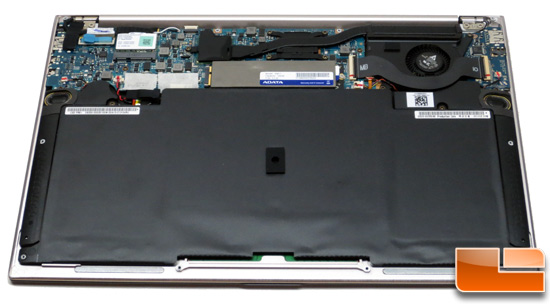
zenbook-back2.jpg


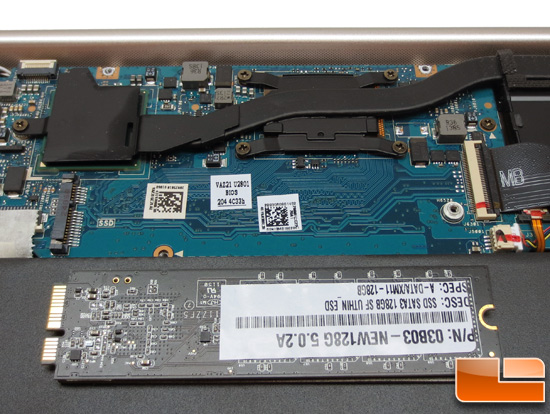
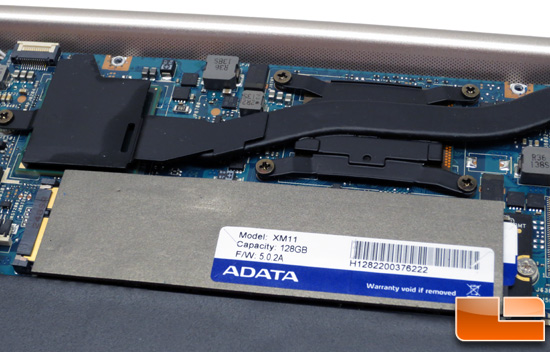
dram.jpg


zenbook-adata-ssd.jpg
 
Get Throttlestop and see how high you can turbo at sustained load.

Or alternatively, go into Windows power settings and set CPU maximum frequency below 100% so Turbo is off.
 
Not sure if it's worth the risk, but looks like you can pull out the heatsink and replace the stock silicone with a better one (say IC Diamond).

Edit: Do your research if you really want to do this. On some (perhaps most) models you could not simply wipe off the old silicone/thermal pad and repaste it.
 
Last edited:
Back
Top