• We’re currently investigating an issue related to the forum theme and styling that is impacting page layout and visual formatting. The problem has been identified, and we are actively working on a resolution. There is no impact to user data or functionality, this is strictly a front-end display issue. We’ll post an update once the fix has been deployed. Thanks for your patience while we get this sorted.

ASRock B85M-ITX won't boot

paperfist

Diamond Member
Hi,

I have an ASRock B85M-ITX board along with a Intel i5-4570T and GEIL DDR3 1866 2x8GB.

Computer won't boot. CPU fan spins up slow and then fast. The case fan spins slow. I'm replacing the MB/CPU from another system so not sure if the case fan used to spin that slow.

Anyway, I get no video on screen. A few times I saw some corruption on the screen for a split second.

The MB manual says it supports DDR3 up to 1600, so not sure if using 1866 is the issue?

The RAM was also in use from the previous build with no issues.

Any idea if it's a bad MB or CPU?

Thanks!
 
Last edited:
Well that was bizarre.

I went to try another monitor which had an HDMI hookup and noticed that on the back plate there was a metal tab bent in and touching the HDMI port. I bent it out, hooked up the monitor and it booted right up.

I hope I didn't fry anything 🙁

One last odd ball question. On the base of the Intel HSF it's round copper surface. The CPU is obviously square. Is the HSF supposed to be round like that?
 
One last odd ball question. On the base of the Intel HSF it's round copper surface. The CPU is obviously square. Is the HSF supposed to be round like that?

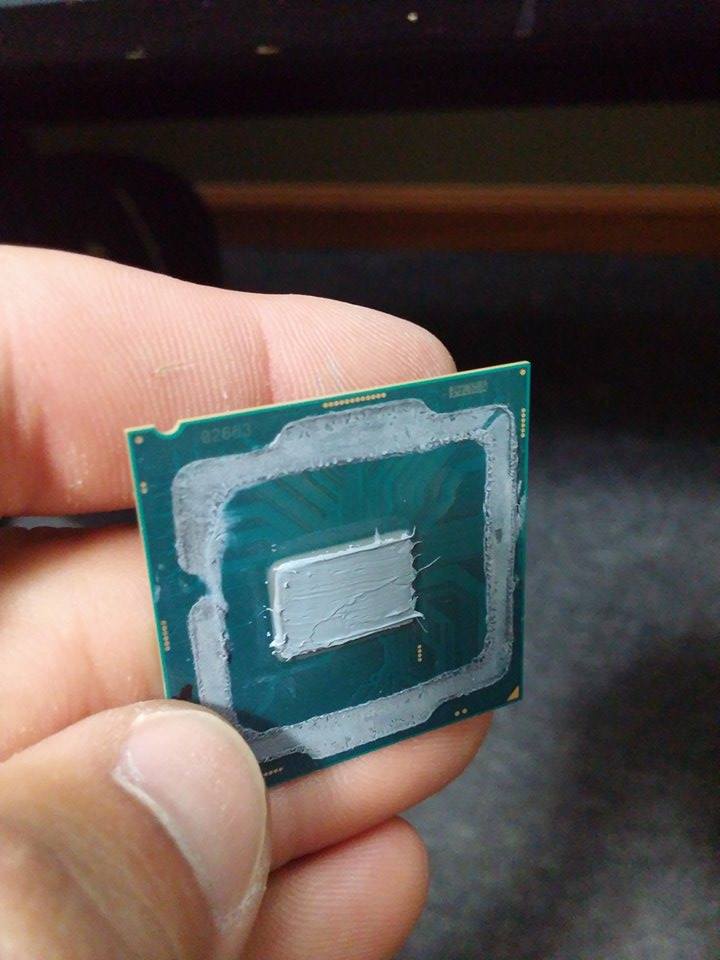
Yes, that's the standard Intel heatsink design that's been around for a few years now. All that matters is that it makes contact with the center of the heatspreader. That's where the cores are located, such as with this Skylake CPU:

900x900px-LL-885d2583_sqKpvCM.jpeg
 
Yes, that's the standard Intel heatsink design that's been around for a few years now. All that matters is that it makes contact with the center of the heatspreader. That's where the cores are located, such as with this Skylake CPU:


Cool thanks!

I haven't built a PC in a few years and just found it odd it wasn't a square to square contact.
 
I've had stuff like that trip me up before too. Good on you for getting it sorted out!

Thanks it was pure luck!

If the other monitor didn't already have HDMI hooked up I probably would still be swapping out RAM sticks, CPUs and pulling my hair out 😀
 
Back
Top