• We’re currently investigating an issue related to the forum theme and styling that is impacting page layout and visual formatting. The problem has been identified, and we are actively working on a resolution. There is no impact to user data or functionality, this is strictly a front-end display issue. We’ll post an update once the fix has been deployed. Thanks for your patience while we get this sorted.

Discussion Apple Silicon SoC thread

Page 480 - Seeking answers? Join the AnandTech community: where nearly half-a-million members share solutions and discuss the latest tech.

Eug

Lifer
M1
5 nm
Unified memory architecture - LP-DDR4
16 billion transistors

8-core CPU

4 high-performance cores
192 KB instruction cache
128 KB data cache
Shared 12 MB L2 cache

4 high-efficiency cores
128 KB instruction cache
64 KB data cache
Shared 4 MB L2 cache
(Apple claims the 4 high-effiency cores alone perform like a dual-core Intel MacBook Air)

8-core iGPU (but there is a 7-core variant, likely with one inactive core)
128 execution units
Up to 24576 concurrent threads
2.6 Teraflops
82 Gigatexels/s
41 gigapixels/s

16-core neural engine
Secure Enclave
USB 4

Products:
$999 ($899 edu) 13" MacBook Air (fanless) - 18 hour video playback battery life
$699 Mac mini (with fan)
$1299 ($1199 edu) 13" MacBook Pro (with fan) - 20 hour video playback battery life

Memory options 8 GB and 16 GB. No 32 GB option (unless you go Intel).

It should be noted that the M1 chip in these three Macs is the same (aside from GPU core number). Basically, Apple is taking the same approach which these chips as they do the iPhones and iPads. Just one SKU (excluding the X variants), which is the same across all iDevices (aside from maybe slight clock speed differences occasionally).

EDIT:

Screen-Shot-2021-10-18-at-1.20.47-PM.jpg

M1 Pro 8-core CPU (6+2), 14-core GPU
M1 Pro 10-core CPU (8+2), 14-core GPU
M1 Pro 10-core CPU (8+2), 16-core GPU
M1 Max 10-core CPU (8+2), 24-core GPU
M1 Max 10-core CPU (8+2), 32-core GPU

M1 Pro and M1 Max discussion here:


M1 Ultra discussion here:


M2 discussion here:


Second Generation 5 nm
Unified memory architecture - LPDDR5, up to 24 GB and 100 GB/s
20 billion transistors

8-core CPU

4 high-performance cores
192 KB instruction cache
128 KB data cache
Shared 16 MB L2 cache

4 high-efficiency cores
128 KB instruction cache
64 KB data cache
Shared 4 MB L2 cache

10-core iGPU (but there is an 8-core variant)
3.6 Teraflops

16-core neural engine
Secure Enclave
USB 4

Hardware acceleration for 8K h.264, h.264, ProRes

M3 Family discussion here:


M4 Family discussion here:


M5 Family discussion here:

 
Last edited:
As our test of the MacBook Pro with the M5 Max showed, the two core types are clocked at nearly the same speed, with a difference of only 228 MHz. We asked Apple whether this represents a departure from efficiency in Apple Silicon.
Do the super cores run at max frequency in all-core load scenarios?

In previous M chips, the Super cores (formerly P-cores) clocked 10% lower in all core loads.

“With the earlier Ultra chips, we connected two identical SoCs to form a larger SoC. Now, we’ve actually split a number of functions across two different dies. They are not mirror images of each other—we’ve integrated distinct IP blocks into each.”
Do we know yet what IP blocks are in each die?
 
Ah, the old fall back argument: It doesn’t count because it’s a bloated program.

Chrome is the number 1 browser in the world overall, and the number 2 browser on macOS. Chrome is also the best supported browser for stuff like some banking / tax / shopping sites, even on Macs.
Chrome also trades memory for performance which backfires when you have too little RAM. That's not an inherent property - see Safari. Chrome is simply the wrong tool for that situation, by their own decisions. There are tradeoffs in all sorts of things - if you are unwilling to recognize where you are resource poor and resource rich, and choose accordingly, then you're just a fool. Why you would make a $599 computer a dependency on a free piece of software and not the other way around is beyond me. I've never once seen a video or print review 'the best computer to pick to run Chrome'. Nobody does that.
 
Chrome also trades memory for performance which backfires when you have too little RAM. That's not an inherent property - see Safari. Chrome is simply the wrong tool for that situation, by their own decisions. There are tradeoffs in all sorts of things - if you are unwilling to recognize where you are resource poor and resource rich, and choose accordingly, then you're just a fool. Why you would make a $599 computer a dependency on a free piece of software and not the other way around is beyond me. I've never once seen a video or print review 'the best computer to pick to run Chrome'. Nobody does that.
That’s just a poor argument. The fact is, Chrome is the most popular browser in the world, including by the target market of the MacBook Neo. So many tech geeks claim most of this Neo crowd doesn’t understand what RAM is but now you’re arguing they should know the RAM utilization characteristics of specific apps like Chrome before deciding which apps to use, which is simply ridiculous in that context.

I will tell you the first application I install on all Macs is Chrome, even on 8 GB models (despite the RAM requirements), because Chrome hands down has the best website support. In fact, my decidely non-techie wife refuses to run Safari now because she ran into compatibility problems on various sites with Safari that were fixed simply by switching to Chrome. Furthermore my kids run Chrome exclusively because their school will only support Chrome for their web apps. Thus, it's bizarre to claim they are using the wrong tool by using Chrome.

The slowdowns with Chrome one can encounter with low RAM machines are actually not a deal killer for much of this crowd, but it’s nonetheless very good info to have when making a purchase decision, especially if they’re considering purchasing the higher cost 512 GB model vs an entry level MacBook Air. And yes, that review video I linked indeed is implying the Neo isn’t the greatest choice if you want to use Chrome, and that a 12 GB model would likely be a significant improvement.
 
Last edited:
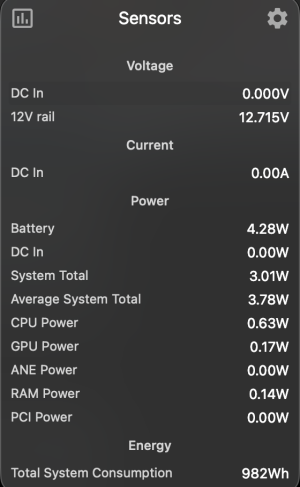
So I was curious what my M4 Mini power draw was in CB26 multi-thread, and it hovered around 22W but scored only 3437. The interesting part is that I used Mx Power Gadget to monitor. I noticed that it uses some p-core even when nothing is happening, so its siphoning off performance (some comments on Vadym's (Max Tech) Twitter brought me awareness on that), and I replicated it. Without running Mx Power Gadget I was basically at what I did before.. 3857 (first-ever run was 3865, so margin of error). Only thing is is I can't tell what the power draw is there, I'm guessing a few more watts.

Edit: In Terminal I ran powermetrics, and it pretty much hovered between 21-22W and was at the same score; so no effect on power draw by getting that higher score.

Mx Power Gadget needs a fix! But more so on the resource usage side. It does seem to report the power draw more or less similar, perhaps a tiny bit higher than powermetrics.
 
Last edited:
Neo $8 thermal pad mod test:


Cinebench 2026 scores:
1556 - Stock Neo
1482 - Bottom removed
1670 - Bottom removed and fan blowing on it
1705 - Thermal pad mod and bottom reinstalled. That's about a 10% performance increase over stock.

Stock Neo SoC throttles from >12 Watts to ~9 Watts
Thermal pad Neo SoC throttles from >12 Watts to >10 Watts, but usually >11 Watts

Bottom of chassis of Neo with thermal pad warms a bit more, but never becomes uncomfortable.
 
So I was curious what my M4 Mini power draw was in CB26 multi-thread, and it hovered around 22W but scored only 3437. The interesting part is that I used Mx Power Gadget to monitor. I noticed that it uses some p-core even when nothing is happening, so its siphoning off performance (some comments on Vadym's (Max Tech) Twitter brought me awareness on that), and I replicated it. Without running Mx Power Gadget I was basically at what I did before.. 3857 (first-ever run was 3865, so margin of error). Only thing is is I can't tell what the power draw is there, I'm guessing a few more watts.

Edit: In Terminal I ran powermetrics, and it pretty much hovered between 21-22W and was at the same score; so no effect on power draw by getting that higher score.

Mx Power Gadget needs a fix! But more so on the resource usage side. It does seem to report the power draw more or less similar, perhaps a tiny bit higher than powermetrics.
use this app

 
Chrome also trades memory for performance which backfires when you have too little RAM. That's not an inherent property - see Safari. Chrome is simply the wrong tool for that situation, by their own decisions. There are tradeoffs in all sorts of things - if you are unwilling to recognize where you are resource poor and resource rich, and choose accordingly, then you're just a fool. Why you would make a $599 computer a dependency on a free piece of software and not the other way around is beyond me. I've never once seen a video or print review 'the best computer to pick to run Chrome'. Nobody does that.

There's also the question of whether Neo buyers would use Chrome. I honestly don't know.
There's the argument that Safari is already there, and they're just going to open that when they need "internet".
And there's the argument that someone is going to tell them "just use Chrome, it's more compatible/what you're used to from Windows" and they will do as told.

I've no idea how this will play out among Neo users, though it's certainly an easy fix (and maybe even a win for Apple) to have them spread the word, via Apple Stores (and who knows, maybe even an ad) that "Safari works better than Chrome -- look at this example".
 
I’d be curious to know which websites are broken on other browsers but not Chrome. I use Brave which is based on Chromium but has way more privacy features and I haven’t seen many issue even with Shields up.
 
I’d be curious to know which websites are broken on other browsers but not Chrome. I use Brave which is based on Chromium but has way more privacy features and I haven’t seen many issue even with Shields up.
Not sure about other browsers (besides Chrome) but Safari is for example broken on the Revenue Canada (Canadian income tax) website and a workplace pension plan website. The pension plan website issue was particularly insidious because it looked completely normal, except that entire sub-sections were just completely missing. The navigation menu in a column on the left of the screen was formatted correctly and appeared normal on Safari but some of the options just were not there. It took us half an hour on the phone with customer service to figure this out BTW because it didn’t actually look broken.
 
I’d be curious to know which websites are broken on other browsers but not Chrome. I use Brave which is based on Chromium but has way more privacy features and I haven’t seen many issue even with Shields up.
When I was working I did a lot of data science visualization - lots of client side JS and the like. I supported Chrome and Safari (none of the MS browsers since they were constantly busted) - Chrome so I could support Windows users, and Safari for iPad/iPhone users, which I had a lot of. Also pretty even split of Mac/Windows. Which was faster for JS went back and forth depending on version. Standards support also went back and forth, but Safari usually rendered a bit more accurately. I did functional testing via headless Chromium.

My normal setup was Safari as my default (Google Drive, etc.) and Chrome for testing as I did a lot of restarting and version changing, but also kind of the workflow around it - pulling data sources, stack overflow, documentation and the like. I think twice I found websites that didn't support Safari in like 10 years. It was pretty common pre-iPhone when IE was the primary target for websites, but with iPhone and Chrome taking over, it almost entirely went away. And decent chance those two were because I forgot to disable one of Safari's privacy options like blocking pop-ups. Since I've retired I've never once opened Chrome. I mean, if you don't support iPhone users, you're not getting very far, and basically none of them run Chrome.
 
Not sure about other browsers (besides Chrome) but Safari is for example broken on the Revenue Canada (Canadian income tax) website and a workplace pension plan website. The pension plan website issue was particularly insidious because it looked completely normal, except that entire sub-sections were just completely missing. The navigation menu in a column on the left of the screen was formatted correctly and appeared normal on Safari but some of the options just were not there. It took us half an hour on the phone with customer service to figure this out BTW because it didn’t actually look broken.
Revenue Canada says that Safari is a supported browser.
 
Back
Top