Question Anyone have a Corsair CW 9060021 WW (H100i GTX) AIO

paperfist

Diamond Member
Nov 30, 2000
6,539
287
126
www.the-teh.com

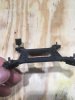
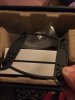
I bought it used from here about a year ago and never used it. I just bought all new parts for a new computer and the CPU is a i7-9700k so I figured I'd use this cooler. The cooler is supposed to work on 1151 sockets, but when I go to attach it to the CPU the stand off screws are a little bit below the mounting bracket and I can't thread the thumbscrews.

I don't really want to press down on it and have something crack. I'm just not sure if I have the wrong screws or I'm just overlooking something.
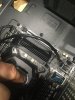
9045F924-EB10-4F22-8538-A34CD34C7974.jpeg
 
Last edited:

aigomorla

CPU, Cases&Cooling Mod PC Gaming Mod Elite Member
Super Moderator
Sep 28, 2005
21,118
3,644
126
those standoff threads are to shallow.

going from pictures, the thumbscrew should thread on without needing you to apply any pressure to the sink.
 
  • Like
Reactions: paperfist

paperfist

Diamond Member
Nov 30, 2000
6,539
287
126
www.the-teh.com
those standoff threads are to shallow.

going from pictures, the thumbscrew should thread on without needing you to apply any pressure to the sink.

Thanks! I figured as much, but wasn't sure since I've never used a AIO and haven't worked on such a newer system.

I'm going to try to shim up the standoffs with nylon washers. I will also contact Corsair to see if they offer anything.
 

Meghan54

Lifer
Oct 18, 2009
11,684
5,228
136
There are actually two sets of those stand offs for that cooler.......you can see here what the mount kit for that cooler should include......(if indeed this kit is for the H100 GTX....I think it is)
 
  • Like
Reactions: paperfist

paperfist

Diamond Member
Nov 30, 2000
6,539
287
126
www.the-teh.com
There are actually two sets of those stand offs for that cooler.......you can see here what the mount kit for that cooler should include......(if indeed this kit is for the H100 GTX....I think it is)

I saw those in the install document and watched a youtube install video and it was the same. I guess I got the wrong parts as I have that bracket on the right, but it mine has threaded nipples on them that poke through the MB and what looks like thumb screws that secure the AIO head to the CPU.

IMG_6647.JPG

What I have looks more like this:

 
Feb 4, 2009
35,862
17,406
136
I have an h115 Pro which is a similar unit. Mine came with Intel stand offs & AMD standoffs. One was shorter than the other.
I used the AMD standoffs, I can locate the Intel standoffs and mail them to you if needed.
I don’t think I threw them out but I’m not sure. Let me know If you need them.

Also the install instructions are sort of difficult to picture how it fits together. I needed to watch a couple of install videos, much more helpful than the pictures included
Finally tip for when you have it working.the pump & fans will work without corsairs icue software, however on my machine the pump & fans were running at the default quiet speed. Very quiet but doesn’t cool that well. I needed to load the icue software and set the fans to extreme and pump to balanced. Not too noisy for me and cools much better. Using icue to set the pump & fan speeds is different than expected. You need to select fan 1 then click on a profile (I chose extreme), then repeat for fan 2, then repeat for pump. Changing the speeds is a two click thing. Select the component, then select the profile. Very easy to miss or screw it up by accident.
 

paperfist

Diamond Member
Nov 30, 2000
6,539
287
126
www.the-teh.com
I have an h115 Pro which is a similar unit. Mine came with Intel stand offs & AMD standoffs. One was shorter than the other.
I used the AMD standoffs, I can locate the Intel standoffs and mail them to you if needed.
I don’t think I threw them out but I’m not sure. Let me know If you need them.

Also the install instructions are sort of difficult to picture how it fits together. I needed to watch a couple of install videos, much more helpful than the pictures included
Finally tip for when you have it working.the pump & fans will work without corsairs icue software, however on my machine the pump & fans were running at the default quiet speed. Very quiet but doesn’t cool that well. I needed to load the icue software and set the fans to extreme and pump to balanced. Not too noisy for me and cools much better. Using icue to set the pump & fan speeds is different than expected. You need to select fan 1 then click on a profile (I chose extreme), then repeat for fan 2, then repeat for pump. Changing the speeds is a two click thing. Select the component, then select the profile. Very easy to miss or screw it up by accident.

Thanks for the offer Fanatical, that's very nice of you! Corsair finally got back to me with a sort of odd answer. They said I probably need that kit that Meghan linked me to. I think even if you sent me your stand offs I wouldn't be able to use them as my back plate has standoffs with a squared bottom that go into a retainer so there would be nothing for me to screw them into. I guess I'll buy that bracket and hope for the best.

Thanks for the tip. So the only way to adjust fan speed is with the software? I hooked mine up to my old computer to see if it leaked before moving to the new one and it was loud as heck. It wasn't attached to the CPU so not sure if that made a difference.
 
Feb 4, 2009
35,862
17,406
136
Thanks for the offer Fanatical, that's very nice of you! Corsair finally got back to me with a sort of odd answer. They said I probably need that kit that Meghan linked me to. I think even if you sent me your stand offs I wouldn't be able to use them as my back plate has standoffs with a squared bottom that go into a retainer so there would be nothing for me to screw them into. I guess I'll buy that bracket and hope for the best.

Thanks for the tip. So the only way to adjust fan speed is with the software? I hooked mine up to my old computer to see if it leaked before moving to the new one and it was loud as heck. It wasn't attached to the CPU so not sure if that made a difference.

Couldn’t adjust my pump speed with the asrock stuff so I didn’t pursue it any further.
The icue software is fine and even makes sense how to use it once you realize everything is a 2 click type thing
 
Feb 4, 2009
35,862
17,406
136
Thanks for the offer Fanatical, that's very nice of you! Corsair finally got back to me with a sort of odd answer. They said I probably need that kit that Meghan linked me to. I think even if you sent me your stand offs I wouldn't be able to use them as my back plate has standoffs with a squared bottom that go into a retainer so there would be nothing for me to screw them into. I guess I'll buy that bracket and hope for the best.

Thanks for the tip. So the only way to adjust fan speed is with the software? I hooked mine up to my old computer to see if it leaked before moving to the new one and it was loud as heck. It wasn't attached to the CPU so not sure if that made a difference.

This piece?

547F3848-DD66-4853-A636-F151F85155FE.jpeg
 

paperfist

Diamond Member
Nov 30, 2000
6,539
287
126
www.the-teh.com
Couldn’t adjust my pump speed with the asrock stuff so I didn’t pursue it any further.
The icue software is fine and even makes sense how to use it once you realize everything is a 2 click type thing

Yeah I never used a AIO before so I just assumed you’d want it on full blast. I ordered a couple of Nocturna fans for it anyway. Sounds like I’ll just install the software since it’s straight forward.


No, it looks like the one I need is more square shaped and metal assuming that one is plastic.
 
Feb 4, 2009
35,862
17,406
136
Yeah I never used a AIO before so I just assumed you’d want it on full blast. I ordered a couple of Nocturna fans for it anyway. Sounds like I’ll just install the software since it’s straight forward.


No, it looks like the one I need is more square shaped and metal assuming that one is plastic.

Yeah it is plastic.
My pump on extreme is kind of loud, hard to explain because it is a pump not a fan.
I keep the pump on balanced. Cools nearly as good as extreme but much less noise.

Regarding pump noise even when it is loud it isn’t bad to my ears, sounds more like a rumble than a whine.
 
  • Like
Reactions: paperfist

paperfist

Diamond Member
Nov 30, 2000
6,539
287
126
www.the-teh.com
Yeah it is plastic.
My pump on extreme is kind of loud, hard to explain because it is a pump not a fan.
I keep the pump on balanced. Cools nearly as good as extreme but much less noise.

Regarding pump noise even when it is loud it isn’t bad to my ears, sounds more like a rumble than a whine.

Cool thanks for the help. I ordered the kit and new fans, hopefully it’s the right mount cause I’ve been sitting in new hardware for a month without using it lol.

How do you have it setup in your case, blow in or out, fans push or pull?
 
Feb 4, 2009
35,862
17,406
136
Cool thanks for the help. I ordered the kit and new fans, hopefully it’s the right mount cause I’ve been sitting in new hardware for a month without using it lol.

How do you have it setup in your case, blow in or out, fans push or pull?

Radiator mounted on front fans behind it pulling air in.
Don’t stress too much on the set up, I’ve read multiple test that fresh air heading in is the best setup but the difference is marginal. Like 2 degrees C.
 
  • Like
Reactions: paperfist

paperfist

Diamond Member
Nov 30, 2000
6,539
287
126
www.the-teh.com
Radiator mounted on front fans behind it pulling air in.
Don’t stress too much on the set up, I’ve read multiple test that fresh air heading in is the best setup but the difference is marginal. Like 2 degrees C.

lol now you tell me :D I stared at the case for days thinking oh if I just trim this I could put the rad here and it won't interfere with the air intake for the GPU or if I put a divider here I can keep air flows separate.

All for naught anyway, got the new bracket and same results. I'm gonna look at more videos, but it seems pretty simple: install back plate, install standoffs on other side, screw down CPU bracket and done. Only I still can't screw down the CPU bracket unless I don't fully seat the stand offs to the back plate.
 

paperfist

Diamond Member
Nov 30, 2000
6,539
287
126
www.the-teh.com
Have you tried contacting Corsair directly with your problem? I know they're quite responsive to helping with problems, lost parts, etc.

Yes, they told me to buy the same kit as you. They are responsive but slow. They just emailed me to send as many varied angle pics as I can. I guess since it’s basically the MB sitting in the case with CPU seated ill just pull it from the case so I can get the best pics. It might give me a little insight too since nothing will be blocking me from seeing the cooler mounting to the CPU.