Anyone else getting a Samsung S25?

Page 2 - Seeking answers? Join the AnandTech community: where nearly half-a-million members share solutions and discuss the latest tech.

WelshBloke

Lifer
Jan 12, 2005
33,320
11,472
136
I have the S25 Ultra.
I didn't need to upgrade but I did anyway.

GB6:
How do you upload geekbench results (and 3Dmark ones) to your accounts? Neither geekbench nor 3Dmark mobile are giving me the options to log in.
I think I might be the only person on the web who admits to liking Samsung's software. Even if they add a lot of useless features most of them can be disabled, removed or ignored.
Im with you on that, but I think for me it's mostly familiarity. I am leaning heavily on the search function to find settings though.
Also I have to say I like the rounded corners.
I think the design bit that I'm most not keen on is the camera rings. I'm worried that when I have a skin in the phone rather than a case I'll end up catching it in my pocket and pulling one off!
 

gdansk

Diamond Member
Feb 8, 2011
4,685
7,924
136
How do you upload geekbench results (and 3Dmark ones) to your accounts? Neither geekbench nor 3Dmark mobile are giving me the options to log in.
For GB, I am logged in on their website. Then when I view a benchmark result online it automatically adds it to my account.
 
  • Like
Reactions: WelshBloke

spacejamz

Lifer
Mar 31, 2003
10,984
1,706
126
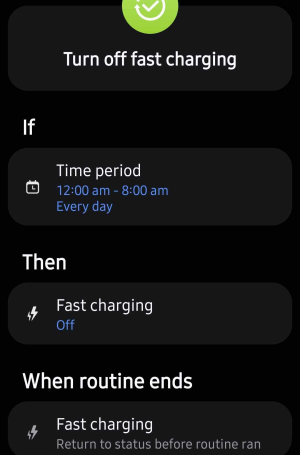
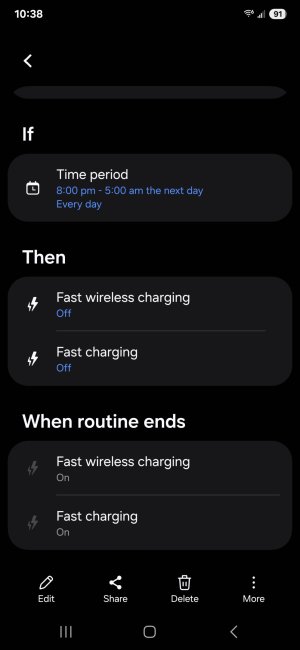
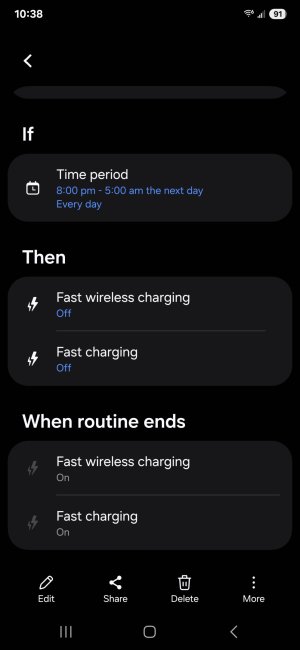
You're welcome! I had read this tip way back when I got my S22 Ultra and I'm so pleased with how it saved the battery. And the bonus of having the routine is fast charging is automatically on by default during the day just in case I need it. But I can't remember ever needing it except a couple times when traveling overseas or if I forgot to put it on the charger at night.
I was really amazed by how easy it was to set this up in the S25U...
1742314967304.png
 

WelshBloke

Lifer
Jan 12, 2005
33,320
11,472
136
For GB, I am logged in on their website. Then when I view a benchmark result online it automatically adds it to my account.
I suspect that it's something to do with my Firefox privacy settings then!

On a similar note this phones 3Dmark scores are ridiculous!
 
  • Like
Reactions: Amused

WelshBloke

Lifer
Jan 12, 2005
33,320
11,472
136
So a quick one UI 7 question.

On my old phone there was an option to change the navigation bar buttons to gestures where you just swiped up where the buttons used to be for those effects.
On the S25 it's the on screen buttons or a weird 'swipe up in the middle and fumble about' thing. Any way of getting the old gestures?
 

Amused

Elite Member
Apr 14, 2001
57,472
19,970
146
So a quick one UI 7 question.

On my old phone there was an option to change the navigation bar buttons to gestures where you just swiped up where the buttons used to be for those effects.
On the S25 it's the on screen buttons or a weird 'swipe up in the middle and fumble about' thing. Any way of getting the old gestures?

Settings > Display > Navigation bar and selecting "Swipe gestures"
 
  • Like
Reactions: WelshBloke

WelshBloke

Lifer
Jan 12, 2005
33,320
11,472
136
Settings > Display > Navigation bar and selecting "Swipe gestures"
I wanted the old version where its basically the same as the buttons but they are hidden and you swipe up where they were.

Good lock to the rescue! You open navstar>enable extra gesture settings then got back to the Settings > Display > Navigation bar and you can get the old style ones!
 
  • Like
Reactions: gdansk and Amused

WelshBloke

Lifer
Jan 12, 2005
33,320
11,472
136
So Gemini (which is the default assistant) can't set alarms!
Fortunately you can switch to the old Google assistant that still can. Finding the option for it was a bit like that bit in hitchhikers guide where he's told where the planning permissions for the new bypass are!
 

WelshBloke

Lifer
Jan 12, 2005
33,320
11,472
136
Anyone tried any magsafe accessories on these?
I've got a magsafe case from spigen and was thinking about an Anker magsafe battery pack.
 

manly

Lifer
Jan 25, 2000
13,436
4,153
136
I'm about to pickup a cheap case, probably a bad idea off of AliExpress. 🤣 Seems like most cheap cases on Amazon start at around $9; I remember it used to be ~ $5 before the pandemic.

The last phone case I bought was an OtterBox over two years ago, and it's held up incredibly well. (actually too well because the OEM S21+ cases I bought have never been opened.)


WelshBloke

Lifer
Jan 12, 2005
33,320
11,472
136
I'm about to pickup a cheap case, probably a bad idea off of AliExpress. 🤣 Seems like most cheap cases on Amazon start at around $9; I remember it used to be ~ $5 before the pandemic.

The last phone case I bought was an OtterBox over two years ago, and it's held up incredibly well. (actually too well because the OEM S21+ cases I bought have never been opened.)


I was going to say that spigen cases are nice quality and fairly cheap then I saw that they are a lot more expensive in the US than the UK!
 

manly

Lifer
Jan 25, 2000
13,436
4,153
136
I was going to say that spigen cases are nice quality and fairly cheap then I saw that they are a lot more expensive in the US than the UK!
Interesting, Spigen is based about 25 miles from me (they're south of Los Angeles).
 

Amused

Elite Member
Apr 14, 2001
57,472
19,970
146
Interesting, Spigen is based about 25 miles from me (they're south of Los Angeles).
I do use a Spigen Liquid Air case and swear by them.

16 bucks is cheap.


If you need the magfit this one is nice for 20:


manly

Lifer
Jan 25, 2000
13,436
4,153
136
I do use a Spigen Liquid Air case and swear by them.

16 bucks is cheap.


If you need the magfit this one is nice for 20:

Took your advice and snagged one to support a local company. Might be the most I've ever spent on a phone case lol.


Spigen Ultra Hybrid MagFit Designed for Galaxy S25 Case
 
  • Like
Reactions: Amused

WelshBloke

Lifer
Jan 12, 2005
33,320
11,472
136
My leather skin from dbrand arrived so im hoping that i won't need to use the case all the time now.
 

manly

Lifer
Jan 25, 2000
13,436
4,153
136
I bought a base model S25 back in February, but never even used it. At that time, the Spectrum Mobile deal was too good to pass on.
I finally am switching from the old S21 Plus, which has served me well.

Some impressions. Samsung Smart Switch worked well, better than the last time. I was able to exclude over 66,000 log files. Probably a bunch of crash dumps since 2014. I sort of feel Smart Switch is a little too easy; you just confirm the old unlock PIN and it's off to the races. I feel as if it should be slightly harder to clone a device (should they force a Samsung or Google login? Not sure.)

As it turns out, Smart Switch transferred everything from a device running One UI 8.0 to a new device that was running One UI 7.0. iPhoneOS does not allow such a downgrade restoration, presumably because app data could easily implode.

I don't know if I'm imagining things, but the old screen's colors look better? Did I forget to enable Samsung's inaccurate vibrancy? No, that's not it.
The old speaker definitely sounds better.
I seem to have lost fast charging, but maybe that's because I haven't been using a PPS charger.

Software updates are stupid. Since my S25 has never been used, it has to install each successive update one by one. Why couldn't it jump right to September's One UI 8.0 update, then apply the next two? The One UI update was nearly 4GB! IIRC Samsung never bothered to implement Android's dual OS slot architecture (until now). Storage I/O seems blazingly fast so the updates are going about as well as they can (they weren't that bad on the S21+). Over an hour later, all 8 updates are mercifully done.

The One UI 8.0 update did something mildly interesting. This phone came from Spectrum Mobile, and had the carrier branding. But I'm actually using T-Mobile service, and the new OS offered to de-brand Spectrum and replace it with T-Mobile. Naturally, I said OK.

Lastly, the S21+ is in pristine condition and feels great out of the case. I think I'm too chicken to use a new phone naked. I thought I would mind a lot that the S25 is smaller, but it doesn't seem to bother me. I prefer long upgrade cycles, so perhaps next time it'll be an S31+ or foldable.

What I may ultimately regret most is the base model has only 128GB of storage. :expressionless: Actually, I have a lot more storage free now than before; that was not expected. 66k log files is a lot of waste, but those should mainly be single cluster (64 KB on ext4?).

 

WelshBloke

Lifer
Jan 12, 2005
33,320
11,472
136
I bought a base model S25 back in February, but never even used it. At that time, the Spectrum Mobile deal was too good to pass on.
I finally am switching from the old S21 Plus, which has served me well.

Some impressions. Samsung Smart Switch worked well, better than the last time. I was able to exclude over 66,000 log files. Probably a bunch of crash dumps since 2014. I sort of feel Smart Switch is a little too easy; you just confirm the old unlock PIN and it's off to the races. I feel as if it should be slightly harder to clone a device (should they force a Samsung or Google login? Not sure.)

As it turns out, Smart Switch transferred everything from a device running One UI 8.0 to a new device that was running One UI 7.0. iPhoneOS does not allow such a downgrade restoration, presumably because app data could easily implode.

I don't know if I'm imagining things, but the old screen's colors look better? Did I forget to enable Samsung's inaccurate vibrancy? No, that's not it.
The old speaker definitely sounds better.
I seem to have lost fast charging, but maybe that's because I haven't been using a PPS charger.

Software updates are stupid. Since my S25 has never been used, it has to install each successive update one by one. Why couldn't it jump right to September's One UI 8.0 update, then apply the next two? The One UI update was nearly 4GB! IIRC Samsung never bothered to implement Android's dual OS slot architecture (until now). Storage I/O seems blazingly fast so the updates are going about as well as they can (they weren't that bad on the S21+). Over an hour later, all 8 updates are mercifully done.

The One UI 8.0 update did something mildly interesting. This phone came from Spectrum Mobile, and had the carrier branding. But I'm actually using T-Mobile service, and the new OS offered to de-brand Spectrum and replace it with T-Mobile. Naturally, I said OK.

Lastly, the S21+ is in pristine condition and feels great out of the case. I think I'm too chicken to use a new phone naked. I thought I would mind a lot that the S25 is smaller, but it doesn't seem to bother me. I prefer long upgrade cycles, so perhaps next time it'll be an S31+ or foldable.

What I may ultimately regret most is the base model has only 128GB of storage. :expressionless: Actually, I have a lot more storage free now than before; that was not expected. 66k log files is a lot of waste, but those should mainly be single cluster (64 KB on ext4?).

If you like using your phone without a case dbrand do a real leather skin that gives it some grip without it adding bulk. I just use a tan leather one of those and a tempered glass screen protector. The S25 is pretty light so that seems to protect it fine against the odd drop.
You'll be doing another big upgrade soon, the new oneui beta just came out!
 

manly

Lifer
Jan 25, 2000
13,436
4,153
136
If you like using your phone without a case dbrand do a real leather skin that gives it some grip without it adding bulk. I just use a tan leather one of those and a tempered glass screen protector. The S25 is pretty light so that seems to protect it fine against the odd drop.
You'll be doing another big upgrade soon, the new oneui beta just came out!
I'm pretty careful with my gadgets, but I'd never use a flagship device naked lol. The last time I used a naked phone was about 10 years ago: the Moto G.
But outside of the sturdy OtterBox case, the old S21+ feels spectacular to hold. It's minor, but the old side buttons also feel a little better than the S25's buttons.

Although I was quite pleased with Samsung Smart Switch, it wasn't seamless the way setting up a new iPhone is. A few bits don't get transferred over automagically. For example, last year Google Timeline (in Maps) went from in cloud before to on-device. So I had to manually backup and restore. Most apps seem to have lost whatever cached data keeps a session, so I have to login one by one for everything third-party. (Security-wise, this is probably a good thing.)

Viber data (messages and media) must be manually backed up (to GDrive), and then restored. (But Smart Switch knows how to copy WeChat's data over, which used to be done by WeChat itself. But I should verify it's all there...)

Oh yeah Smart Audiobook Player didn't keep its data. :expressionless: I manually copied the statistics.xml file over, and the reading stats are all there, but I don't care about that. What didn't make it over was titles that were marked as read (vs new or started).

The updates are pretty quick, so I don't mind a monthly drop. It just felt lame to have to do 8 updates in a row. In Windows parlance, a "rollup" update would have been a lot more efficient.

As expected, using a proper Samsung charger with PPS enabled "super fast charging." Finally, the fingerprint reader is impressively fast.

I guess I have one last question for the class. One UI can backup the phone to both Samsung Cloud and Google. Before, I had both enabled, but why? In the end, I used neither backup because Smart Switch worked well over a USB-C cable. Currently, it's backing up to Samsung Cloud but not to Google. The former has some options on what "items" to backup; the latter has just two broad categories: Photos & videos, or "Other device data." I'm all for redundant backups, but I'd rather not pay Google One for more storage.

All in all, an upgrade I should have done 9 months ago.