• We’re currently investigating an issue related to the forum theme and styling that is impacting page layout and visual formatting. The problem has been identified, and we are actively working on a resolution. There is no impact to user data or functionality, this is strictly a front-end display issue. We’ll post an update once the fix has been deployed. Thanks for your patience while we get this sorted.

*alive again* Cooler Master microATX case, $30 AC AR FS [Newegg, thru 7/29]

mechBgon

Super Moderator<br>Elite Member
Update: alive again with code CMEMX20J13, thanks Pariah! I can also remark that mine has been in use 24/7 since I got it, and still doesn't show dust at the bezel, maybe because the mesh is pretty free-flowing.

Zap mentioned a possible gotcha below: without a fifth slot at the bottom, you can't run a dual-slot card if your motherboard requires it to be at the bottom, such as my Gigabyte SLI setup. So gamers take note.


http://www.newegg.com/Product/Produc...82E16811119274

I got one of these today and I like it. $49.99 FS, 20% off with code HASCASE20, and there's a $10 rebate.

It's got a decent arrangement of space for a compact gaming rig... two HDDs, one optical and a 3.5" bay you could use for a card reader or a third HDD. It has multiple SSD mounting points, room for two 120mm fans in front (and a nice breathable bezel). The two stock 120s are pretty quiet. Construction feels great.

I wish it had two front USB 3.0 ports, not just one, and it takes six screws to get the HDD rack out for HDD installation, but that's the worst of my gripes.
 
Last edited:
What makes a good system build (psu/mb) for one of these (either amd or intel but below $350. Thinking of putting something together for my mom; her ancietn system is dying and it is too difficullt to diagnose remotely. Was thinking i3-3220 but she needs like 0 processing power - so amd a10 might work fine - thing is that the system needs to be 100% reliable (it can be slow; no 3d graphics but it has to be able to run 24/7 and never crash due to hardware issue).
 
Wow, really nice for the price. About the only thing it is "missing" to be an even higher end mATX rig is a 5th slot, so you can run dual graphics on those stupid Gigabyte boards that use slots 1 & 4.
 
Thanks mechBgon. I went ahead and bought one. Looks like a nice case for the price.
I'm starting a build for my 6yo son and this looks perfect.:thumbsup:
 
What makes a good system build (psu/mb) for one of these (either amd or intel but below $350. Thinking of putting something together for my mom; her ancietn system is dying and it is too difficullt to diagnose remotely. Was thinking i3-3220 but she needs like 0 processing power - so amd a10 might work fine - thing is that the system needs to be 100% reliable (it can be slow; no 3d graphics but it has to be able to run 24/7 and never crash due to hardware issue).

If the i3 is overkill, maybe an Ivy Bridge Pentium with integrated GPU. Ivy Bridge cores have a new variant of Data Execution Prevention called SMEP that Win8 can make use of. On the security note, Win8 is also packing some major security hardening under the hood, so I'd suggest Win8 and get StartIsBack for $3 to make it work like classic Windows if desired.

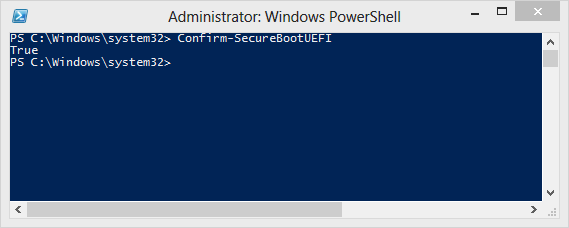
it's also worth the effort to enable Secure Boot in the BIOS, install the default Secure Boot keys in the BIOS, and make the boot options "UEFI Only", and do that before beginning Windows setup. If you've got it right, then you can run PowerShell with a right-click > Run As Administrator, and the command confirm-securebootUEFI should result in "True."

secureboot_check.PNG


SecureBoot staves off extremely nasty and stealthy bootkits. Worth getting it right when it's your Parental Unit at risk 😉

If you can hold out for a Haswell i3, they add another security doodad, SMAP.


Thanks mechBgon. I went ahead and bought one. Looks like a nice case for the price.
I'm starting a build for my 6yo son and this looks perfect.:thumbsup:

Sweet :biggrin: Gonna get him some LED fans? That'll make his friends oooh and ahh for sure!
 
Last edited:
Which processor # and which mb chipset are you suggesting. I believe her current system is a Intel Pentium 4 Processor 540 which is quite slow. I was thinking of using an old amd dual core 939 system i have but a small (phyiscal) systerm would be better. In fact I was thinking this litle box might be the perfect thing:

http://www.amazon.com/gp/product/B00...A3J2VUK9571N8X

--
Hum should I start my own thread elsehwere ?

If the i3 is overkill, maybe an Ivy Bridge Pentium with integrated GPU. Ivy Bridge cores have a new variant of Data Execution Prevention called SMEP that Win8 can make use of. On the security note, Win8 is also packing some major security hardening under the hood, so I'd suggest Win8 and get StartIsBack for $3 to make it work like classic Windows if desired.

it's also worth the effort to enable Secure Boot in the BIOS, install the default Secure Boot keys in the BIOS, and make the boot options "UEFI Only", and do that before beginning Windows setup. If you've got it right, then you can run PowerShell with a right-click > Run As Administrator, and the command confirm-securebootUEFI should result in "True."

secureboot_check.PNG


SecureBoot staves off extremely nasty and stealthy bootkits. Worth getting it right when it's your Parental Unit at risk 😉

If you can hold out for a Haswell i3, they add another security doodad, SMAP.


Sweet :biggrin: Gonna get him some LED fans? That'll make his friends oooh and ahh for sure!
 
Last edited:
Which processor # and which mb chipset are you suggesting. I believe her current system is a Intel Pentium 4 Processor 540 which is quite slow. I was thinking of using an old amd dual core 939 system i have but a small (phyiscal) systerm would be better. In fact I was thinking this litle box might be the perfect thing:

http://www.amazon.com/gp/product/B00...A3J2VUK9571N8X

--
Hum should I start my own thread elsehwere ?

For the processor, if the i3 is overkill, I was thinking the Pentium G2020, which has the Ivy Bridge core and Intel HD graphics. For the mobo, there are tons of Socket 1155 boards with UEFI bioses. In my last build (in this chassis) I went with an Asus H77 board that had SecureBoot support already available in the BIOS (on some of Gigabyte's models you must use the latest Beta bios to get SecureBoot).
 
Yea looking up the G2020 it should be more than fast enough. It is 2/3 of an I3 and 4x pentium 520.
 
Thanks again mechBgon. I liked this case so much when I unpacked it that I moved my setup out of my cheap and ugly Rosewill case to this one.:sneaky:
I will have to keep an eye out for another nice case for my sons build.hehe

It really is a nice case for the price. It fit my SSD and two HDD's no problem plus I have an aftermarket cooler that cleared without issue. Cable management was nice to. Overall I'm really impressed.:thumbsup:
 
Thanks again mechBgon. I liked this case so much when I unpacked it that I moved my setup out of my cheap and ugly Rosewill case to this one.:sneaky:
I will have to keep an eye out for another nice case for my sons build.hehe

It really is a nice case for the price. It fit my SSD and two HDD's no problem plus I have an aftermarket cooler that cleared without issue. Cable management was nice to. Overall I'm really impressed.:thumbsup:

Glad you liked it 🙂 I'd consider one for my home gamer rig too, except I do have one of the Gigabyte mATX mobos with a video-card slot at the bottom, and I do have SLI, so the bottom video card wouldn't fit (being a dual-slot card).
 
Thanks again mechBgon. I liked this case so much when I unpacked it that I moved my setup out of my cheap and ugly Rosewill case to this one.:sneaky:
I will have to keep an eye out for another nice case for my sons build.hehe

I hear that there's a cheap and ugly Rosewill case looking for a new home. 😉
 
This deal is alive again with a new code:

CMEMX20J13

I bought one when this was first posted for a build for a friend. The case is phenomenal for $30. Plenty of space for components, especially if you remove the hard drive cage and 3.5" external bay. Plenty of holes in the mb tray and space behind it for cable management. It's very light and still feels solid and the included fans are pretty quiet.
 
This deal is alive again with a new code:

CMEMX20J13

I bought one when this was first posted for a build for a friend. The case is phenomenal for $30. Plenty of space for components, especially if you remove the hard drive cage and 3.5" external bay. Plenty of holes in the mb tray and space behind it for cable management. It's very light and still feels solid and the included fans are pretty quiet.

Cool, I'll update the original post. Thanks Pariah 🙂
 
Back
Top