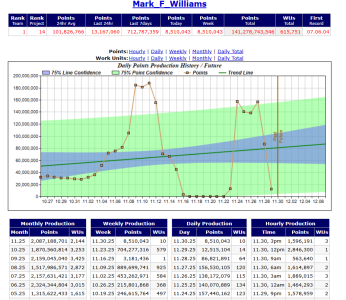
After months, I just tried Folding@Home, and it's desolate. [poor Internet uplink at home]

Page 3 - Seeking answers? Join the AnandTech community: where nearly half-a-million members share solutions and discuss the latest tech.

Markfw

Moderator Emeritus, Elite Member
May 16, 2002
27,360
16,193
136
not sure what you mean by desolate. I have gone way down in my points to do trying to dave money, but it looks fine to me:
1764537585909.png
 

StefanR5R

Elite Member
Dec 10, 2016
6,794
10,831
136
Do you still have to use wondershaper?
Maybe, maybe not.

Earlier today I tested https://speed.cloudflare.com/ first without wondershaper, and it gave much better values than those I showed in post #9. The summary said "Video Streaming: Good • Online Gaming: Average • Video Chatting: Good", I think. (I did this on a PC with OpenSuse Linux though, not on one of my F@H computers which have Linux Mint.) Then I enabled wondershaper, and that gave even lower latencies and jitter and was summarized as "Video Streaming: Great • Online Gaming: Great • Video Chatting: Great".

I'll have yet to try F@H.

Edit:
I also visited the cable modem's diagnostic pages now.
https://192.168.100.1/RgConnect.asp shows quite many correctable errors, like before the damage+repair. I don't know if the error rate is the same or lower now. There are no uncorrectable errors.
https://192.168.100.1/RgEventLog.asp doesn't show any connection loss (with or without automatic reconnection) for the entire three days since the cable was repaired. Which is good and seems better than before.
 
Last edited:
  • Like
Reactions: TennesseeTony

Skillz

Golden Member
Feb 14, 2014
1,214
1,218
136
Correctable errors are bad, but not that bad. Its the uncorrectable ones that do the most damage.

One thing that can cause errors like that is from bad cable or too many splitters. Also if you have any exposed splitters or lines that don't have terminators covering them can cause it as well.
Though I would think the likely reason, being that you live in an apartment type complex is that their are too many splitters on your line causing errors.

What do the power numbers look like and the SNR? Too much power (using amps on the line) or not enough power (usually from the line being too long or split too many times) can cause errors also.

Screenshot for you to reference off of from my own cable modem with good power, good SNR and no errors.

1764544511431.png
 

StefanR5R

Elite Member
Dec 10, 2016
6,794
10,831
136
My Pwr and SNR values are lower, but still acceptable according to this page:
speedguide.net: What cable modem signal levels are considered good?

Downstream Bonded Channels
ChannelLock StatusModulationChannel IDFrequencyPowerSNRCorrectablesUncorrectables
1LockedQAM256714000000 Hz2.3 dBmV39.7 dB141720
2LockedQAM256618000000 Hz2.5 dBmV40.2 dB76470
3LockedQAM256650000000 Hz2.3 dBmV40.1 dB47630
4LockedQAM256658000000 Hz2.9 dBmV40.1 dB37170
5LockedQAM256674000000 Hz3.4 dBmV38.6 dB90240
6LockedQAM256682000000 Hz2.8 dBmV39.9 dB96240
7LockedQAM256690000000 Hz2.1 dBmV39.8 dB107010
8LockedQAM256698000000 Hz2.7 dBmV39.8 dB110090
9LockedQAM256626000000 Hz3.2 dBmV40.2 dB70920
10LockedQAM256634000000 Hz3.1 dBmV40.2 dB64090
11LockedQAM256642000000 Hz2.9 dBmV40.1 dB63380
12LockedQAM256666000000 Hz3.5 dBmV40.1 dB44790
13LockedQAM256746000000 Hz3.3 dBmV39.5 dB135610
14LockedQAM256754000000 Hz3.2 dBmV39.4 dB130240
15LockedQAM256762000000 Hz3.3 dBmV39.3 dB115340
16LockedQAM256770000000 Hz3.2 dBmV39.3 dB99120

Upstream Bonded Channels
ChannelLock StatusUS Channel TypeChannel IDSymbol RateFrequencyPower
1ATDMA5120 Ksym/sec35400000 Hz44.8 dBmV
2ATDMA5120 Ksym/sec41800000 Hz44.5 dBmV
3ATDMA5120 Ksym/sec48200000 Hz44.8 dBmV
4ATDMA5120 Ksym/sec61000000 Hz44.8 dBmV
 

Skillz

Golden Member
Feb 14, 2014
1,214
1,218
136
I dont think that amount of correctable errors is a cause for any kind of concern. It looks like a lot, but I don't think it actually is a lot.
 

StefanR5R

Elite Member
Dec 10, 2016
6,794
10,831
136
Yes, I am guessing that the cause for transfer failures of large F@H/BOINC result files is (or has been) bad TCP/IP packet queuing by the cable modem-router or a router at the ISP, coupled with upstream routers of 3rd parties eventually not tolerating the huge latencies when the routes are respectively long.

Physical layer problems or maybe just plain overbooking manifested as my other problem: Actual connection losses between cable modem and whatever sits upstream, which sometimes didn't happen for months and sometimes happened several times a day especially on weekends — most of the time followed by automatic reconnect, sometimes (generally at most inconvenient times) followed by the modem just doing nothing about it until I reset it.

Anyhow. Now that the required ducts have been laid in our street, I hope that fiber is threaded in sooner than later, and that the apartments in our house finally get FTTH...