• We’re currently investigating an issue related to the forum theme and styling that is impacting page layout and visual formatting. The problem has been identified, and we are actively working on a resolution. There is no impact to user data or functionality, this is strictly a front-end display issue. We’ll post an update once the fix has been deployed. Thanks for your patience while we get this sorted.

Question 9900K 5.4 ghz question

icyulkn

Member
I was able to get my 9900k to a stable 5.3 GHZ @ 86 C on RealBench with an Auros Master, which makes me think I have some room to spare for 5.4 GHZ. I'm able to do daily tasks and gaming without interruption with the below @ 5.4

My settings are:
CPU v.core 1.430
vcore calibration @ UltraExtreme (Last out of 8 in hierarchy)
hyperthreading off
CPU internal ac/dc load line to Performance
Enhanced Multi-Core Performance On

I have run both InterBurn and RealBench in 5.4 but they freeze along with my mouse cursor in the beginning for about 7-10 seconds and then goes to blue screen. I have upped the voltage numerous times but mainly get the screen freeze. What am I missing to get this baby stable?
 
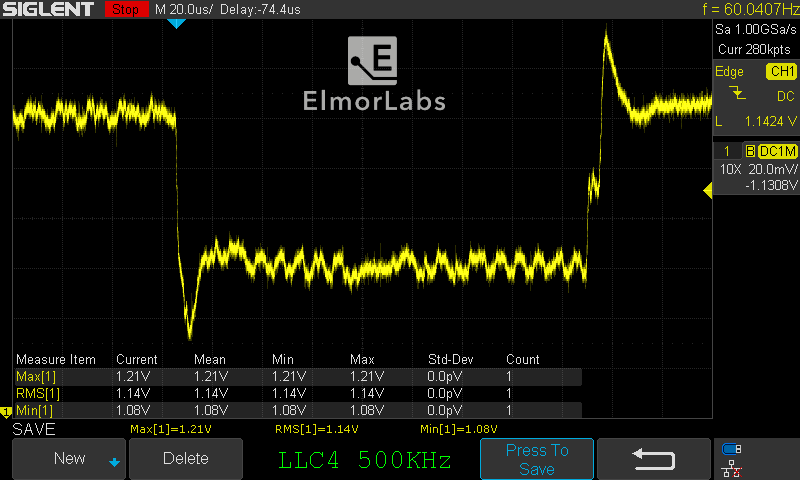
1.43V + UltraExtreme LLC => means insane voltage overshoots during load transitions, I think even 5.3 is too high in those conditions.
 
1.43V + UltraExtreme LLC => means insane voltage overshoots during load transitions, I think even 5.3 is too high in those conditions.

Thanks for your help. I'm still wanting to get 5.4 at stable temps. Is this possible for yourself? I have a pretty supreme cooling system.
 
Thanks for your help. I'm still wanting to get 5.4 at stable temps. Is this possible for yourself? I have a pretty supreme cooling system.


Cooling is (important) part of equation, but please look here:


basically your settings mean then chip is subjected to 1.5V+ overshoot in load transitions and I don't think that is good idea. Cooling can help with thermal and current induced damage, but that voltage will shorten your chip lifespan.
 
Outside of suicide runs and LN2 bench sprints, you're already in danger territory for electromigration. Unless you absolutely have spare cash on hand for a replacement CPU and don't care if it cooks, dial down a bit. 1.43 with 1.5v arcs, its already past wise daily limits regardless of temps. Too much volts can damage the thing even if kept at 40-50c with ludicrous subambient cooling.
 
Cooling is (important) part of equation, but please look here:


basically your settings mean then chip is subjected to 1.5V+ overshoot in load transitions and I don't think that is good idea. Cooling can help with thermal and current induced damage, but that voltage will shorten your chip lifespan.

I doubt overshoot is that high. He might reach 1.45v tops. Still too high. The chip should be backed off to 5.2Ghz.
 
I doubt overshoot is that high. He might reach 1.45v tops. Still too high. The chip should be backed off to 5.2Ghz.

The way I read the Elmor article is: he has 1.2V set in BIOS and has 60mV overshoot @Max LLC, our guy here has 1.43V and max LLC => he probably has at least 1.49V, but it would be safe to guess that transients get worse with increasing voltages and currents?
 
Since he's on an Aorus Master, I think he can increase VRM switching frequency to reduce the duration of overshoot. It will also reduce the duration of droop (if any) initiating the workload.
 
I don't think he will fry his chip. What I think will happen. His chip will deteriorate over a shorter time where he needs more voltage to run what was already stable. Eg. 1.43v would require 1.45v for the same results within 6 months or a year. Intel chips have become great for thermal tolerance but his chip won't run like a champ for years. So what would take 3-4 years or more, would take 6 months to a year.

By the time Zen 3 comes around he won't regret realy pushing his 9900K.
 
Back
Top