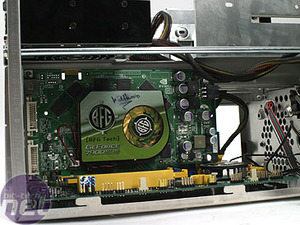
6600GT overheating

thedna

Junior Member
Jun 24, 2010
13
0
0
I just recently been having a problem with my 6600GT. It started about a week ago. Ever since then it's been overheating and I installed new drivers hoping that would do anything, and nope nothing :rolleyes:.

It was idling around 75-80c and when I went to play WoW it would spike to 90-120c until the monitor would shutoff. I took the video card out and cleaned it off and got a LOT of dust out of it. The temps now idle around 68c. I went to test WoW out again and it spiked to 90 real quick and it disconnected me.

Any ideas what is going wrong? Seems me cleaning it made it worse. Yes the fan is still working on it and I have a twin antec pci exhaust fan in front of it, that doesn't help. Everything has been okay since just last two weeks.

I am on Windows 7 32bit.
 

SolMiester

Diamond Member
Dec 19, 2004
5,330
17
76
Sounds like the thermal paste has un-attached from the heat sink and gpu, try removing, clean and re-applying some thermal paste
 
Feb 14, 2010
78
0
0
Have you recently installed any new optical drives or HDDs? This may have affected your casing's ventilation and air flow.
 

Bill Brasky

Diamond Member
May 18, 2006
4,324
1
0
Sounds like the thermal paste has un-attached from the heat sink and gpu, try removing, clean and re-applying some thermal paste

This sounds fairly likely since the problem just started out of the blue without any changes. They say to use ceramic TIM on graphics cards, but I've used artic silver before w/o problems.
 

thedna

Junior Member
Jun 24, 2010
13
0
0
I didn't remove the fan, just unmounted the cover and got all the dust out of it. I will purchase some arctic silver at radio shack in the morning. Will also find a dvi-hdmi cable, since this seems like a good time to upgrade from VGA.


I may have blew a dust nugget into a bad spot and just overlooked it, doubt it though. Hopefully the compound already on there had it's last breathe, seems like that would be a simple fix. I'll do the CPU as well.

Didn't install any devices that would block it's airflow. If anything it seems like I'm being punished for cleaning the card. :awe:
 

jaqie

Platinum Member
Apr 6, 2008
2,471
1
0
If I were you I would just get the cheaper and safer alternative at radio shack, their silicone thermal grease. I actually use it on older equipment and low wattage equipment and have used it since the days of 486s. in my tests, its within a degree or two celcius of arctic silver and arctic alumina and ceramique for performance, and $3 a tube at radio shack for enough to last even me over a year and I remount HSFs a lot.

http://www.radioshack.com/product/in...032230.2032272

I use it on my core2 duo, my s939 a64 x2, many video cards... more systems than I can even remember... it just works, and no worry about ever shorting anything with it. ever.
 

faxon

Platinum Member
May 23, 2008
2,109
1
81
MG Chemicals also sells a 60 gram tub of thermal grease which can be had for about $8, benchmark reviews tested it once and it's actually not to shabby, and cheap as hell. should be non electrically conductive, and if you happen to run a shop that fixes comps you could prolly save a lot of money by using it lmao
 

dust

Golden Member
Oct 13, 2008
1,328
2
71
These threads appear to be quite often of late, maybe a sticky with the proper maintenance of the card would be appropriate.
 

mizzou

Diamond Member
Jan 2, 2008
9,734
54
91
The 6600gt especially in a who slot form is a very hot card , mine actually caught fire....well one of the transistors exploded and caused an.electrical fire. Thankfully my case was open at the time.p

Fast at its time but i was happy to get rid of it eventually( manufacturer sent me a pci express version after I threw a fit. FYI this was a non overlooked, stock xfx version
 

thedna

Junior Member
Jun 24, 2010
13
0
0
Okay just swiped the old compounds out with the new. One of the bridges on the GPU was not flush to the chip. I put compound on both with another blow session ridding it of dust.

The CPU seemed to have fried out all of the remaining compound that was on it, had a slight greyish hue to it from the leftovers. Redid that with new compound and cleaned all the dust out of the case, it's now spotless. This was manual blowing and no compressed air. I am now exhausted as all hell.


GPU max load is now peaking around 80-85c, much better than the previous 100+C before the monitor shut off.

CPU max load is around 55-60c now from the previous 60c idle.

So far all is well. Thanks for the suggestions guys.


Mizz: Maybe mine will blow up tonight, will see. As long as it doesn't take out my HDD thing I'll be okay.
 

0roo0roo

No Lifer
Sep 21, 2002
64,795
84
91
are you sure your pci cooler is doing any good? might just cause poor air flow if it competes with its natural air flow.

on my old 6600gt i got annoyed by its loudness and eventually just removed the front of the heatsink. does your heatsink have a metal cover on it held on by screws? i disconnected the included fan and then i found that i could just either attach or hang an 80 or bigger mm fan right beside the card blowing right down on the heatsink, either use a zalman bracket fantype thing, or just glue/expoxy or zip tie the fan to a bent slot cover.
2814.jpg

that card sucked..loud and hot. not pleasant memories.

what model 6600gt is it

point-of-view-geforce-6600-gt-agp-128-mo.jpg


mine and most i've seen look sorta like that. the heatsink under the face plate is best exposed by removing it. the included weedy little fan just does a poor job forcing air through the already small heatsink. better to use your own big fan right side or blowing down across, either is better than the original solution. the original solution is just what they had to do for a 1 card slot cheapo solution.
 
Last edited:

thedna

Junior Member
Jun 24, 2010
13
0
0
It seems to be working decently. Maybe it turned down a notch just recently.

It does look just like the one in the picture above, it's from EVGA.

The pci cooler is exhausting the air from the card. Which in my mind doesn't seem like a good thing since there is not much air flow at all going through that area.

I don't have any other fans that I could use to mount on the current fan housing for the card. BUT I have a old cpu fan w/ heatsink that I could modify into an existing fan pin, but I would have to rig that up a bit.

Anyway things seem to be going okay for now. I was going to buy a DVI cable, but they wanted 39.99 for one which is too much for my budget atm.


Question: I know the quality from vga to dvi differs, from what I hear anyways. Does anyone know if the quality from a standard dvi cable, differs from a DVI-to-HDMI cable? I guess since it's not an actual hdmi source, that it's probably the same as using a dvi cable?

Anyways I purchased one from amazon for 13$ shipped, so hope it turns out okay.
V13-4200-B.jpg

My pci fan.
 
Last edited:

0roo0roo

No Lifer
Sep 21, 2002
64,795
84
91
so that antec just blows straight on the card? or does it try to do something stupid like funnel the air out through the bracket slot? if its blowing straight on it, then you can pretty much unplug the cards own fan, and uncover the heatsink. fans blowing on other fans only cause turbulence and poor air flow.

if you got it reversed and somehow its blowing air away from the card, then the fans are fighting each other..leading to poor air flow.

*edit looking at it further its just a simple bracket fan setup.
too close to the gpus own fan might interfere with air flow, sucking away from the gpus fan would simply fight it. i suggest you disconnect the gpu fan and take off the heatsink cover and see how well the bracket fan does cooling it by blowing on the card alone.
 
Last edited:

0roo0roo

No Lifer
Sep 21, 2002
64,795
84
91
dvi/hdmi cables are cheap on monoprice/amazon
unless you are running cables from room to room, it doesn' t matter a bit. cheap is fine.
 

zagood

Diamond Member
Mar 28, 2005
4,102
0
71
1. never re-use thermal paste. Always use a fresh application. Only use a thin layer on one side for standard plate-to-plate heatsink/cpu (or gpu).

2. DVI to HDMI outputs the same as DVI/DVI or HDMI/HDMI for video since they're both digital. Obviously there won't be any audio though.

3. Test with/without PCI fan. You never know.

4. The Zalman vf-700 was a great aftermarket cooler for this card. Probably worth about the same as the card these days though.
 

thedna

Junior Member
Jun 24, 2010
13
0
0
When you say take off the heatsink and have it blowing on the card. Do you mean having it exhaust that air? Since that's the only way it fits in the pci slot, is the exhaust position.

The case I have is a apevia
11-144-110-S01


So airflow in this thing is nonexistent to begin with.

Just waiting on the reply back for which way to position pci fan and I will test it out.
 

0roo0roo

No Lifer
Sep 21, 2002
64,795
84
91
i'm saying blow towards the card and heatsink the same way the original fan does. tends not to work very well if you suck away from a heatsink. aka blowing vs sucking. i'm not sure what you mean by exhaust since air has no place to exhaust on a pci card cept out the back plate. if you have a pci cooler right by the gpu fan sucking away you are probably messing up the air flow by fighting the gpu fan.
 
Last edited:

thedna

Junior Member
Jun 24, 2010
13
0
0
Okay I took the fan out and the bridge thing, both of them. Now it's idling around 93c. I took the paste off as well since I figured dust was going to get on it and that it seemed useless without a plate against it.

I'm just going to keep it the way it was.

The fan I linked is blowing the air onto the card, there is no actual tunnel to push the air outside the case.


tp4: Thanks for the comment, but I want to rid the problem at the source. I can't stand fan noise so that would drive me insane.
 

jaqie

Platinum Member
Apr 6, 2008
2,471
1
0
silentpcreview - awesome idea to link this person there. :)

As for removing the side of the case? 1) ugly 2) baby fingers or pet paws and computer insides don't mix, and as a pet owner I cannot. 3) can you say dust magnet? 4) loud, I can't stand loud comps either.
 

Zap

Elite Member
Oct 13, 1999
22,377
7
81
cleaned all the dust out of the case, it's now spotless. This was manual blowing and no compressed air. I am now exhausted as all hell.

LOL, what? :awe: Huff and puff... the big bad wolf has nuthin' on you!
 

0roo0roo

No Lifer
Sep 21, 2002
64,795
84
91
Okay I took the fan out and the bridge thing, both of them. Now it's idling around 93c. I took the paste off as well since I figured dust was going to get on it and that it seemed useless without a plate against it.

I'm just going to keep it the way it was.

The fan I linked is blowing the air onto the card, there is no actual tunnel to push the air outside the case.


tp4: Thanks for the comment, but I want to rid the problem at the source. I can't stand fan noise so that would drive me insane.

we aren't sure if ur serious anymore:p