• We’re currently investigating an issue related to the forum theme and styling that is impacting page layout and visual formatting. The problem has been identified, and we are actively working on a resolution. There is no impact to user data or functionality, this is strictly a front-end display issue. We’ll post an update once the fix has been deployed. Thanks for your patience while we get this sorted.

$2000 gaming

Hummada

Junior Member
I've been racking my brain for the past few days. I want the best system there is for 2G or less.

I've researched people saying get 2 graphic cards sli and others saying stick to one that you can afford. Performance will be this much better than that with 8 to 16 RAM and so on. which is it?

Every hobby I get into has these flaws-simply overwhelming internet knowledge of too many people saying this and that company is the best or this part is better than that,but this one is just insane with the amount of hardware and tech.

So here is what I'm gaming with- an xbox 360


This is my monitor and sound processing...

panasonic 54" plasma-with this there is only 1080p as you know!

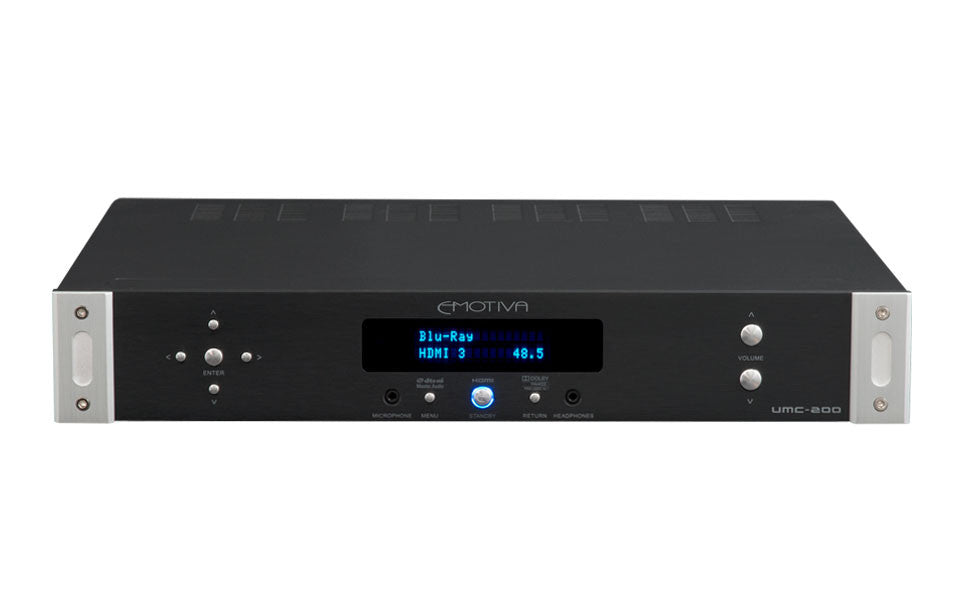
Emotiva UMC-200 Processor hooked to a XPA-5 Amp


I want power,graphics,and no stutter at all. Wu ha ha ha!

Saying all that,this needs to last about 3 years until upgrade. I want performance over looks. It doesn't matter what the case looks like,etc.

This system will be purchased between Oct-Jan 1. That way I can take advantage of some deals in that time frame.

Edited to remove profanity. We try to keep the tech forums clean so that people can visit them from work.

mfenn
General Hardware Moderator
 
Last edited by a moderator:
First, whatever you're building, start [thread=80121]here[/thread]. I got your budget; are you planning to overclock? Doing anything besides gaming? There's a few other questions there as well.

Second, base your build off of [thread=2192841]what Mfenn has here[/thread]. Most of what's there will apply, but you might want a better mobo for Crossfire, and you might want to wait for the AMD 9000 series which is supposed to be coming next month. RAM is a little up in the air as well, but if you're just gaming you probably don't need more than 8GB.

$2000 is a lot. Would you be interested in saving some to upgrade later within that 3 year time frame? Would you be interested in getting a different, higher-resolution monitor?
 
I'm in USA -Indiana

Will be gaming 100%

Not brand specific

I'm not against overclocking anything. I'd have to learn though

Now I would absolutely love a better monitor,but I'd be sacrificing a 5.1 surround sound set up. So going from a 54" plasma to a 27" monitor that has way better resolution wouldnt work. I'm running a very nice sound system. This doesn't have to be $2000,but that's what I can afford by January. So if I can save money than that's what I'd like to do. I'm very open minded on suggestions for my entire set up though.
 
Last edited:
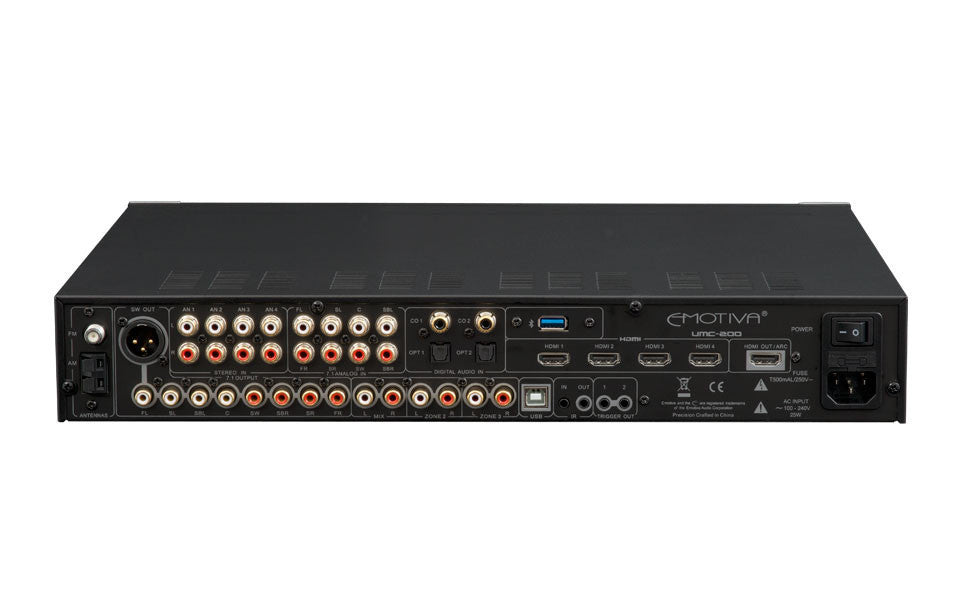
What kind of hookups does your receiver have? HDMI, Optical S/PDIF, Coax S/PDIF, etc? That'll determine what parts you need to get in order to make sure you can use your 5.1 system effectively.
 
  • 4 HDMI Inputs all inputs HDMI 1.4 compliant, with 3D and CEC support
  • 1 HDMI Output HDMI 1.4 compliant, with ARC support
  • Analog Inputs 4 stereo pairs and 1 7.1 channel unbalanced;direct
  • Digital Inputs S/PDIF, Coax, and 2 Toslink Optical
  • USB InputAccepts Emotiva Bluetooth dongle only
  • Analog Outputs 1 7.1 channel (unbalanced), 1 subwoofer (balanced), 1 stereo pair (unbalanced), and 2 stereo pairs (Zone 2 and Zone 3).
  • Antenna Inputs 1 AM and 1 FM
  • 2 Trigger Outputs
  • 1 IR Input
  • 1 IR Output
  • Remote Control Full function infrared remote control with CEC sub panel
  • Display (on-screen) Full color OSD over live video
  • Display (front panel) Two line alphanumeric High visibility blue VFD (dimmable)
  • Size:
    unboxed: 17” W x 14” D x 3-1/4” H
    boxed: 21” W x 18” D x 7.5” H
  • Weight: 10 lbs (16 lbs boxed)


Im not opposed to a high resolution monitor,but have no idea how id set it up with huge tower speakers.
More items to consider
 
Good, you have HDMI input. That means you can just use HDMI from the GPU as your "sound card". You'll get full 5.1 output from games and movies that support it.

Check out my latest build that Ken linked (updated as of a couple minutes ago). You could certainly add both the SSD and RAM upgrades on your budget, but I don't think that going for a Crossfire setup makes sense at 1080p.
 
From what I understand so far is that there really is nothing better than what I have now for 1080p gaming. If I wanted higher resolution then it there would be sacrifice in smoothness or ghosting. Correct?
 
From what I understand so far is that there really is nothing better than what I have now for 1080p gaming. If I wanted higher resolution then it there would be sacrifice in smoothness or ghosting. Correct?

Certainly an LCD would have ghosting whereas a plasma does not. The plasma TV is probably giving you much more input latency than a computer monitor would though.

Smoothness is determined by the strength of the graphics card(s), you have the budget to increase that along with the bigger monitor.
 
It's a panasonic viera G25 which is known to have low input lag,but it's 2-3 years old compared to what ever computer monitors have these days. There are gaming and PC modes that I have never even fooled with that. Might help me out though. Is the resolution in todays PC monitors way beyond 1080p as far as the human eye can see?

I've been suggested either a gtx 770 sli or just go for 1 gtx 780 so far from another guy.

cpu-intel i5-4670k

motherboard-ASrock Z87 extrem6

memory-G.Skills ares series 8gb

storage-samsung 840 pro series 125gb ssd

storage-western digital caviar black 1tb 7200 rpm int. hard drive

power supply-EVGA Supernova 1000g2 1000w

this is a lot more expensive and would that be too much?
 
The required resolution really depends on how far away you sit. At the typical 5-6' away from a TV, you'd be hard pressed to tell the difference between 1080p and higher (at least I would).

As for those parts:
- CPU: Good
- Mobo: Good but overkill, go with my recommendation for single-GPU or the ASRock Z87 Extreme3 for multi-GPU
- RAM: Ram is RAM, as long as it's from a good vendor. My weekly recommendation tries to find good deals
- SSD : Good, but overpriced. You'll not notice a difference between 840 Pro and 840 EVO that I recommended
- HDD : The Black series are only worthwhile for the longer warranty. Otherwise you're just paying more for a drive that is at best the same speed and sometimes slower than the WD Blue 1TB or Seagate ST1000DM003
- PSU: Just crazy overpowered. You only need 550-650W for single GPU or 750W for dual-GPU
- GPU : I would not bother with multi-GPU at all for 1080p. Get the GTX 780 if you must spend $1500 on a machine, but the 7970 is an overall better value.
 
Dual Crossfire of SLI of the highest end cards needs about a 750 watt PSU. A single GPU, even a Titan, only needs a 450W-to-550W unit.

Stay in or under spec, and the electrical circuit will work without issue. Go over spec, and something will break.
 
Ha ha! I didn't know that certain work places would have such a high block for profanity. Sorry about that.

I've been reading a lot since I've posted so now I'm think that a monitor may be needed. You are right about the input lag(while it is very low for a 50' TV),it is real high for gaming. I'm assuming this would be very noticable on the TV with an awesome gaming computor.

I will be doing sli,but don't know when until these knew graphic cards come out. I have until Jan 2014 to buy all the parts so the price drops should help me with GPU.

I will keep your recommendations in mind for the storage,PSU,and mobo.

Now for the monitor. Why can't I have the best of both worlds yet? It's 2013!! ha ha ha. Was looking at Qnix Evolution 11 and Eizo Foris. Not brand specific because I only know about HDTV and not monitors. Graphics or FPS.

Thanks for the response so far guys. This is a research/purchase in progress.
 
You should wait to see what AMD comes up with before choosing the graphics card with a budget like that imo.
 
SLI doesn't make sense on a standard 1080p 60Hz monitor. To make a case for it, you have to go with either more pixels (harder to drive the same framerate) or a higher refresh rate (can see a higher framerate). For fast-paced gaming, people usually like to go with high refresh rate monitors such as the ASUS VG248QE.
 
I've decided to go with QNIX and OC. That's really the lowest priced monitor that I will see improvements on that I can find. There is no 1080P monitor that is going to match my plasma TV for cheap.

This is coming together nicely now. The motherboard will need to have SLI support. Doesn't matter which brand. Just one that works without problems.
 
The ASRock Extreme3 that I linked earlier will do either. What I would caution against is buying an SLI/Crossfire-capable mobo and PSU, but not getting two cards. In that situation, the most likely outcome is that you will never buy the second card and will end up with an overly expensive mobo and PSU on your hands.

All that being said, you certainly have the budget to get SLI/Crossfire right off the bat.
 
I'm going to get SLI,but im waiting on the new card to come out. See what happens to prices.

I've decided on a stormtrooper case.

OS -windows 7 or 8? I'm still on XP!

The real crazy thing is that I just had to restart my computer because it's a 10 year old POS! I'm typing this edit on my cell which is 100 X faster than my home pc with a monitor that's deeper than Pamela Anderson's !$@#!(can I say that for work safety?) God love er. But anywho,when I spend this much $$ on something I mean for it to last a while. With that in mind,I'm not going to cheap out on anything that will be staying in my setup for a long time. I do know there isn't a future proof gpu or cpu though,but I've learned that SLI is at least 3-4 years with my set up for that hardware.

I'm really looking forward to this system because the best I've seen or played on is tox 360. That,and the fact that I can actually surf the web without restarting my pc every 30 minutes.
 
Last edited:
Back
Top