
WhipperSnapper
Lifer
So, which is faster:
1600 CAS 9 -- or -- 1866 CAS 10
Assume that they are running at their rated frequencies.
1600 CAS 9 -- or -- 1866 CAS 10
Assume that they are running at their rated frequencies.


But is the 'real world' performance increase perceivable to justify the price difference between the two?

Depends. With IGP, maybe (if even light gaming with an AMD APU, or Skylake's IGP, definitely). With simulation work, maybe (including games like Flight Simulator X and Dwarf Fortress, that I know of). With significant CPU overclocks, or running multiple GPUs in a dual-channel socket, faster RAM can definitely lead to better real world performance.But is the 'real world' performance increase perceivable to justify the price difference between the two?
Worst case, you can run them like I do, at 1600MHz and tight timings (6-6-6 :twisted🙂.
It's 2133MHz, CL11 or CL10, but I have a B85 motherboard. I can't remember the exact cost, now, but it was definitely less than $10 more for the whole 32GB of it, compared to 1600MHz CL9, at the time.Seriously? You have RAM running at 1600 CL6?
That's 1600 / 6 = 266.7 which is the fastest specs I've seen available for purchase on DDR3.

Seriously? You have RAM running at 1600 CL6?
That's 1600 / 6 = 266.7 which is the fastest specs I've seen available for purchase on DDR3.

Voltage?you can run them like I do, at 1600MHz and tight timings (6-6-6 :twisted🙂.
1.5V. It's these (I can't run higher than 1600MHz). One of the slower profiles on the ones I got is 6-6-6, which they run well at, but it won't pass one memtest run with 5-6-6, much less any tighter.Voltage?

In the real-world you won't notice any difference between 1333 and 2133, much less this. Heck, many can't even tell if they're running in single channel mode.But is the 'real world' performance increase perceivable to justify the price difference between the two?

In the real-world you won't notice any difference between 1333 and 2133, much less this. Heck, many can't even tell if they're running in single channel mode.
The exception might be the IGP, but anyone running an IGP doesn't care about about performance to begin with.
67% is massive 10-30% is more what i would expect so i wouldnt be surprised if there was something else wrong with here test systemWhen benchmarking the Intel Haswell processors, the memory speed in the BIOS kept reverting back to 1333MHz (was an issue with the BIOS which has now been fixed) at every processor change rather than holding the DDR3-2400 XMP (Extreme Memory Profile). At first we accidently tested the Core i7-4770K with the memory clocked at 1333MHz and were perplexed by the much weaker than expected performance.
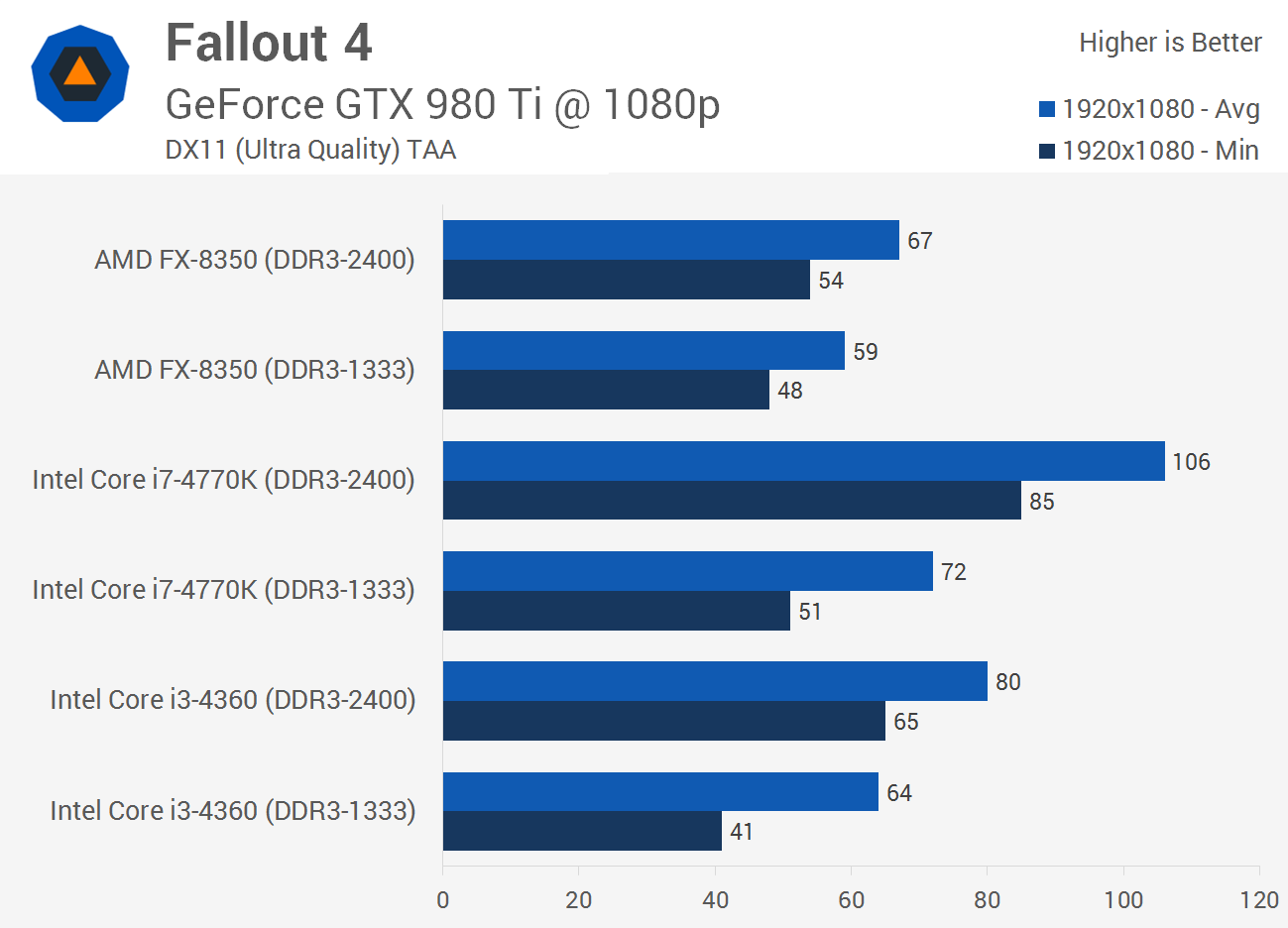
It was quickly spotted that the memory was running much slower than it ought to be, though we weren't entirely sure this was the cause of the massive deficit. Turns out it was, as moving the memory back up to 2400MHz resulted in a massive 67% increase in minimum frame rate for the Core i7-4770K.
A similar situation was found with the Core i3-4360, which went from a minimum of 41fps with DDR3-1333 memory to a minimum of 65fps with DDR3-2400.
Yes, we know there's a significant difference between the now obsolete 1333MHz memory speed and 2400MHz, but from memory I don't recall it having anything like that kind of impact on gaming performance. Interestingly the same variation in memory speeds had little impact on the AMD FX-8350's performance, as the processor was just 13% faster with the quicker memory.
Anyway, we found this interesting and it would suggest that Fallout 4 fans with Intel hardware will want to ensure they are running their memory as fast possible.




1600 Mhz CL6 @ 1.5v is quite rare. Too bad you are handicapped by the B85 chipset, it's a shame to run such a great kit at this lower speed.1.5V. It's these (I can't run higher than 1600MHz). One of the slower profiles on the ones I got is 6-6-6, which they run well at, but it won't pass one memtest run with 5-6-6, much less any tighter.

I just selected one of the other profiles, after the auto setting wanted to run it at the same timings as 2133MHz specs, rebooted, ran Windows' RAM test, and then went on about my game playing (until the urge to try even lower timings came). I expected to run it at lower than CAS 9, which is why I bought 32GB (then re-purposed the 2x8GB I started with), at the time; but yeah, I was expecting more like 8-8-8, or 7-8-8, from 10-12-12@1.6V to start.1600 Mhz CL6 @ 1.5v is quite rare. Too bad you are handicapped by the B85 chipset, it's a shame to run such a great kit at this lower speed.
http://www.techspot.com/review/1089-fallout-4-benchmarks/page6.html
67% is massive 10-30% is more what i would expect so i wouldnt be surprised if there was something else wrong with here test system
it will be interesting to see more testing done on fallout4 which is clearly horribly optimised

Seriously? You have RAM running at 1600 CL6?
That's 1600 / 6 = 266.7 which is the fastest specs I've seen available for purchase on DDR3.


