• We’re currently investigating an issue related to the forum theme and styling that is impacting page layout and visual formatting. The problem has been identified, and we are actively working on a resolution. There is no impact to user data or functionality, this is strictly a front-end display issue. We’ll post an update once the fix has been deployed. Thanks for your patience while we get this sorted.

16 Gigs DDR3 1600 vs 2133 (Same Price)

In day to day usage you will notice basically no difference between the speeds. A few applications (winrar, 7-zip, fluid sims, etc.) will run better with more bandwidth. However, 1.6V is out of spec and I would not consider potential benefits to be greater than the potential problems.
 
I would go with the 2133 MHz kit. It should be better binned, and should have a 1600 MHz 1.5V SPD profile that should be close to the other kit.

I hate that manufacturers don't post entire SPD Tables, since it would be easier to compare if a faster kit would be better if I run it at lower speeds.
 
Thanks for the replies! I am thinking that I'll play it safe with the 1600 since the performance gain by the 2133 wouldn't be significant enough to warrant potential problems.
 
Ah, I missed that! So, ram clocks vs latency vs timing confuses the heck out of me so I see with those that you linked we obviously have a higher clock (2133), but the latency is 11 versus the 1600's latency of 9. Also, the timings are higher than the 1600. So, is clock speed overall much more important than those? Or would the 1600 be faster in this case since the latency and timings are better?
 
2133 11-13-13 is slower than 1600 8-8-8

Performance%20Index_575px.png


if your not overclocking on 1150 stick with 1600 c7\c8\c9

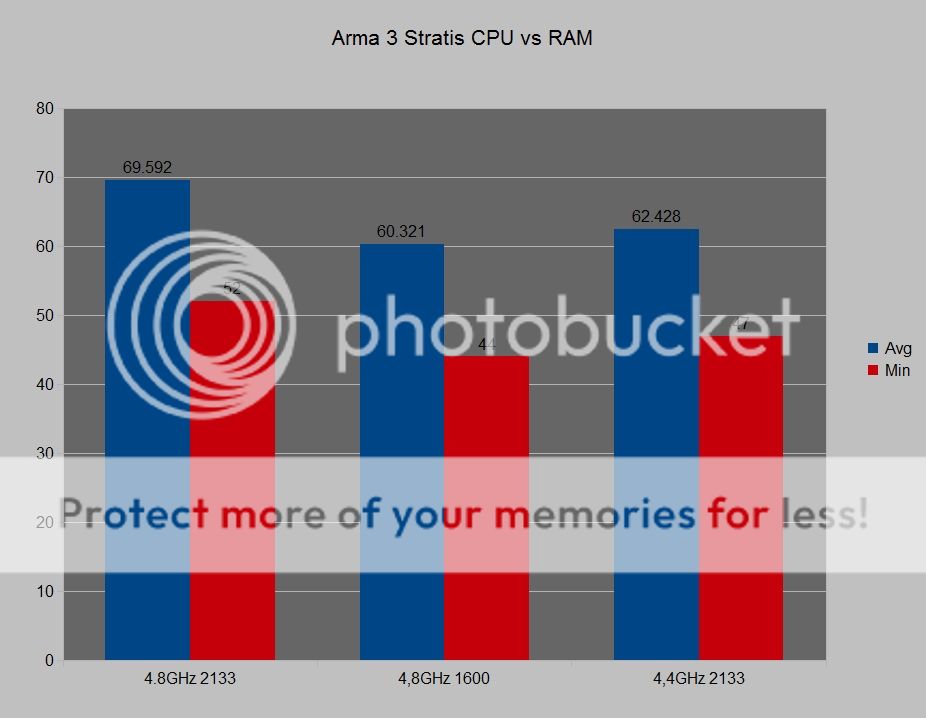
if you are overclocking then going from 1600c9 1.5v to 2133c9\2400c10 1.65v can be equivalent to ~400mhz higher cpu oc in a cpu limited game like arma
http://forums.bistudio.com/showthre...rmance-comparison-1600-2133-up-to-15-FPS-gain
this is 1600c10 vs 2133c10
arma3stratiscpuvsrambar_zps0cf88683.jpg

armastratisramtimmings_zpsd0398bf9.png


most games will be gpu bottlnecked and show little to no difference from a overclocked cpu\faster ram which is why most ram reviews show minimal improvement from faster ram
so its typically best to spend cash on the best gpu you can get before spending extra on overclocking cpu\ram
but the gpu will be the first part you want to upgrade and a overclocked pc will handle future gpu & games better

1.65v is out of spec but then so is overclocking
lots of overclockers run 1.65v ram and it isnt a problem just a bit of extra heat like taking the core v up a bit

these look like the best value kits to me if your wanting to oc
2133c9 1.6v $95
http://www.newegg.com/Product/Product.aspx?Item=N82E16820231617
2400c10 1.65v $115
http://www.newegg.com/Product/Product.aspx?Item=N82E16820226569

or if you dont want to oc
1600c8 1.35v $100
http://www.newegg.com/Product/Product.aspx?Item=N82E16820148657
 
Last edited:
As you can see, these sets of 16GB ram are exactly the same in all aspects including price except one is 1600mhz and one is 2133mhz and slightly different timings. So, what am I missing? Is there any reason I'd not get the 2133 over the 1600? (My mobo supports 2133 and my CPU is an i5 2500k).

http://www.newegg.com/Product/Product.aspx?Item=N82E16820231571

http://www.newegg.com/Product/Product.aspx?Item=N82E16820231568

If your CPU is a 2500K, I'd stick with RAM settings at either 1600 or 1866 Mhz. You won't get much of anything extra for 2133.

That being said, I'd also stick with a RAM kit which (a) has a spec voltage of 1.5V or (b) can run at 1.5V if run at less than its spec speed.

This would make the 2133 kit a viable option, if, for instance, you wanted to run it at 1866 and tighter timings.

Generally, there is a trade-off between speed, timings and voltage. You may be able to run a 1600 kit at 1866 with looser timings and the same voltage, or the same timings at a higher voltage. If you wanted to run a kit of a certain speed at spec speed and lower voltage, you would try loosening the timings.
 
Ah, I missed that! So, ram clocks vs latency vs timing confuses the heck out of me so I see with those that you linked we obviously have a higher clock (2133), but the latency is 11 versus the 1600's latency of 9. Also, the timings are higher than the 1600. So, is clock speed overall much more important than those? Or would the 1600 be faster in this case since the latency and timings are better?

Overall, you are never going to be ale to tell any difference, unless you are a benchmark freak. :biggrin:

I would just stick within the voltage spec of the memory controller and be at least at 1600.
 
Overall, you are never going to be ale to tell any difference, unless you are a benchmark freak. :biggrin:

unless his a overclocker and playing a cpu limited game

faster ram on its own may not be a hugely noticeable improvement at ~10% performance gain but it stacks with performance gained from overclocking the cpu so a 20% cpu oc becomes ~30% performance once you add the faster ram

considering the small price of faster ram vs overclockable components its good value

somebody mentioned above op has a 2500k?
if so they normally top out at ~2133 so that 2400 kit i suggested above probably wouldnt post at its rated speed
 
Last edited:
I'd always buy lower voltage rated memory.

+1.

I'd just get the DDR3 1600. You get nice 9-9-9 timings @ the stock 1.5V.

The DDR3 2133 is 9-11-11 timings @ 1.6V, so you have to be careful to boost the voltage everytime something resets the Mobo settings or you change boards/PC's.

I like RAM that runs at the stock for that type of RAM - eg. 1.5V for DDR3, 1.8V for DDR2, etc.

Yes SPD does make it easy to run your default settings on any motherboard, but you have to love the plug-and-play easiness of RAM that runs at 1.5V.
 
Thank you for all the input. It sounds like the consensus is to just stick with 1600 @ 1.5v. I can't go wrong that way!

you have a 2500k which is a overclockable cpu why pay extra for the k if your not going to make use of it?
people suggesting 1600 1.5v are those that dont oc (which is fine)
 
unless his a overclocker and playing a cpu limited game

faster ram on its own may not be a hugely noticeable improvement at ~10% performance gain but it stacks with performance gained from overclocking the cpu so a 20% cpu oc becomes ~30% performance once you add the faster ram

considering the small price of faster ram vs overclockable components its good value

somebody mentioned above op has a 2500k?
if so they normally top out at ~2133 so that 2400 kit i suggested above probably wouldnt post at its rated speed

To paraphrase the Three Stooges:

If I had some salami, I'd have salami and whipped cream. If I had any whipped cream.
 
you have a 2500k which is a overclockable cpu why pay extra for the k if your not going to make use of it?
people suggesting 1600 1.5v are those that dont oc (which is fine)

Well, I already have my CPU OCed to 4.5GHZ using 1333 RAM. How much more could I squeeze out of it with 2133 RAM?
 
Well, I already have my CPU OCed to 4.5GHZ using 1333 RAM. How much more could I squeeze out of it with 2133 RAM?

Maybe nothing. Memory has very little impact on what CPU overclock you get. I can run my memory at 2400Mhz but I can't get past 4.6Ghz (with 1.36v which brings temps over 90c at full load). So I'm basically stuck at 4.5Ghz no matter what.
 
Well, I already have my CPU OCed to 4.5GHZ using 1333 RAM. How much more could I squeeze out of it with 2133 RAM?
you wont get a higher oc but look at the benchmarks i linked above
4.3ghz 2133c9 is ~10% faster than 4.9ghz 1333c9 on my 2600k
 
Back
Top