
• We’re currently investigating an issue related to the forum theme and styling that is impacting page layout and visual formatting. The problem has been identified, and we are actively working on a resolution. There is no impact to user data or functionality, this is strictly a front-end display issue. We’ll post an update once the fix has been deployed. Thanks for your patience while we get this sorted.

wireless adapter (pci-e x1) slowing down my gpu...what can i do?

abeal2

Senior member
I bought a PCE-AC68 for my comp which has the ASRock Z97 Extreme 4 (http://www.asrock.com/mb/photo/Z97 Extreme4(L2).jpg). After installing the AC68 in the PCIE3 slot (please refer to the labels on the mobo picture), my GTX 780 Ti in the PCIE5 slot now only runs at x8 speed. Is there any way around this? Am I installing my wireless adapter in the wrong slot?
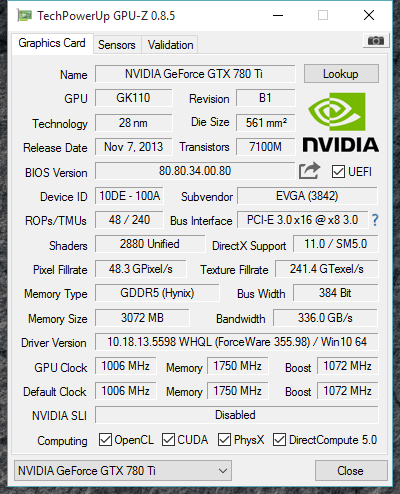

dw4.png
 
I bought a PCE-AC68 for my comp which has the ASRock Z97 Extreme 4 (http://www.asrock.com/mb/photo/Z97%20Extreme4(L2).jpg). After installing the AC68 in the PCIE3 slot (please refer to the labels on the mobo picture), my GTX 780 Ti in the PCIE5 slot now only runs at x8 speed. Is there any way around this? Am I installing my wireless adapter in the wrong slot?

To be overly pedantic, you're installing BOTH your graphics card and wireless adaptor in the wrong slots... 😉

The only PCIe x16 capable slot on your MB is the PCIE2 slot. Your GPU goes there. The PCIE5 slot is only capable of PCIe x8 electrically*. I'd put the wireless card in the PCIE6 slot, to avoid interference with airflow to your graphics card.

Hope it helps.

*If you look closely on the picture you linked to, you can see the second half of the PCIE5 slot isn't even connected to anything.
 
Back
Top