• We’re currently investigating an issue related to the forum theme and styling that is impacting page layout and visual formatting. The problem has been identified, and we are actively working on a resolution. There is no impact to user data or functionality, this is strictly a front-end display issue. We’ll post an update once the fix has been deployed. Thanks for your patience while we get this sorted.

Windows 7 Professional - password protected shares

MJoshi

Member
Hi,

Is it possible to create password protected shared folders on Windows 7 Professional that can be seen on a network of other (XP & Windows 7) computers in the same Workgroup?

I do not want to have to create a separate login for each user as that will then give them access to the main Windows 7 computer.

Is there another method that I can use rather than creating login accounts?

Thank you.
 
Win 7 added the Homegroup to make the life of people easy when they want basic sharing.

This feature works only between Win 7 computers.


Otherwise using what is called Work Groups is the same type of sharing as it was in Win XP and Vista.

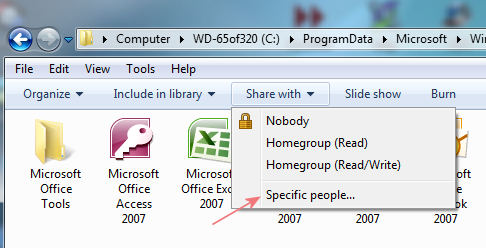
Open in Explorer the folder that you want to share. Pull down the Share it Menu and choose specific People.

share-specific.jpg
 
Thanks for your reply JackMDS.

Does the second method that you suggested allowing 'Specific people' to share files or folders require them to have a login on the Windows 7 computer?
 
Windows per-se does not have sharing system that it is just a matter of giving any one a password and he/she can log into a computer through the Network and share.

These are the general options.

Win7-Sharing.jpg


Once you choose a general option you can get more flexibility on the specific folder configuration.

Otherwise if you want forgo security. Disable the need for password, and enabling the Guest account.
.
 
I have now managed to enable password protected shares for each person. However, they all now have a login on the Windows 7 computer.

Is there a way to disable their logins but still allow password protected sharing?

Thank you.
 
Back
Top