
• We’re currently investigating an issue related to the forum theme and styling that is impacting page layout and visual formatting. The problem has been identified, and we are actively working on a resolution. There is no impact to user data or functionality, this is strictly a front-end display issue. We’ll post an update once the fix has been deployed. Thanks for your patience while we get this sorted.

Question Windows 11 upgrading issue

ingeborgdot

Golden Member
I held off upgrading my one PC to W11 because I have been using it as a Blue Iris server for my cameras. Now that I know that BI works well in Windows 11 I went in to upgrade it today. I got the TPM turned on, but when I go to secure boot I see this message

after enabling secure boot windows says checking media prescence... Media Present/// Start PXE over IPv4

What is going on? What do I need to do? It's like it can't find my M.2 drive or something. I went into bios and looked at boot order but it all looks ok.

My CPU qualifies to upgrade and I was told all the specs say it should work.

It is a Lenovo M720 with an i7 8700 cpu.

What am I missing?
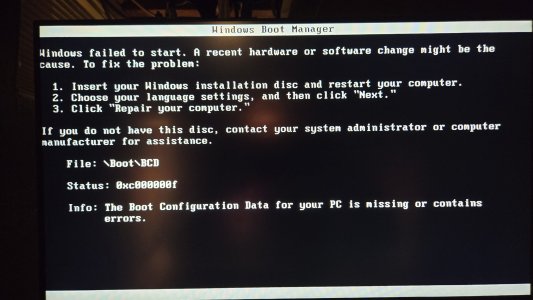
 
Drive needs to be converted to gpt most likely. It's a quick command from a Dos prompt. Then switch it all back to UEFI/SB.
 
Yes, I found that out, but I was having a ton of issues. When I went to validate it wouldn't validate. It said the OS can't be found. So, I tried what some people said to do, and now I have a bigger problem. It won't boot. I went in and made the drive active like someone said to do. Now this. I should know better.
 

Attachments

  • 20241208_185736.jpg
    20241208_185736.jpg
    849.4 KB · Views: 5
Clear the keys and turn off csm. I don't think I even have SB or tpm enabled and it runs fine. Just more crap to go wrong.
 
I got back in. I setup a windows media on usb and got in and set the proper partition to active.
WIndows 11 runs fine with those things not on??????
 
I am trying to upgrade to W11 and unless I change my MBR to GPT it won't happen. I get a message after the mbr2gpt where is says it can't find the OS partition for disk 0.
 
Yeah, the requirements are dumb as they need to be available but are optional.

After you switch to gpt you have to switch the bios to uefi and disable csm to get it to boot. If it complains about the mismatch then clear the keys for SB and reboot or just disable it. W11 just has a lot of stupid hoops to jump through for no apparent reason.

One thing I cant stand is the new task bar and found a way around it with https://github.com/valinet/explorerpatcher/releases

Works well to get that classic feel you're used to instead of that mac feel.
 
I have done the mbr2gpt to 2 machines. This is the 3rd. This one won't convert. The validation process won't go. It throws that damn message at me that it can't find the OS partition disk. It should be a done in 10 minutes task from start to finish. This one is far from that.
 
Back
Top