• We’re currently investigating an issue related to the forum theme and styling that is impacting page layout and visual formatting. The problem has been identified, and we are actively working on a resolution. There is no impact to user data or functionality, this is strictly a front-end display issue. We’ll post an update once the fix has been deployed. Thanks for your patience while we get this sorted.

Windows 10 Firewall Not Enforcing Rule

dabench

Senior member
Hi. I have a VM on my network that I don't want to be able to access my Windows 10 machine. On the Windows 10 Machine I created both an inbound and outbound block rule for the VM for all three profiles but the two machines can still talk. Why isn't the Windows 10 machine blocking traffic to and from the VM?

 
As stated in the first post "inbound and outbound block rule for the VM for all three profiles".

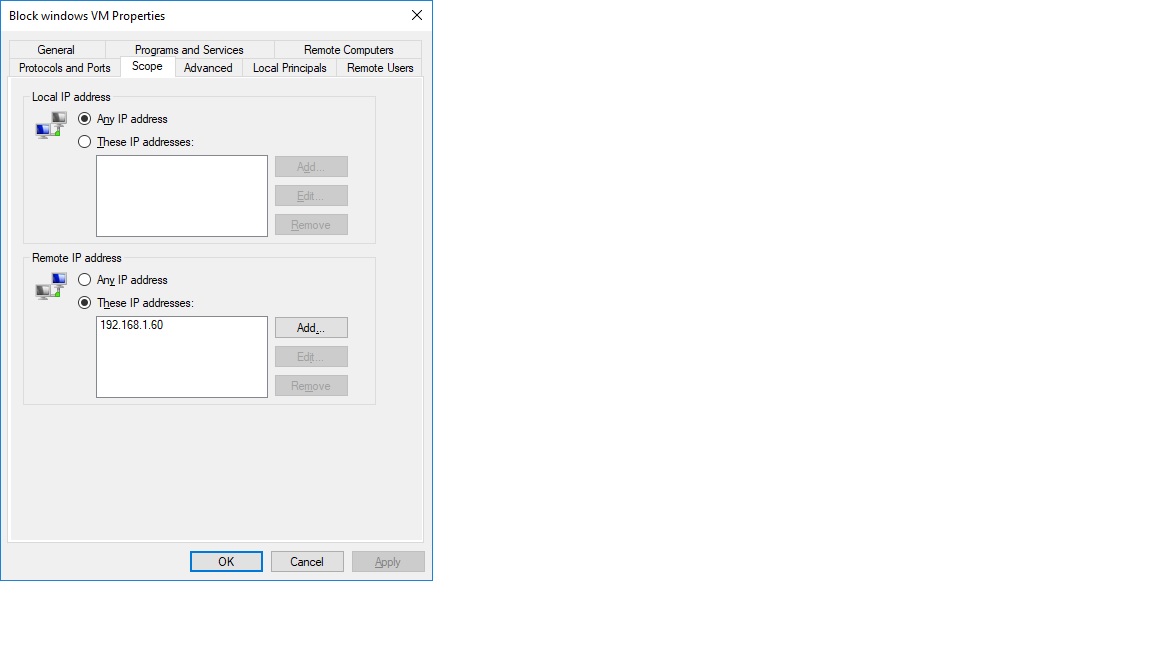
Here is an image on the windows 10 machine. 192.168.1.60 is the IP of the VM I am trying to block

mL5rcb


For some reason the board isn't showing the picture. Here is the link https://ibb.co/mL5rcb
 
Here is your Image as an Image. Just follow your link, then Right Click on the Image and select Copy Image, Then just Paste it into the forum reply box.

firewall.jpg
 
What do your network settings look like for the VM? What VM software are you running? I know with VMWare you can choose which adapter (real or virtual) the VM uses. I would suggest only allowing one then applying your firewall rules to that specific connection.
 
Thanks but that's what I'm already doing and it's not working hence the reason I'm posting here.


What do your network settings look like for the VM? What VM software are you running? I know with VMWare you can choose which adapter (real or virtual) the VM uses. I would suggest only allowing one then applying your firewall rules to that specific connection.
Can you be more specific? I'm not sure what you mean by that specific connection. I already have the rule applying to "all" connections. I'm using Oracle VM VirtualBox
 
Thanks but that's what I'm already doing and it's not working hence the reason I'm posting here.


Can you be more specific? I'm not sure what you mean by that specific connection. I already have the rule applying to "all" connections. I'm using Oracle VM VirtualBox

Hi, so I made a VM with VirtualBox earlier today (I am normally a VMWare guy). I made a connection to my file server and made sure it could connect to my shared folders and the Internet. Then I powered down, went into VirtualBox settings and the network tab for that VM. I set it to a Bridged Adapter and promiscuous mode to deny. When I powered the VM I verified that I could no longer connect to my shared folders, but can still connect to the Internet. Hope that helps.
 
Back
Top