• We’re currently investigating an issue related to the forum theme and styling that is impacting page layout and visual formatting. The problem has been identified, and we are actively working on a resolution. There is no impact to user data or functionality, this is strictly a front-end display issue. We’ll post an update once the fix has been deployed. Thanks for your patience while we get this sorted.

Win7, Vista, XP networking

RKS

Diamond Member
I need some basic help.

I have:

Win 7 (Home) - wired to Wireless Router
XP Pro - wired to Wireless router
Vista Ultimate - wireless
Wii - wireless
WD TV Live - used to work sometimes

Everything is able to connect to the internet but I can't get the computers to see each other.

Any basic assistance would be appreciated. All computers are using ESET but I'm not sure if it is a firewall issue. I did turn the sw firewall off but it did not seem to help.

I know at some point I used to be able to network all the computers (not sure how), then it became sporadic, now non-existant.
 
Last edited:
Win 7 has three types of Sharing configuration when configured on peer-to-peer Network.

Home Network = Works only between Win 7 computers, and make it very easy to Entry Level Users to start Network sharing.

Work Network = which is basically similar to the previous methods of sharing that let you control what, how, and to whom folders would be shared with.

Public Sharing = Public Network (like Internet cafe) to reduce security risks.

The Work Network is the one that most of us are going (and need) to use.

Win 7 Work Network's Sharing setting is in principle similar to Vista (some menu in locations in Win 7 might be in different place, and look a little different, but it should not be a problem for a computer enthusiasts to adopt)

So, maybe this can Help.

Make sure that the Software Firewall on each computer allows free local traffic. If you use 3rd party Firewall On, Vista/XP Native Firewall should be Off, and the active Firewall has to adjusted to your Network IP numbers on what is some time called the Trusted Zone (consult your 3rd Party Firewall instructions.

General example, http://www.ezlan.net/faq#trustet

Windows 7 Work Network, http://www.onecomputerguy.com/windows7/windows7_sharing.htm

Vista File and Printer Sharing- http://technet.microsoft.com/en-us/library/bb727037.aspx

Windows XP File Sharing - http://support.microsoft.com/default.aspx?scid=kb;en-us;304040

Printer Sharing XP - http://www.microsoft.com/windowsxp/using/networking/expert/honeycutt_july2.mspx

Windows Native Firewall setting for Sharing XP - http://support.microsoft.com/kb/875357

Windows XP patch for Sharing with Vista (Not need for XP-SP3) - http://support.microsoft.com/kb/922120

When finished with the setting of the system it is advisable to Reboot all the hardware including Router and all computers involved.
icon14.gif


.
 
Do all the computers have the same workgroup name, and/or is file sharing turned on? Some OS's use "workgroup" and some use "MSHome" as the default workgroup name. I set all mine to the same name ie: "Home". I use the "network setup wizard" found in Control Panel to change the workgroup name and turn on file sharing.
 
Last edited:
NotquiteanooB, Work Group is the Name of the Mode.

All the computers on the same peer-to-peer Network should bare the Same Network Name for smooth operation.

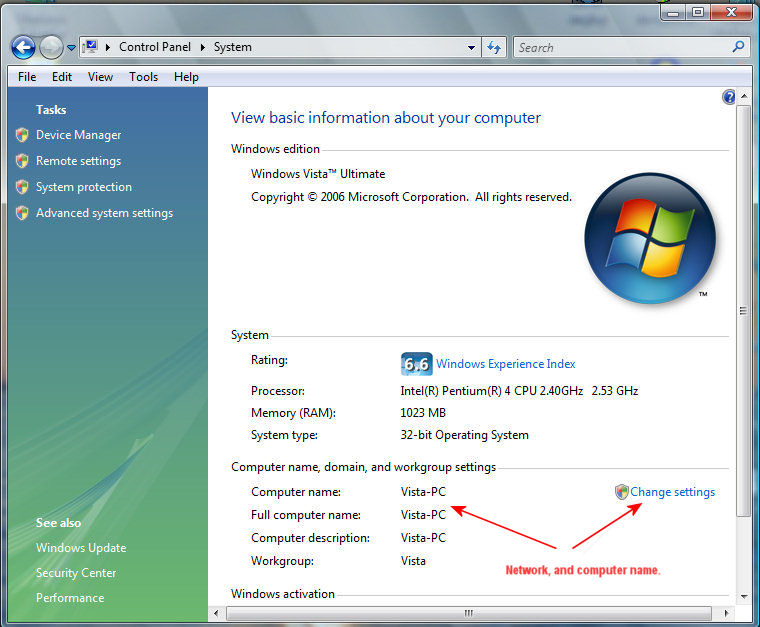
Vista (Win 7 is almost the same) configuration location.

vs-sys.jpg


Win XP (Win 2000 very similar) configuration location.

net-name.jpg
 
Last edited:
Win7 (wired) is able to see and access the XP Pro (wired) and only able to see Vista(wireless)

XP Pro (wired) is able to see Win7 (wired) but can't access it. Can't even see Vista (wireless)

Vista(wireless) sees Win7 (wired) but no access. Does not even see XP Pro (wired)
 
All the computers on the same peer-to-peer Network should bare the same name for smooth operation.
Um, I imagine you are saying that the workgroup name should be the same on all the computers not that the computers' names should be the same. Is that right?
 
Um, I imagine you are saying that the workgroup name should be the same on all the computers not that the computers' names should be the same. Is that right?

Yes that is what he meant. Same workgroup name. Computers with the same name would not work together.
 
Um, I imagine you are saying that the workgroup name should be the same on all the computers not that the computers' names should be the same. Is that right?

Thanks for pointing the missing word. 🙁

Original Post corrected.
 
Sharing Files In Windows 7 and XP
Sharing folders between two Windows 7 machines with the new HomeGroup feature is an easy process, but the HomeGroup feature is not compatible with Vista or XP. For this tutorial we are using Windows 7 x64 RC1 and XP Professional SP3 connected through a basic Linksys home wireless router.
First make sure both machines are members of the same Workgroup which by default is named Workgroup.

On the Windows 7 machine go into Control Panel \ All Control Panel Items \ Network and Sharing Center then click on Change advanced sharing settings
 
Back
Top