• We’re currently investigating an issue related to the forum theme and styling that is impacting page layout and visual formatting. The problem has been identified, and we are actively working on a resolution. There is no impact to user data or functionality, this is strictly a front-end display issue. We’ll post an update once the fix has been deployed. Thanks for your patience while we get this sorted.

Question Win10, version 2004, start-up's huge problem problems

Christian1

Junior Member
Hi everyone

Since installing Win10’s version “2004”, I cannot disable the Fast startup\shutdown.

It’s disabled in power-options (as it should be), registry, hibernate is enabled, I’ve tried sfc-scannow, turned relevant features on, off, on, etc.

Nothing works.

even Restart is too quick.

Is anyone having the same problem??

In advance, thank you very much for you kind help
 
Maybe that's not "Fast Startup". Maybe the PC actually boots faster? "Restart" doesn't use Fast Startup that I know of, so if that's faster, then you're simply getting faster boot times. It seems.
 
Two places to check:

1. BIOS: Is the BIOS set to disable Fast Boot? Also, disable the splash screen, if it's enabled. That way you can see the console readout as it boots & have time to hit special keys.

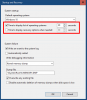
2. Operating system display time: Open System Properties, go to the Advanced tab, open the Settings button under Startup & Recovery, and tweak the two options for time to display the list of operating systems & time to display recover options when needed:

windows2.png

Not sure if either are directly related to your 2004 problem, but give it a shot!
 
Back
Top