• We’re currently investigating an issue related to the forum theme and styling that is impacting page layout and visual formatting. The problem has been identified, and we are actively working on a resolution. There is no impact to user data or functionality, this is strictly a front-end display issue. We’ll post an update once the fix has been deployed. Thanks for your patience while we get this sorted.

Win 8 Detailed features comparison.

Sometimes I swear MS is just screwing with us. That looks like a reasonable list, right until you get to the point where Enterprise (the granddaddy of Windows) can't have MCE added, or that Pro doesn't come with Windows-To-Go, or that Core can't back up to a network share.
 
Sometimes I swear MS is just screwing with us. That looks like a reasonable list, right until you get to the point where Enterprise (the granddaddy of Windows) can't have MCE added, or that Pro doesn't come with Windows-To-Go, or that Core can't back up to a network share.

Yep, most of the differences are completely arbitrary and cause more issues than they fix. That is if they even fix any at all.
 
What version has the start button? 😉

I am Not missing the start button, but if it desperately needed.

It is the one that you install this 3rd party on.

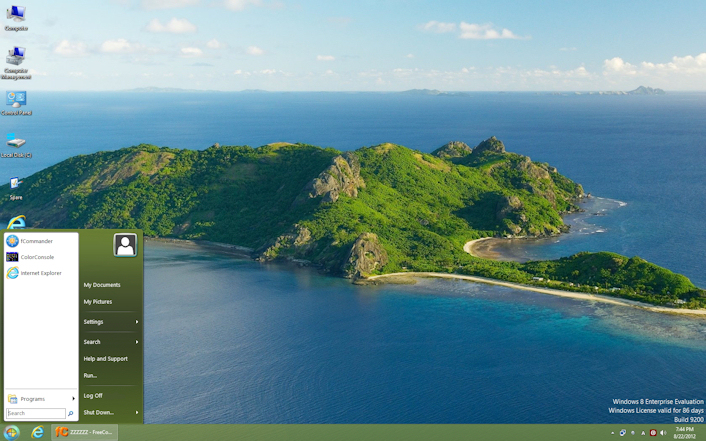
Win8-Orb-menu.jpg


http://classicshell.sourceforge.net/features.html

--------------
P.S. In general, I do not want my employees to have comfortable Media Streaming capacity on their Enterprise work computer.


😎
 
Last edited:
Disable it.

They're taking out that step. Then again, it's just another headache in case it's a company such as Netflix or whoever that could add their application to it... Then again, having Windows 8, it can easily be your end-all media consumption device and I understand the whole point of them taking it out completely.
 
Thank you! i may have to try this out.

I am pretty surprised that metro killed windows 8 for me. Along with some piss poor video performance, but that maybe fixed with new video drivers.

I will give it another shot, took a few tries with vista too. 7 was a great transition though.
 
They also removed the nice feature to require the user to press CTR-ALT-DEL to sign on. So much for security. They like that feature where I work.
 
I haven't actually used Win 8 yet, but I seem to recall reading in a review or two that the start button "missing" is purely a cosmetic thing. Hit the Windows key on the keyboard, and up pops the start menu.
 
in the windows 7 theme, can you make the icons on the left smaller so that it can have allot more icons ?


I'm back on my Win7 PC now,however I did see an option to choose how many programs you can have on the left(default was 10) but you can change that 🙂.


I'll do more testing tomorrow on the Win7 theme.
 
Sometimes I swear MS is just screwing with us. That looks like a reasonable list, right until you get to the point where Enterprise (the granddaddy of Windows) can't have MCE added, or that Pro doesn't come with Windows-To-Go, or that Core can't back up to a network share.
lol, same feeling.

For example:

Wireless Adhoc Networking: not possible for RT
Internet connection sharing: not possible for RT

So you can not share your internet connection with your other devices ..
 
lol, same feeling.

For example:

Wireless Adhoc Networking: not possible for RT
Internet connection sharing: not possible for RT

So you can not share your internet connection with your other devices ..

Those are probably the least offensive restrictions given that RT should only be on mobile devices. How many people will have their tablet plugged directly into their cable modem and try to tether their laptop or phone to it?
 
Sometimes I swear MS is just screwing with us. That looks like a reasonable list, right until you get to the point where Enterprise (the granddaddy of Windows) can't have MCE added, or that Pro doesn't come with Windows-To-Go, or that Core can't back up to a network share.
The RDP limitations are very much BS, too, and would be very nice to have for pro users (hint to MS: people with pro installed aren't upgrading, and they aren't going to get special OS versions from their bosses, either).

Thank you! i may have to try this out.
Do! I use it for 7, mainly for an Explorer up arrow.

I haven't actually used Win 8 yet, but I seem to recall reading in a review or two that the start button "missing" is purely a cosmetic thing. Hit the Windows key on the keyboard, and up pops the start menu.
When my keyboard dies, and its spare dies, and then its spare dies, I'll get a Windows key. Pretty small chance, that. And, why have a keyboard shortcut as the only way to bring up a primarily mouse-navigated menu?
 
When my keyboard dies, and its spare dies, and then its spare dies, I'll get a Windows key. Pretty small chance, that. And, why have a keyboard shortcut as the only way to bring up a primarily mouse-navigated menu?
Well, the lower left corner still works.
 
When my keyboard dies, and its spare dies, and then its spare dies, I'll get a Windows key. Pretty small chance, that. And, why have a keyboard shortcut as the only way to bring up a primarily mouse-navigated menu?

So hit Ctrl+Esc instead.
 
So hit Ctrl+Esc instead.
But how close is that to the bottom-left corner of the screen? 🙂

It's not a problem that it's impossible to do, but that the old way worked well. It is a point and click interface that is both accessed and used by the mouse. Accessing by the keyboard has been an awkward way to do it since they started including the assisted suicide Windows key. A good example is that you have to move above programs in the recent list to actually move to the right-hand column, unless you have memorized the tab order (which places the recent/all programs menu last, despite being closest to the text box which defaults to having focus!), and never accidentally hit shutdown. It could be made reasonably easy to safely and intuitively navigate it by the keyboard, but no, they're just going to remove it.
 
Back
Top