• We’re currently investigating an issue related to the forum theme and styling that is impacting page layout and visual formatting. The problem has been identified, and we are actively working on a resolution. There is no impact to user data or functionality, this is strictly a front-end display issue. We’ll post an update once the fix has been deployed. Thanks for your patience while we get this sorted.

Win 10 1809 the Update conundrum.

JackMDS

Elite Member
Super Moderator
This page is a Summary of the issue.

https://www.howtogeek.com/fyi/micro...tober-2018-update-was-deleting-peoples-files/

My take for it is...

If One already perform the Upgrade, whether it OK or performs the Folder/File deletion.

Leave it as is, if you lost Files and contact Microsoft if you can not find your own solution. Otherwise it does not have further implications and One can keep using Win 10 1809.

If One has a USB with the Download from MS last week, do not use it until a New ISO/USB Updated version is available to download.

The regular Weekly Update - 2018-10 Cumulative Update for Windows 10 Version 1809 for x64-based Systems (KB4464330) is already available.

At first look (Updating two computers) it seems to be OK, it Yields Win 10 17763.55

Take into considerations that every ones Millage Might Vary.

I used a USB to Upgrade close to 20 computers from 1803 to 1809 and every thing is "Peachy". :peach:

😎


I upgraded, didn't lose any data but vmware and a few other things were throwing up an error which I can't remember right now (it was to do with device guard, or hyper v. Hyper v wasn't enabled on my pc).
The only way I could solve it was to revert the update. Luckily I didn't lose any data then either!
 
This is the big reason we don't immediately deploy updates. We were about to pilot 1809 when we started seeing reports
 
I just looked at the windows upgrade now/media creation tool page and its still 1803.

https://www.microsoft.com/en-us/software-download/windows10
Didn't they pulled the latest Feature Update(1809) until they can figure out why some users are experiencing an issue?
Personally I haven't experienced any issues with the 1809 upgrade but I've only done it on my laptop. I didn't get around to upgrading the rest of the pcs in the house but that seems to be a blessing in disguise since this issue has come to light.
 
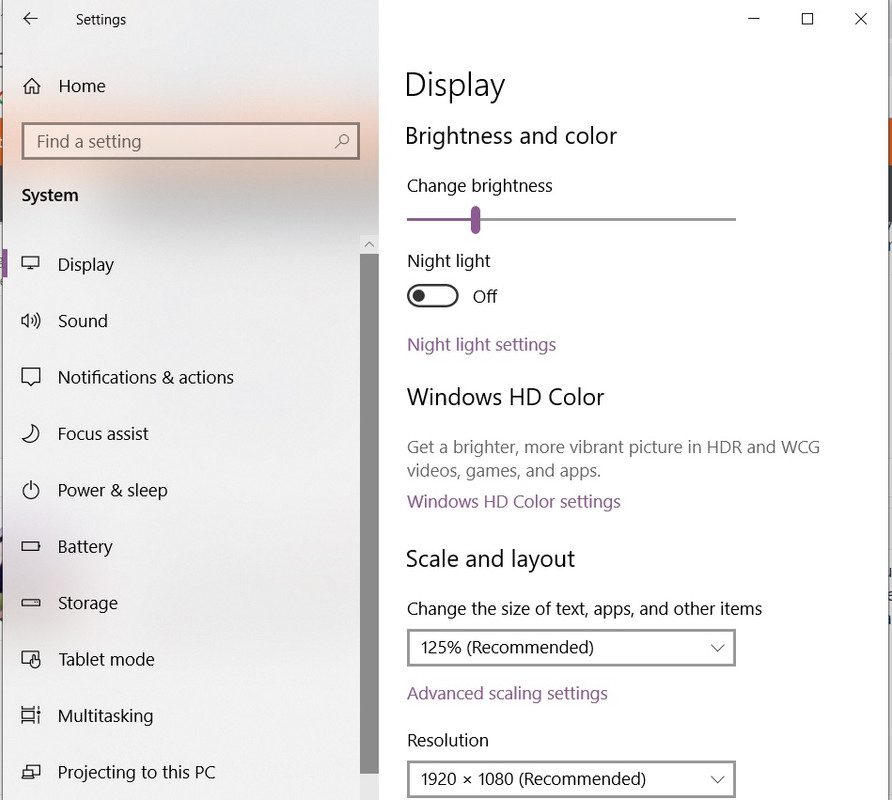
The only issue I have so far with Windows version in the OP, is the monitor brightness slider that used to be there is changed. While it still has a screen brightness slider, there is now only one instead of having one for "plugged in" and "on battery". This is my laptop, so I kept my screen less bright when on battery to extend my battery life. Now when I set the brightness, it automatically lowers it somewhat, but nowhere near where it used to be set at.

Now all I have is this, and I haven't seen the option that used to be there:

24-Jul-11-7-53-15-PM.png


Now all I have is this:

power.jpg
 
Is anyone else thinking, "MS is messing with the live operating systems of millions of people and they forgot/didn't bother to check whether a folder was empty before deleting it?!?"?

All the more justification that updates should be deferrable... at least while those responsible for this idiocy go back to school.
 
The only issue I have so far with Windows version in the OP, is the monitor brightness slider that used to be there is changed. While it still has a screen brightness slider, there is now only one instead of having one for "plugged in" and "on battery". This is my laptop, so I kept my screen less bright when on battery to extend my battery life. Now when I set the brightness, it automatically lowers it somewhat, but nowhere near where it used to be set at.

Now all I have is this, and I haven't seen the option that used to be there:

24-Jul-11-7-53-15-PM.png


Now all I have is this:

power.jpg
Oh man I totally understand your frustration with this. I even mentioned it in the sticky at the top of the forum. Why the hell would they remove a feature that is perfect for laptops?😡
With the new upgrade the only way to adjust the screen brightness is through the system settings like your screen cap shows or adding the brightness icon back into the notifications. The main draw back of that is it only allows you to to change it in 25% increments and it doesn't take into account plugged in vs battery.

Anyway, yes it sucks they removed the ability to finely tune the brightness. My guess and it is pure speculation is that it is more mobile friendly. Kind of like Android phones only has a brightness slider.
 
Yeah, it does suck indeed. I've used a particular brightness plan for my laptops going back at least a decade (if not longer), and those jerks done took it away. My eyes were so used to it that it's currently driving me nuts when I go between plugged in and battery.

At least I now know that I am not alone in thinking this sucks, and that they couldn't even leave the old way of doing it buried in the control panel or something? 😡
 
Battery slider: I'm not suggesting this as an excuse to ignore what MS has apparently done, but is it possible to change the brightness through a (IIRC) powercfg switch?

Admittedly my foray a few years ago into changing power configuration settings on the fly with powercfg didn't work so well, or maybe there was some additional thing I should have done to give Windows a prod so that it consistently applied the setting (and this was on Win7). I was playing with the processor max frequency option.
 
Is anyone else thinking, "MS is messing with the live operating systems of millions of people and they forgot/didn't bother to check whether a folder was empty before deleting it?!?"?

I'm guessing its more that they thought they were doing it correctly but there was a check\step\situation\etc that they missed

Battery slider: I'm not suggesting this as an excuse to ignore what MS has apparently done, but is it possible to change the brightness through a (IIRC) powercfg switch?

Yeah I feel like there would probably still be an way to adjust it - just more hidden somewhere. Admittedly we don't have any 1809 machines to test out on
 
Yeah I feel like there would probably still be an way to adjust it - just more hidden somewhere. Admittedly we don't have any 1809 machines to test out on
Another possibility is that there's a way to trigger the old UI just like there currently is for the old Control Panel > Printers UI:

C:\Windows\explorer.exe ::{2227A280-3AEA-1069-A2DE-08002B30309D}

Handy when 'Devices & Printers' doesn't match up with the list of available printers for applications.
 
Is anyone else thinking, "MS is messing with the live operating systems of millions of people and they forgot/didn't bother to check whether a folder was empty before deleting it?!?"?

All the more justification that updates should be deferrable... at least while those responsible for this idiocy go back to school.

This particular issue was a failure of the insider program feedback getting surfaced correctly. The issue was reported ~3 months ago several times, but due to the reporting mechanism it flew under the radar. They are making some changes to the feedback process, so hopefully things like this won't happen again.

The only people that actually got this update are those that actively checked for it. It was never pushed to anyone. Thankfully the issue was seen, though from the root cause I have seen I don't think too many people would have hit the issue.

That said I don't see any reason for MS to prevent Home users from deferring feature updates for 30 days at least, hopefully they will relent on this issue.
 
I ran into an interesting issue on a freshly-formatted 1809 N2830 laptop.

Task Manager shows CPU time 70-100%, but it only shows like 10 processes, and for each of them, it lists 0.1%-0.5% CPU usage? What gives? Is Task Manager now useless at tracking down sources of CPU usage? Malwarebytes didn't find anything; like I said, a fresh install.
 
The re-release has been going well for me. Being able to right-click a program in the task bar and have the menu come up properly makes it a worthy upgrade over 1803.
 
Didn't they pulled the latest Feature Update(1809) until they can figure out why some users are experiencing an issue?
Personally I haven't experienced any issues with the 1809 upgrade but I've only done it on my laptop. I didn't get around to upgrading the rest of the pcs in the house but that seems to be a blessing in disguise since this issue has come to light.
1809 is back up again and I've been using the tool to update my install drives.
 
Back
Top