• We’re currently investigating an issue related to the forum theme and styling that is impacting page layout and visual formatting. The problem has been identified, and we are actively working on a resolution. There is no impact to user data or functionality, this is strictly a front-end display issue. We’ll post an update once the fix has been deployed. Thanks for your patience while we get this sorted.

Will the 5850 fit into my hp pavilion 9550f?

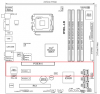
Basically my parents brought me this computer which came with the 4850. Heres the picture of the motherboard
http://h10025.www1.hp.com/ewfrf/wc/d...roduct=3887826

The actual picture of what my computer looks inside is this.
photoon20100302at1405.jpg

and another angle
photoon20100302at1424.jpg


I know I have to buy a new psu but that can easily be done.
 
Break out a tape measure and see how much space you have. The 5850 is something like 9.5" long (Google that to be sure) and 2 slots wide. It's impossible to tell solely from those pictures if it will fit - it looks like you have a wire or something in between slot 1 and slot 2, but I can't tell for sure.
 
Last edited:
Specs show a 460 watt PSU. I'm not sure that is enough for a 5850. It requires 2 6pin PCI-E power supply cables.
 
Well I know I have to buy a new psu. No question about that. I made a paper replica of the dimensions of the card and it looks like it will fit. My main issue now is rather if I have clearance next to my DIMM slot and another thing is that my Sata cables are blocking my way, but I have 4 extra sata slots open. Is it alright to move the 2 sata connectors to the next slots or am I stuck on the slots my connectors are already in?

Also If I'm not mistaken the ati radeon 4850 is about 9 inches long? but the width of the card is significantly smaller than the 5850.
 
Last edited:
Well I know I have to buy a new psu. No question about that. I made a paper replica of the dimensions of the card and it looks like it will fit. My main issue now is rather if I have clearance next to my DIMM slot and another thing is that my Sata cables are blocking my way, but I have 4 extra sata slots open. Is it alright to move the 2 sata connectors to the next slots or am I stuck on the slots my connectors are already in?

Also If I'm not mistaken the ati radeon 4850 is about 9 inches long? but the width of the card is significantly smaller than the 5850.
Your DIMMs won't be an issue. They stop right where the space behind the PCIe slot starts. The only conflict there is that you won't be able to add/remove DIMMs with the card installed, which is a normal design quirk. The 5850 won't encroach any more than the 4850 did.

As for your SATA slots, you should also be fine. Most motherboards will let you move drives without an issue, and Vista/7 shouldn't care one way or another.

The only concern I have is your front panel connectors. Looking at the layout of the board you have both a FP 1394 connector near the front of the board, and some other connector in the rear near the SATA ports. If the FP 1394 connector is in use, you may have to unplug it if the cable is too stiff to bend underneath the 5850. It's harder to tell with the connector in the rear, since I can't tell what it is or if it's in use.

Here's a quick diagram of roughly what space the 5850 would occupy. You can see how it will end up sitting over parts of those connectors.
 

Attachments

  • 5850.png
    5850.png
    14.9 KB · Views: 27
Last edited:
Well I have my ram filled out already so its not an issue. You got a point about the fp 1394. Quick question what is that? and the cable near the sata port is the power button Im pretty sure. From the looks of your diagram it is barely grazing the wireless card on the second pci port. I have no clue how much i can bend both the fp 1394 and the power button
 
Your going to have to do some manual labor. OMG it's going to hit the PSU and not fit. hmmm why is the PSU doing overthere anyways,,
 
hp flawed design right there. It wont reach the psu thats for sure. Bending wires sound like a catastrophe waiting to happen. I know they wont break but I can't help but feel pessimistic <.<. Its just wheter those wires will bend to allow clearance for the card
 
Well I have my ram filled out already so its not an issue. You got a point about the fp 1394. Quick question what is that? and the cable near the sata port is the power button Im pretty sure. From the looks of your diagram it is barely grazing the wireless card on the second pci port. I have no clue how much i can bend both the fp 1394 and the power button
1394 is the IEEE designation for Firewire. So that's the cable for the Firewire port on the front of your case. You can unplug it with no ill effects other than the fact that you won't be able to use your front Firewire port.

As for your power button, if that's what it is it'll be a bit trickier. In custom PCs, something like that would be hooked up with multiple small wires that would bend out of the way, but I have no idea if your wires are quite that flexible.

And your wireless card should be fine assuming it's in the lower PCIe slot.
 
Well the power connector thing is the only thing blocking my way from actually getting the 5850 now. The plastic component of the power connector would prevent me from installing the card. The wires themselves are flexible. Not so much the rectangular plastic covering on them. About the firewire, that would be easy to remove. I dont suppose there's another way to turn on my computer without the power switch?
 
Last edited:
Well the power connector thing is the only thing blocking my way from actually getting the 5850 now. The plastic component of the power connector would prevent me from installing the card. The wires themselves are flexible. Not so much the rectangular plastic covering on them. About the firewire, that would be easy to remove.
How big is the plastic connector? Keep in mind that the bottom of the card is a bit higher than the top of a PCIe slot, so you have some space. On my Asus board for example I can install a dual-slot card and have it cover my front panel connectors without an issue, since the bottom of the card is higher than the resulting mess of wires after bending them out of the way.
 
the plastic covering give or take is around 1 to 2 cm. It was tall enough that it wont allow the card hypothetically to go over it.
 
the plastic covering give or take is around 1 to 2 cm. It was tall enough that it wont allow the card hypothetically to go over it.
Then you should be able to work around it with something like this extension cable. That specific product is for USB ports, but as long as you can line up the pins correctly, you should be able to plug it in to your FP header and run it out of the way. Otherwise I'm sure there are other specialized extension cables for the job.

In either case, all of those cables have a connector that is the standard height. It will fit under the card.

Edit: And for the sake of reference, I just pulled out a spare video card. The distance from the bottom of the PCIe connector to the bottom of the card is roughly 1.5cm (this is all in the ATX/PCIe spec). So you have at least that much room to work with.
 
Last edited:
Well I'm just making sure. Getting some what ansty cause Im gettin it in about 2 weeks and I want to make sure it fits. Going to measure the power connector thing as well as the fp connector as well
 
Last edited:
Actually you're in luck. I just caught a friend who was putting a computer together tonight, and got him to take a photo that should help put your mind at ease.

(Apologies about the image quality. Camera phone)
http://img.techpowerup.org/100303/5850Size.jpg

He has a 5850, and dropped it in to the last slot on his motherboard where it would cover the FP connectors (the black and blue boxes you see). There's 1.5cm of space between the bottom of the card and the mobo, which is just enough space to fit a standard sized plug and let the wires snake out (I just measured a standard plug, it's 1.5cm).

If your case's plug is that size or smaller it will fit. Otherwise an extension cable will surely work.
 
You really have been extremely helpful. Its puts my mind somewhat at ease. In about 2 weeks from now Im going to order the card plus a psu for it. Thanks a lot for the help and I will post whether it fitted or not. Last question. I assume that the power connector is also around 1.5 cm? and thanks alot
 
Last edited:
You really have been extremely helpful. Its puts my mind somewhat at ease. In about 2 weeks from now Im going to order the card plus a psu for it. Thanks a lot for the help and I will post whether it fitted or not. Last question. I assume that the power connector is also around 1.5 cm? and thanks alot
If by power connector you mean the front panel plug* coming from your case, then I would imagine so. You'd have to measure yours, I have no idea whether HP is doing anything crazy there. But I'm assuming they're not.

* That plug would actually have pins to wire up the reset button, power button, hard drive LED, and system power LED; all the things on the front panel of a computer.
 
Assuming that it's individual wires leading to a common bundle like the USB extension cable, then you won't even have to force it. Just bend the wires to a side, and the card will go right on top.
 
Last edited:
Hey guys... did this work? What PSU did you upgrade to Kingso? I ordered same card and am curious how this turned out!

Thanks
 
Back
Top