• We’re currently investigating an issue related to the forum theme and styling that is impacting page layout and visual formatting. The problem has been identified, and we are actively working on a resolution. There is no impact to user data or functionality, this is strictly a front-end display issue. We’ll post an update once the fix has been deployed. Thanks for your patience while we get this sorted.

Question WiFi is starting to cut in & out. Time for new router?

thestrangebrew1

Diamond Member
I've noticed in the last 2 weeks or so that my phone and tablet are losing wifi signal at the other end of my house (our bedroom). It'll switch from the network to 5G randomly, and the signal is also significantly weaker. When on wifi, the devices will buffer intermittently. I have tplink router that we've used for almost 10 years. The router is probably about 75-100' as the crow flies to the other end of the house, being blocked by exterior and interior walls. My daughter also mentioned to me this morning her desktop pc wifi has been acting weird lately. Is it time for a replacement? Is it a good time to switch to some kind of mesh system? If so, what do you guys recommend? We have a lot of devices that connect to the network, phones/tablets, but I also game on a laptop, at least 1 tv is on streaming content, and a at least one desktop pc that my daughter uses for homework or gaming. Hardwire isn't really an option, mostly because where the modem is located, I'd have to run a line outside then come back in, and the wife doesn't really want to see a wire on the exterior.
 
Is the router at the periphery of the house? You'd probably get away with a WiFi range extender. Does your router work fine up close?

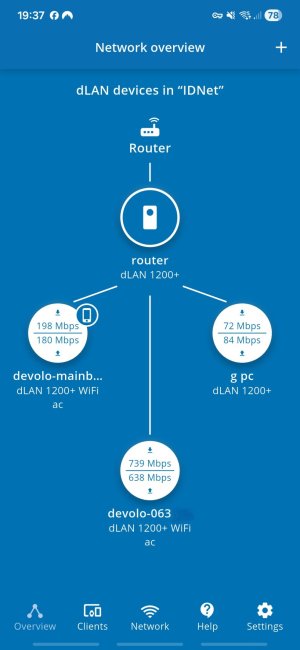
You can get fairly good speeds on powerline stuff nowadays. This is mine, I have a stone wall that's 18inches thick running through my house so WiFi has some blind spots!

1000051502.jpg
 
10 years is a lot for a WiFi router! I've probably had 3 different ones in that time period. I have a TP link Deco X60 mesh system now, only using 2 of the 3 nodes that it came with. I do have them connected via Ethernet backhaul though and not using them in the traditional wireless mesh method. They perform well but I'm considering a full network upgrade for security reasons (doing VLANs to keep devices segregated), plus the fact that TP Link could get banned in the US.

Do you use your cable lines in your house for TV? If not, you could consider using them with MOCA adapters to get wired Ethernet to other areas of the house. https://www.amazon.com/s?k=moca+ada...p13n-expert-pd-ops-ranker_ci_tech-br-left_1_4

This seems to be a decent pathway when getting wires to other areas of the house is problematic.
 
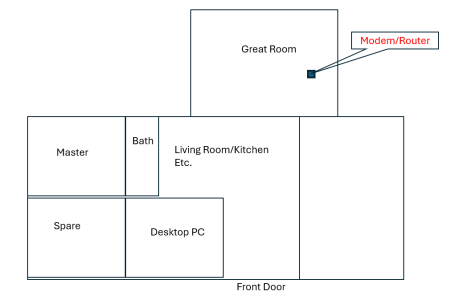
It's been so long I can't remember if we've got cable lines coming out of the rooms. Literally all of the tvs in the house is on wifi. If I were to go with mesh, I could probably get 1 of the nodes wired. Here's kind of the layout of the house:

1764977737887.png
I could run a wire from the router/modem behind the great room and around to the master. I could keep the wire pretty well hidden. But there's not really a way to run a cable from the great room into the living room. The great room has no attic space, and the "wall" is actually all glass between. There's also a fireplace and a door to go into the great room. I'll have to take a look at PoE too. I seem to recall when I looked into them before, they weren't that great, but that was years ago!

Edit: Signal in the living room seems to be ok and really no issues streaming to our tv. Although when I'm playing BF6 I'm constantly getting the latency and slow wifi speed warnings (I'm not sure exactly what they're called but the icons look like speedometers in cars lol).
 
If the mentioned deives are working well in the Great Room then Yes it is

Time for new router!​


😎
 
Back
Top