• We’re currently investigating an issue related to the forum theme and styling that is impacting page layout and visual formatting. The problem has been identified, and we are actively working on a resolution. There is no impact to user data or functionality, this is strictly a front-end display issue. We’ll post an update once the fix has been deployed. Thanks for your patience while we get this sorted.

Question Where to plug in cpu cooler?

Kledgie

Member
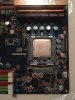
Hey guys. I'm not seeing a place to plugin my cpu cooler. Should I just plug it into the fan 1 at the top left? Normally I see a cpu fan spot but i'm not seeing one on this board ~ shuttle SP35P2 Pro
 

Attachments

  • IMG_0224.jpg
    IMG_0224.jpg
    77.3 KB · Views: 18
I see in the mobo manual that all the fan headers are labelled solely as "Fan1", etc. However, the manual also indicates that, in BIOS Setup, there are separate settings available for the CPU FAN and the SYS FANs. I suggest you plug your CPU cooler into FAN1. Then go into BIOS Setup and try setting CPU_FAN to one of the fixed slower speeds. You may have to SAVE and Exit from BIOS Setup to see the fan speed change. Try this process with other speed settings on CPU_FAN. If this does NOT change the CPU cooler speed, then try again using a different header, until you can identify the one that the CPU_FAN settings work on.

 
I see in the mobo manual that all the fan headers are labelled solely as "Fan1", etc. However, the manual also indicates that, in BIOS Setup, there are separate settings available for the CPU FAN and the SYS FANs. I suggest you plug your CPU cooler into FAN1. Then go into BIOS Setup and try setting CPU_FAN to one of the fixed slower speeds. You may have to SAVE and Exit from BIOS Setup to see the fan speed change. Try this process with other speed settings on CPU_FAN. If this does NOT change the CPU cooler speed, then try again using a different header, until you can identify the one that the CPU_FAN settings work on.
Beautiful! Thanks for the help Doc!
 
FAN1 is most of the time the CPU_FAN unless you have a port that specifically says CPU_FAN, or your using a high class modern gamer board, which has a special plug for AIO water pumps, as those require a bit more amperage then a normal cpu fan would.
 
Back
Top