• We’re currently investigating an issue related to the forum theme and styling that is impacting page layout and visual formatting. The problem has been identified, and we are actively working on a resolution. There is no impact to user data or functionality, this is strictly a front-end display issue. We’ll post an update once the fix has been deployed. Thanks for your patience while we get this sorted.

Question Where to connect on PSU?

Devdeep

Member
It is a few years since I last built a PC. Am puzzled with the PSU and Asus Crosshair VII Hero Motherboard connections to Corsair RM750i PSU. I can see where the 24pin connection goes from MB to PSU but not sure about the 8 pin / 4pin connections on the MB. Using Ryzen 2700X CPU, do I need the 8+4 connections and where does the other end go on the PSU please?
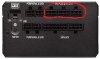
2019-03-21_18-15-15.jpg
 
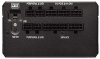
1.jpg

For this power supply model, these are interchangeable for your CPU and your PCIe (GPU). Your cable for your CPU should fit into one of these, and then the other side should be split into 2 x 4 pin (and the cable will likely be labled CPU).

You usually do not need to use both the 8 pin (2 x 4 pin) + the stand-alone 4 pin for the CPU unless you are heavily overclocking your 2700x. However, from what I have seen, there's not much overhead left to get much more out them. So at first just use the one 2 x 4 pin CPU connector, and you shouldn't need to worry about the other one.
 
Back
Top