• We’re currently investigating an issue related to the forum theme and styling that is impacting page layout and visual formatting. The problem has been identified, and we are actively working on a resolution. There is no impact to user data or functionality, this is strictly a front-end display issue. We’ll post an update once the fix has been deployed. Thanks for your patience while we get this sorted.

What's the likely bottlneck in my LAN?

Muse

Lifer
What will be the bottleneck getting data to/from the server machine to my wirelessly connected laptops?

1. Speed of the server machine HD(s)? Does it matter if they are 5400 or 7200RPM?

2. Ethernet adapter performance of the server machine?

3. Wireless router performance?

4. Wireless adapters of the laptops?

I'm investigating my options in designing and implementing a home network. I will have two laptops connected wirelessly and an ethernet-connected desktop, a non-N wireless router (Buffalo WHR-HP-G54), some kind of low power data server (low power CPU and PSU or a laptop, for the time being) connected by ethernet to the router. I have reasonably fast DSL internet (2.7 mbps). I will have my email client's data on a server HD, database tables I'll want to search and query, MP3s I'd like to stream. Only one machine will be making data requests at a time, IOW light duty for the server.
 
1. The speed of the HD's are almost 10 fold the speed of the network, Not a problem compared to the speed of the server you mention no stats of.
2. More info on the server machine please,,,, But even if it had only a 100Mbps NIC in it that would keep up to 2 laptops using Wireless G.
3. The router is also a 10/100mbps
4. again the info of what the laptops wireless support helps but by the router your using G is the limit.

Building your own NAS of prefab?, Prefabs are generaly slow due to poor CPU power but should handle anything up to wireless N with no problem.

here is some rough stats (Ratings, Not actual speeds and non-turbo modes) and you can add it up yourself.
Wireless B=1.2MBps, G=7MBps, N=14MBps.
Wired 10/100mbps= 11MBps, Gigabit (1000) = 111MBps
The HDD speed in the NAS will be way beyond what your router and wireless can handle and your DSL is less then half the speed of what your laptop wireless can handle.

I dont see any bottleneck unless your intentions are to do the accasional hardwire to the router and that would only be if your NAS and your laptop support Gigabit connections.
 
3/4

Here's why:

802.11n has a wireless performance of up to 600mbits with the best routers coming out in the future. (Common to see 270mbit, 300mbit, 450mbit) This will be your drawback since routers coming out today and new motherboards all have 10/100/1000mbit connections. If your old hardware has 10/100mbit then you might be in trouble. If you're operating on 802.11g, then you're screwed even more. Further you are from the wireless router, the less of the peak performance of the bandwidth you'll get.

Your hard drives, if SSD, can completely saturate a 3gbit (5 times the best of 802.11n) SATA II port according to AnandTech articles. So, that's not going to be the bottleneck. Most hard drives have much higher performance than 802.11g.

Again, wireless is going to be your enemy. You will almost never get the rated mbit the standard says it is. (802.11g being 54mbit. Real world performance will be much less)
 
Last edited:
Bottle neck depends on what is done with the network.

From your description it does not look like you have one.

For the wire part use computers with Giga NIC connecting to Giga switch.

For Wireless you need more if you plan to Stream mufti videos through the Wireless, you probably need a device with lager Bandwidth than 802.11g.

P.S. Numbers like "802.11n has a wireless performance of up to 600mbits", are marketing BS functionally it about 70-90% less.


😎
 
Bottle neck depends on what is done with the network.

From your description it does not look like you have one.

For the wire part use computers with Giga NIC connecting to Giga switch.

For Wireless you need more if you plan to Stream mufti videos through the Wireless, you probably need a device with lager Bandwidth than 802.11g.

P.S. Numbers like "802.11n has a wireless performance of up to 600mbits", are marketing BS functionally it about 70-90% less.


😎

Well, according to Wiki it's the limit of 4x4:4 or whatever.
 
Wireless will be your bottleneck. It's half-duplex, which means that the more active nodes you have on it, the worse the performance will be...right off the top...not to mention other issues related to wireless ethernet.
 
Wired > wireless

Yeah, one of the laptops is just 802.11g, the other is 802.11agn. I suppose the latter will only get N speeds if the router is N? The N capable machine will be further from the router, but not super far. Range is one of the reasons I got the Buffalo router, it has a good rep for range. It's running dd-wrt.

For the wire part use computers with Giga NIC connecting to Giga switch.

For Wireless you need more if you plan to Stream mufti videos through the Wireless, you probably need a device with lager Bandwidth than 802.11g.

😎
[/B]
Pardon my blatant ignorance, but what's a Giga switch? Sorry, I've heard of switches but I don't know what they do. I have the Buffalo router, DSL modem, do I need a "switch?"

I have no immediate plans to stream video, maybe someday though. Quite possible. I want to stream MP3s now, though.
 
Last edited:
Wireless Routers are combo devices, the part of the Router that you plug the computers into is a switch.

The Buffalo switch is 100Mb/sec.

If you have Giga NIC in the computers. You get this...

8 Ports - http://www.newegg.com/Product/Produc...82E16833156251

5 Ports - http://www.newegg.com/Product/Produc...82E16833156250

You plug one port to the Buffalo to get the services from the Router, and you plug all the computers that are Giga capable into the Giga switch. By doing so you will get a Giga "speed" between the computers for Local LAN transfer.
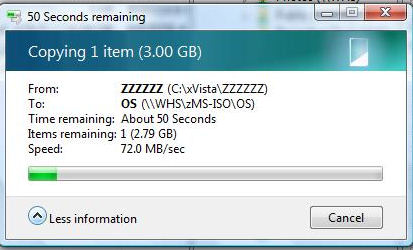
Good Giga transfer can be like this.

Giga-Optimized.jpg


😎
 
Last edited:
The Buffalo switch is 100Mb/sec even when the connection to it is by ethernet?

I think I do have Giga NIC in the computers, but only the desktop is connected by ethernet. the laptops' connections will be wireless, unless I move them temporarily to the vicinity of the router, not something I want to do if I can help it. The server machine, whether a laptop (interim solution, don't know how long, will see) or a low power server machine, will be ethernet connected to the router (or the switch, as you suggest). So, what would be the advantage in having one of those switches in this case (the laptops will be wireless connection to the network)? Also, if the Buffalo only supplies 100Mb/sec, how can the switch get higher speeds out of it?
 
Last edited:
The Buffalo switch is 100Mb/sec even when the connection to it is by ethernet?

Yes, each switchport on the Buffalo is capable of operating at either 10 or 100Mb.

I think I do have Giga NIC in the computers, but only the desktop is connected by ethernet. the laptops' connections will be wireless, unless I move them temporarily to the vicinity of the router, not something I want to do if I can help it. The server machine, whether a laptop (interim solution, don't know how long, will see) or a low power server machine, will be ethernet connected to the router (or the switch, as you suggest). So, what would be the advantage in having one of those switches in this case (the laptops will be wireless connection to the network)?

The advantage is Desktop to Server transfers will operate at 1000Mb (Gigabit) instead of 100Mb. Your workload seems light (database queries, streaming mp3s) but it would definitely help for streaming videos, large file transfers, backups, etc. This would add no real value to the wireless clients.

Also, if the Buffalo only supplies 100Mb/sec, how can the switch get higher speeds out of it?

The TRENDNet is Gigabit and does not rely on the Buffalo for switching frames between directly connected computers.
 
Back
Top