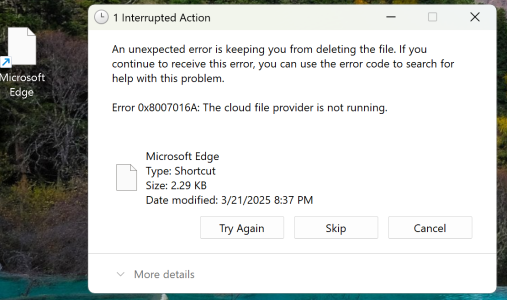
Purchased a new laptop, upgraded from Windows 10 to 11. I ordered a copy of Office Standard 2024. Installed without any issue and the program is running fine. After installing Office, a file appeared on my desktop, labeled Microsoft Edge. It's a blank, white file. Unable to open and despite trying everything I can think of, it cannot be deleted. It's like my in-laws when they come by for a "quick visit" visit and three months later they're still here. When I try to delete it I receive an error message.
Please see attached screenshot.
What did I do to deserve this, and how do I remove this file? Thank you.
Please see attached screenshot.
What did I do to deserve this, and how do I remove this file? Thank you.