• We’re currently investigating an issue related to the forum theme and styling that is impacting page layout and visual formatting. The problem has been identified, and we are actively working on a resolution. There is no impact to user data or functionality, this is strictly a front-end display issue. We’ll post an update once the fix has been deployed. Thanks for your patience while we get this sorted.

What are your thoughts on mousepad cushions?

Kalmah

Diamond Member
Like this:
images


I had to buy one a couple of years ago because my wrist was hurting unbarably. At times I feel like it's giving me a disadvantage in competive fps play. I'll be trying to roll the mouse back and keep getting the cushion in the way, for instance.

Do you think they are a bad idea?

I'm thinking I might get a plain mousepad for fps gaming and just switch between them.
 
It is a lifesaver for me. Keeps me from having tendonitis so often. It does get in the way of playing more competitive, but it is far better than the alternative.
 
I personally think that the small mousepad is contributing to your tendonitis. Moving your wrist repetitively is the problem. I use huge mousepads and my move my whole are and keep my wrist straight. I never have any problems.
 
If your desk setup allows it, get an office chair with arm rests and height adjustment. Raise/lower your chair to a point where your forearm is neutral to your wrist while gripping the mouse. The ergonomics of your mouse could also be a factor.
 
Get a bigger mousepad and use a separate beanbag style wrist rest. The ones with the pad built in are annoying.
This is what I did years ago for work. Gaming for hours still is no problem, but Visual Studio and SQL Server Management Studio were Hell on my wrist 🙂.

What I have now is a thick rubber mouse pad (Allsop XL), that's not uncomfortable to rest my forearm on.

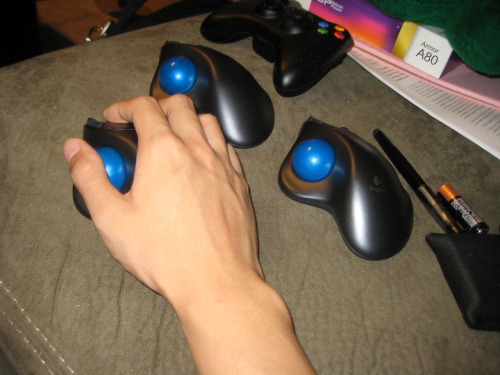
Trackball.
Depends on type of game. Anybody should be able to transition to one for vehicle and strategy, but arcade type shooters can be tricky for those of us used to mice for rapid aiming.
 
When I had wrist problems, I used to have a mouse for gaming and a trackball for everything else. My wrist problems cleared up eventually (I think partly because of the combo and partly because my work took me from trying to use a computer for 8 hours a day to having lots of breaks and computing in between).
 
my thoughts on "What are your thoughts on mousepad cushions?"

=

They ruin your wrists. <---------------- surprise lol.

Its much better to simply make sure your "intire" arm is resting flat on a table (not hovering above it, but laying against it) with just your elbow sticking outsides of the table resting area. Your intire arm length should be flat and supported by the table (which might not be that good for the up/down movements in first person shooters, but is by far the most comfortable way to use a mouse).

Whenever I see a person how doesnt know this.....
I think "grandma/grandpa" type thoughts of them, like have they never used a pc before?

If their "sitting" too high on table, if their arm is hovering, or their hand *isnt* wresting on the mouse (ive seen old people who just have 2 fingers touching the mouse (one for each mouse button), I cant help but feel like Ive walked into the 80's or something, by now everyone should be comfortable useing a pc.


I personally think that the small mousepad is contributing to your tendonitis. Moving your wrist repetitively is the problem. I use huge mousepads and my move my whole are and keep my wrist straight. I never have any problems.


^ this is the correct answear.


If your desk setup allows it, get an office chair with arm rests and height adjustment. Raise/lower your chair to a point where your forearm is neutral to your wrist while gripping the mouse. The ergonomics of your mouse could also be a factor.
^ this is also a correct answear.


so in short.....
get a decent table, mouse pad (thats completly flat, the lower to the table it is the better), a egonomic mouse, and a chair you can adjust height on.

AND dont ever buy a mousepad with "cushions".... learn to sit properly at a table, useing a mouse. Your wrists will thank you.
 
Last edited:
Anthro.com..get the Console desk for about $1000. You will wonder why you never got it before. Its fantastic adjustments for keyboard area are lifesavers for wrists.
 
Despise them. They completely destroy any speed or precision. Suppose I could get by, but I've never had a need for one. Then again, my wrist is usually resting on my desk anyway. It has support, all the "cushion" does is elevate it.
 
Step 1: Buy a mouse that fits your hand
Step 2: Position your chair or table at a proper height
Step 3: Take frequent breaks
Step 4: Strengthen your forearms with weight training
 
I used that exact same gel mousepad with the trackball imaginer posted above.

I recently decided to try a gaming mouse, and I'm still using it. I may in the end go back to the trackball, since I've used trackballs since 1989 and I love them, but I do enjoy this mouse too.

Thing is, like the OP said, I couldn't use that gel wrist rest pad with the mouse like I could with the trackball. Insufficient space, and the back of the mouse kept butting into the pad. So I got a special, nice Rocketfish gaming mousepad:

sZ84k.jpg


that gave me a nice surface for the mouse, and lots of space... but the edge of it is metal, and so now my wrist was hurting against the edge of the desk and the metal edge of the mousepad. Not cool.

So I tried cutting off just the bottom gel pad section and velcroing that to my desk just below the mousepad:

rfTAB.jpg


But that was too bulky and either covered too much of the mousepad or forced me to put the mousepad so deep into the desk that it began interfering with other items on the desk and required my arm to stretch out too much.

So the solution I seem to have settled on now is that I cut some strips out of the other section of the pad, the part without gel, the part that's just a thin foam... and I velcroed those down at the base. They of course could still have the mouse butting up against them problem but that doesn't SEEM to be an issue because they're cut to fit only on the desk area and not go onto the mousepad itself at all.

I think this is the best solution I've found which allows wrist comfort and mouse use, but in the end perhaps I'll just revert to trackball.

7M6nJ.jpg
 
@Geosurface

your doing it wrong 🙂

with the mousepad right up to the edge of the desk/table your useing, you wont be able to really "rest" your intire arm on the desk, which means you end up "lifting" your intire arm while your useing your pc = bad form.

try pushing your monitor back a little (1 intire arm length from your sitting position, stretch your arm+hand and put monitor about 5cm futher than that out), then adjust your height on chair, so your arm is resting againt the table. Where your "hand" is when your arm is laying on the table is where you put your mousepad. So make sure your "tummy" is up against the table, when your sitting with a straigt arched back supported by your chair.

Haveing a mousepad right out the edge of the table like that is probably gonna end up resulting in pain from prolonged use.

*Im not surprised to hear you normally use a trackball, and just resently started useing a mouse. Try the tips I posted above. 🙂
 
Last edited:
I personally think that the small mousepad is contributing to your tendonitis. Moving your wrist repetitively is the problem. I use huge mousepads and my move my whole are and keep my wrist straight. I never have any problems.

It isn't the size if the mouse pad, but the angle my arm comes in at. With my new desk, I have to put the mouse on the desk rather than the keyboard tray. This causes my hand to have an upward angle at the wrist when using the mouse. This upward angle causes extra strain on the tendons in my wrist causing tendonitis, and eventually carpal tunnel. Solutions to this are to get a new desk, get a new chair with arm rests that allows my wrist to rest normally, or get a mousepad with padding that does this. The last option was the simplest, easiest, and cheapest, so I went with that.

Edit: after reading through this, a fourth option occurred to me. I could move my keyboard from the tray to my desk top. This would allow me to sit closer to the desk and let my arm rest more on the desk so my wrist wouldn't have such a upward angle. I could also jury rig the desk to use a wider keyboard tray to put my mouse down there. I like that option the best since it wouldn't be so high.
 
Last edited:
@Martimus

Solutions to this are to get a new desk, get a new chair with arm rests that allows my wrist to rest normally, or get a mousepad with padding that does this.

new desk = yes (one lower)
new chair = yes (so you can sit higher)
new chair with arm rests = NO! if your useing arm rests your doing it wrong (rest arm on table instead)

get a mousepad with padding = horrible solution.

******** If your arm is "floating" and only supported at the wrists by one of these pads, then your putting alot of weight on your wrists = bad solution.

The best option is to have a "wide" enough table, where you can have your intire arm resting on it.
 
@Martimus


new desk = yes (one lower)
new chair = yes (so you can sit higher)
new chair with arm rests = NO! if your useing arm rests your doing it wrong (rest arm on table instead)

get a mousepad with padding = horrible solution.

******** If your arm is "floating" and only supported at the wrists by one of these pads, then your putting alot of weight on your wrists = bad solution.

The best option is to have a "wide" enough table, where you can have your intire arm resting on it.

I think a big part of it is that I have one hand below my desk at the keyboard tray, and one above on the desk. It is a very wide desk, so the space is not a problem. I can bring the keyboard up to fix this problem. To be honest I haven't thought about it like this since I got the padded mousepad, but it is a very awkward way of playing. The padded mousepad and keyboard pad at work did work though. It lets me float my hand naturally like I did before when they keyboard tray was lower. But the padding is still better than no padding. You don't put much pressure on your wrist with a pad, since there isnt much force pushing down, so it isn't as big of a problem as you are imagining. Same with a arm rest, although both can cause more lateral motion problems. That said, most are designed to allow easy lateral motion while restricting vertical motion.
 
Trackball.

Someone beat me to it. Really, this is what I recommend.

Understand that there is a BIG muscle learning curve when switching over. But once you do, and particularly if you already have wrist problems, this is THE way to go and solve your problems.
 
We had a big ergonomics thing at work the other day and the speaker said those wrist pads are absolutely the worst possible things for your wrists and your body in general. It forces you into essentially the exact opposite form you should maintain while mousing.

KT
 
Pinch/gripping between the thumb and fingers while bending at the wrist is what causes carpal tunnel. In any case do you best to avoid it.

re: armrests and desk- new desks won't be a reality for some due to various situations. Being able to have your elbow on the same surface as the mouse would be ideal, but when that isn't a reality do whatever you can to keep a straight line between your elbow, wrist, and hand.
 
I actually went out and bought one because the outer part of my wrist would start to get irritated from dragging along my mouse pad/desk. It is super comfy and I like it!
 
I always felt pads in general were bad. Makes you lazy about posture, which is the number one important thing about not hurting yourself.
 
Back
Top