
• We’re currently investigating an issue related to the forum theme and styling that is impacting page layout and visual formatting. The problem has been identified, and we are actively working on a resolution. There is no impact to user data or functionality, this is strictly a front-end display issue. We’ll post an update once the fix has been deployed. Thanks for your patience while we get this sorted.

Wacom Bamboo Pen is Amazing!

bhanson

Golden Member
318sqmQNmIL._AA300_.jpg


http://www.amazon.com/Wacom-CTL460-B...dp/B002OOWC3I/

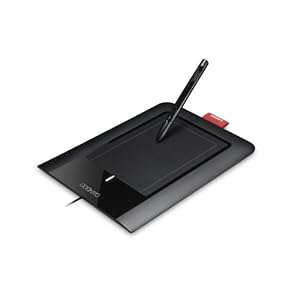
I've always been fascinated by the idea of tablet entry but have run across some monstrosities of implementations. I decided to order the Wacom Bamboo because I wanted to create some screencasts à la Khan Academy but in some subject areas he doesn't do that I tutor for.

Video

I think with this I can replace my paper notes with OneNote finally. If the screen on an actual tablet PC works as well as this tablet does then I may consider getting one exclusively for note taking.
 
I would prefer the Bamboo Pen & Touch although it would cost more than the Bamboo Pen. The Bamboo Touch would be a better choice and functionality compared to the Apple Magic Trackpad. The only problem is Wacom products are never cheap. :\
 
I have used Wacom pads for years - back when they used a serial connection. I use the Graphire - it has both a pen and a wireless mouse. I use the mouse for macro moves and the pen for graphics editing and micro work. It saved me from CTS!
 
I would prefer the Bamboo Pen & Touch although it would cost more than the Bamboo Pen. The Bamboo Touch would be a better choice and functionality compared to the Apple Magic Trackpad. The only problem is Wacom products are never cheap. :\

$58 for the Pen, $88 for the Pen and Touch.

I don't know, it seems very reasonable to me.
 
This thing is pretty fun! My daughter loves to color with it, and the handwriting detection is cool.
Well worth the $61!

Try SmoothDraw 3. It makes the tablet feel like real paper.

I'm having trouble getting it to work as well in other applications--like OneNote. It works "okay" but the resolution seems to be lower. If I zoom in the resolution increases (intuitively), but in SmoothDraw the resolution is good all of the time.
 
With my Graphire I used to just tape a sheet from a sketch pad on top to make it feel like paper. Apparently that wears out the plastic tip though
 
That would probably confuse her more than anything. She should learn to write with a pencil and paper

She uses her NDS to draw with and she writes letters on there, and this is just a much larger version of it. 🙂
She's ahead of the game as far as reading and writing, this is just extra.
 
Back
Top