Ubuntu wireless drivers

Jassi

Diamond Member
Sep 8, 2004
3,296
0
0
I bought a laptop recently from a friend that didn't have an OS. Since I don't any spare licenses, I thought Ubuntu would be a great OS and a learning tool. I am stuck on one thing however. I don't have access to internet via Ethernet and the wireless drivers (proprietary Broadcom) are only available via the net.

The thing that irks me though is that the Ubuntu LiveCD was able to detect and install the proprietary drivers but the installation procedure didn't do that for me. Is there a way I can force Ubuntu to install the same drivers that I know are on the LiveCD?

I think your chances for an answer to this question will be better in the*nix section.

TonyH
AnandTech Administrator
 
Last edited by a moderator:

Jodell88

Diamond Member
Jan 29, 2007
8,762
30
91
What is the output of this command?
Code:
lspci | grep Broadcom
If it doesn't work then post the results for just lspci.
 

Nothinman

Elite Member
Sep 14, 2001
30,672
0
0
Do you have another PC with which you can get on the Internet? You probably just need the package containing the appropriate firmware for your card, which should be a simple thing to download and install manually.
 

Jassi

Diamond Member
Sep 8, 2004
3,296
0
0
So, I ended up hitting a library that had ethernet connections available. It was a pain but as soon as I connected and started up the Ubuntu Software program, it detected that proprietary drivers were available and installed them.

I honestly do feel that Ubuntu fails in this respect. The LiveCD makes it look really easy because it detects, prompts the user and installs the drivers if the user chooses to do so without a connection to the internet. However, the install version fails to do so out of the box.

Sorry for the lack of an update, got tied up with other things. Thank you for your help.

On a positive note, upgrading from 8 to 9 killed my audio settings in my personal laptop but it was nice to see that everything else worked right out of the box.
 
Last edited:

Nothinman

Elite Member
Sep 14, 2001
30,672
0
0
I honestly do feel that Ubuntu fails in this respect. The LiveCD makes it look really easy because it detects, prompts the user and installs the drivers if the user chooses to do so without a connection to the internet. However, the install version fails to do so out of the box.

The Live CD and the install CD are the same, unless you downloaded the alternate install disc.
 

Jassi

Diamond Member
Sep 8, 2004
3,296
0
0
The Live CD and the install CD are the same, unless you downloaded the alternate install disc.

No, I think you misunderstood what I meant.

I installed from the LiveCD. But when I booted from the LiveCD, it detected that I may need proprietary drivers and gave me a prompt via which I could choose to install them. The drivers were on the CD and in the LiveOS environment, I had my wireless connection up and running in like 5 mins.

When I installed it and booted from the hard drive, it did not prompt me with the option of installing the proprietary drivers until after I connected to the 'net through a wired connection. If it had behaved the same way as it did in the LiveOS environment, there would be no issue.
 

lxskllr

No Lifer
Nov 30, 2004
60,926
11,258
126
No, I think you misunderstood what I meant.

I installed from the LiveCD. But when I booted from the LiveCD, it detected that I may need proprietary drivers and gave me a prompt via which I could choose to install them. The drivers were on the CD and in the LiveOS environment, I had my wireless connection up and running in like 5 mins.

When I installed it and booted from the hard drive, it did not prompt me with the option of installing the proprietary drivers until after I connected to the 'net through a wired connection. If it had behaved the same way as it did in the LiveOS environment, there would be no issue.

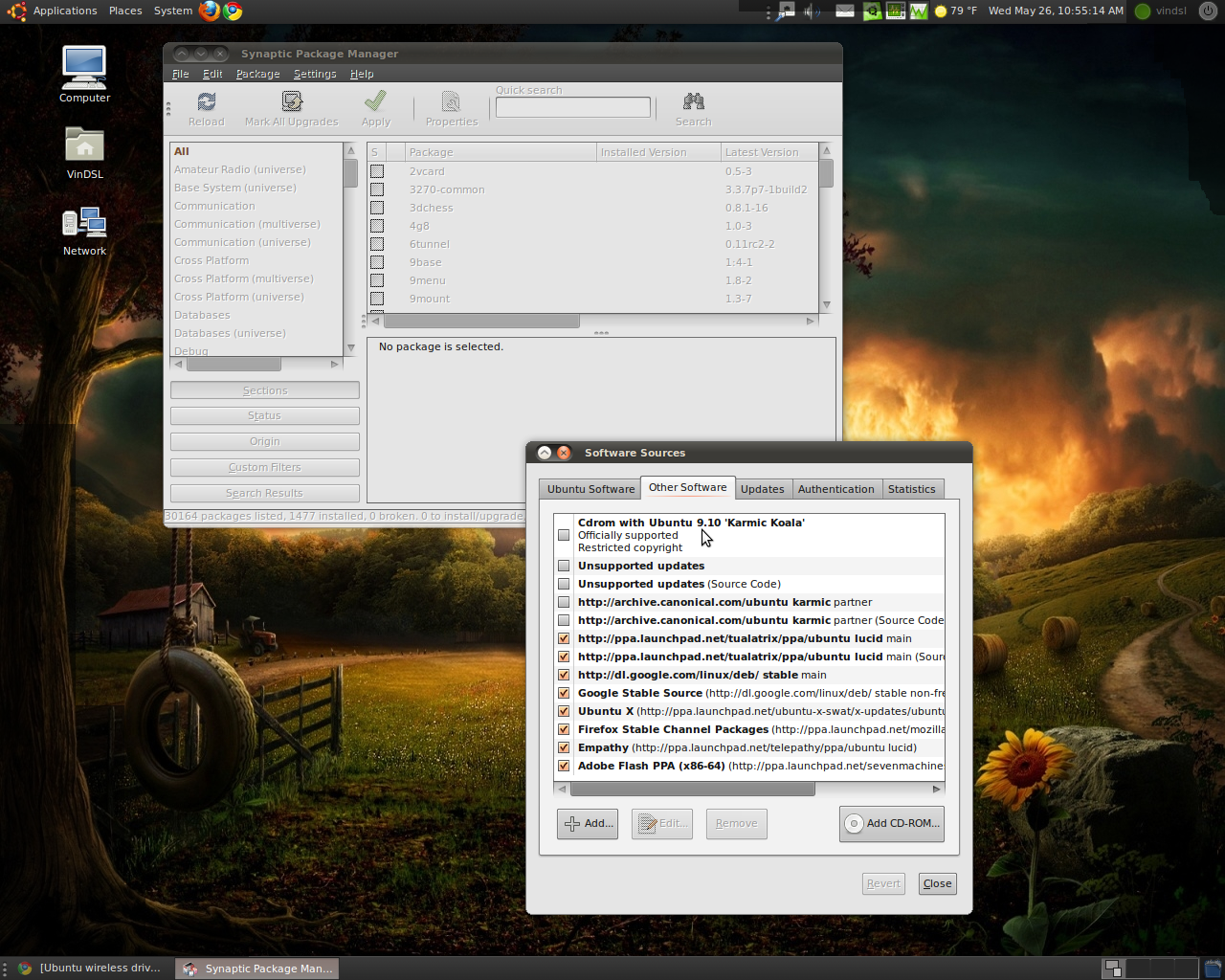
Oh, you need to go into Synaptic, and add the CD as a software source. Then when you reload the repositories, it'll scan the CD and get the necessary drivers(assuming they exist there).
 

Jassi

Diamond Member
Sep 8, 2004
3,296
0
0
Oh, you need to go into Synaptic, and add the CD as a software source. Then when you reload the repositories, it'll scan the CD and get the necessary drivers(assuming they exist there).

Hmm.... Thanks. Did not see that anywhere while looking online. Might be just one of those basic Linux things I missed.

Awesome. I'll try that as I try to rid my personal laptop of Windows this weekend :)

Edit : Forgot to say, thanks for the help guys/gals. OSS exists because people like you are willing to help newbs like me. I hope to pass on the favor.
 

Patt

Diamond Member
Jan 30, 2000
5,288
2
81
I had the same issue with the install of 10.04 ... but fortunately was able to plug in directly and get it from the internet. I was a bit surprised the LiveCD was so simple, and that the regular install didn't check that. Either way, I'm installed and happy. That old laptop that was going to head out the door is now used on a daily basis.
 

Jassi

Diamond Member
Sep 8, 2004
3,296
0
0
I had the same issue with the install of 10.04 ... but fortunately was able to plug in directly and get it from the internet. I was a bit surprised the LiveCD was so simple, and that the regular install didn't check that. Either way, I'm installed and happy. That old laptop that was going to head out the door is now used on a daily basis.

I might be wrong on this but I think Mint Linux (Ubuntu based) can actually load the drivers without network connection. I DL'ed v. 9 and without installing proprietary drivers, the LiveCD was able to get me online. I have not had the time to install it yet but I expect the process to be simpler than plain Ubuntu.
 

VinDSL

Diamond Member
Apr 11, 2006
4,869
1
81
www.lenon.com
Did not see that anywhere while looking online. Might be just one of those basic Linux things I missed.[...]
Here's a screenie...

ubu-cd-repo.png


I might add:

This cuts both ways.

Most of the time, you'll want to 'uncheck' this box!

Otherwise, it'll drive you crazy (like Windows) asking you to 'Insert the CD' every time you do an update... D:
 

VinDSL

Diamond Member
Apr 11, 2006
4,869
1
81
www.lenon.com
Thinking out loud... ():)

I might be wrong on this but [...]
PORTABLE "Wireless Drivers" have been the bane of every OS I've tried -- and I've tried many.

LoL! Last year, that was my hobby -- installing/testing every viable 'alternative' OS.

Regardless...

Most of the time, there's nothing intrinsically wrong with the installer, or the OS. It's your hardware.

Example #1: My Toshiba A215 Satellite lappy has a very common wireless chipset, but...

For some reason, the wireless card is attached (internally) to a USB header, instead of the PCI bus. Hello?!?!?

Why 'they' did this is anybody's guess -- but there are very few installers that will find this Wifi card and/or install the correct drivers.

Example #2: My Asus 1000HD Eee PC netbook has a very common wireless chipset, but...

The Mint/Ubu installer found the wifi card and installed the correct drivers. However, the default *free* wifi drivers were conflicting with the video drivers - causing my EeePC display to flicker whenever there was network activity. LoL! Initially, I thought my netbook was defective, but XP (the OEM install) displayed no such quirk...

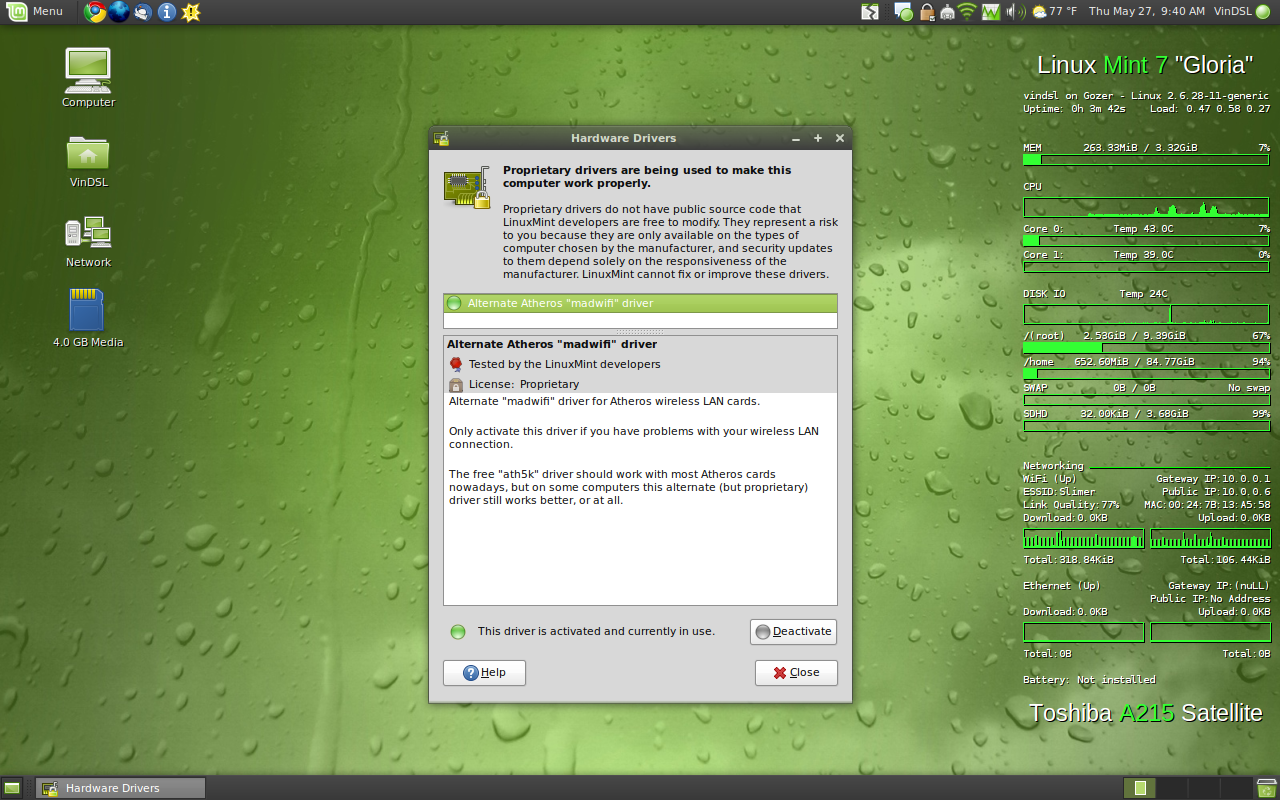
Personally, I recommend MadWiFi: http://madwifi-project.org/wiki/About/MadWifi (for Atheros-based devices)

Using the MadWiFi HAL module took care of the (above) problems...

Be aware -- madwifi usually creates it's own set of problems (coming out of a sleep state, et cetera) -- but IMHO, dealing with these problems are preferable to flaky wifi connections and screen flicker.

NATIVE RES SCREENIES

Netty:

madwifi-netty.png

Lappy:

madwifi-lappy.png
 
Last edited: