mikeymikec
Lifer
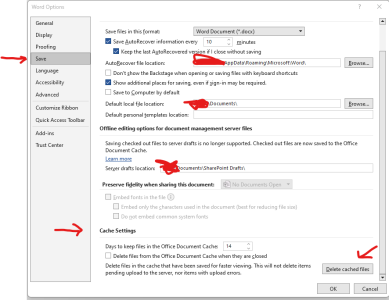
Office 365, %localappdata%\Microsoft\Office\16.0\OfficeFileCache\0\0 contains over 100k files in 604 folders totalling ~1.8GB, each folder with spurious names.
The only reason I discovered this was that I'm doing a more-thorough-than-usual backup of a customer's user profile and it is taking freaking ages to copy this particular folder structure to a HDD via USB 3.0.
So many questions. LibreOffice apparently has no cache folder (why would an office program need one?). My Firefox cache folder for multiple Firefox profiles only contains ~3k items and weighs 1.2GB. Why create a folder structure in the cache folder which starts with one folder inside another, each named '0'? Why does MS love CLSID-style spurious folder names?
The only reason I discovered this was that I'm doing a more-thorough-than-usual backup of a customer's user profile and it is taking freaking ages to copy this particular folder structure to a HDD via USB 3.0.
So many questions. LibreOffice apparently has no cache folder (why would an office program need one?). My Firefox cache folder for multiple Firefox profiles only contains ~3k items and weighs 1.2GB. Why create a folder structure in the cache folder which starts with one folder inside another, each named '0'? Why does MS love CLSID-style spurious folder names?