• We’re currently investigating an issue related to the forum theme and styling that is impacting page layout and visual formatting. The problem has been identified, and we are actively working on a resolution. There is no impact to user data or functionality, this is strictly a front-end display issue. We’ll post an update once the fix has been deployed. Thanks for your patience while we get this sorted.

Toaster hard drive docks - mean time between failures

Status
Not open for further replies.

hammer256

Member
In the place I work the toaster hard drive docks are becoming pretty popular, and people like to just pop off drives and transport them between toasters. As you can imagine the number of plugging and unplugging is really high for those drives. Now, I remember from somewhere that a big difference between SATA and ESATA cables/plugs was that ESATA has a much higher rating for number of times it can be plugged/unplugged. Is that impression correct? If so, do drive connectors have the same limitations as SATA cables/plugs?

So what I'm wondering is, what is the mean plug/unplug times between failures of drive connectors? It would be a shame to have broken drives just because we unplugged them too many times.

hammer
 
I don't have an answer for you, but I would be more concerned with the constant moving around and handling of HDDs.
 
Ah well, they can just replace the drives when they fail. At least they are good about backing up data.
I was just curious about it, especially since hearding Anand mentioning the MTBF of CPU sockets in one of the podcasts.
 
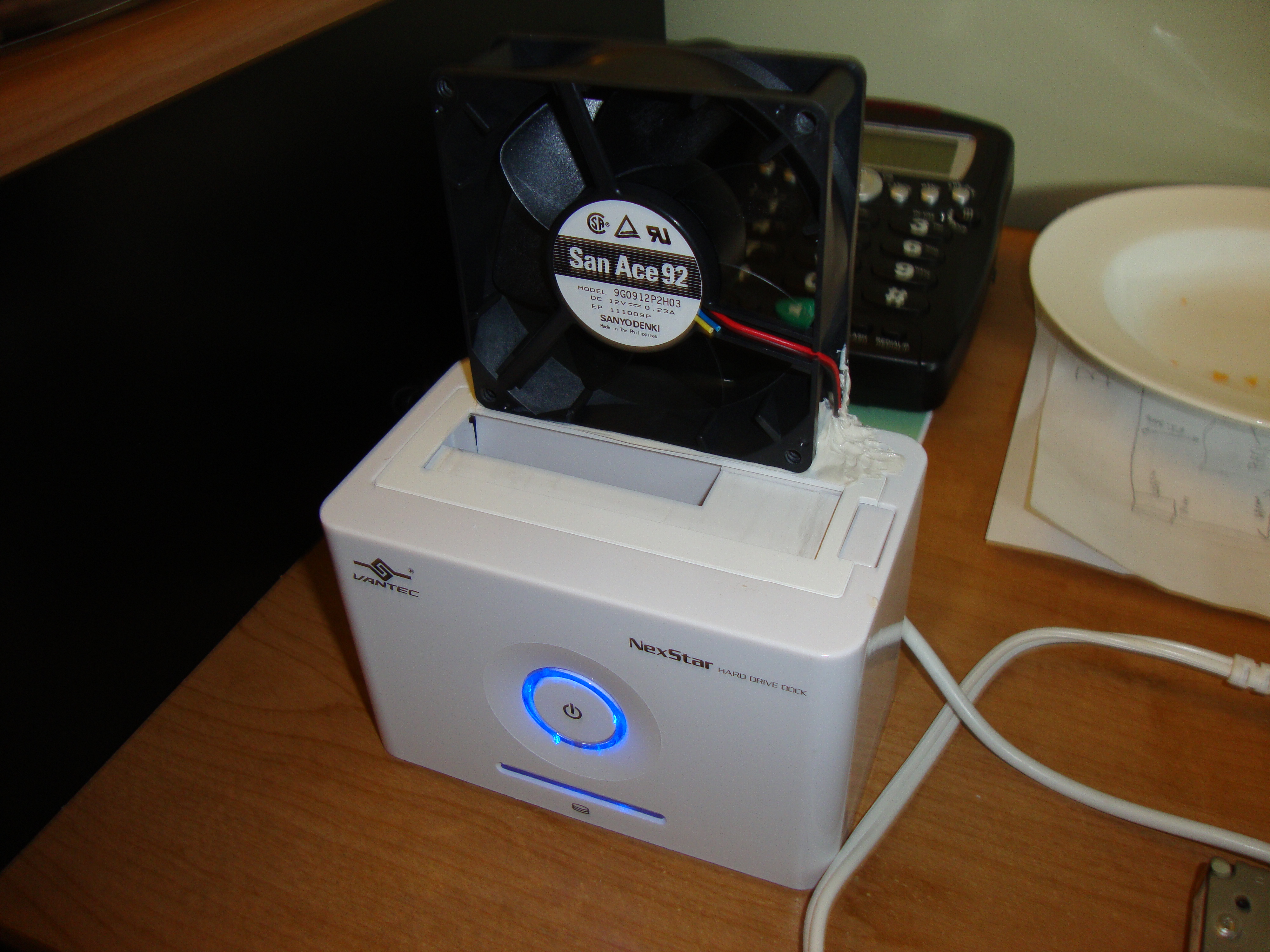
I have one I use for backups, the only issue I had was heat, particularly because lot of the drives I use are Hitachis and those things get hot enough to make scrambled eggs on them. It had started to melt the plastic, and I actually had to let it cool down before I could handle it. Even though it's open air, because there's not really any air flow the heat does not disapate fast enough.

So I added a fan:


The fan turns on when I turn the unit on. Just opened it up and traced the wires that lead to the hard drive plug and tapped into them. Used caulk to "glue" the fan. Was going to use PVC glue but there was not enough surface area.

You also gave me an idea. Convert a toaster into a 4 drive dock. 😛 Have it pop up when the backup is complete.
 
I got one for free from newegg. It stopped working after the third use. I dont even know what happened. It just wouldnt fit. I looked at the connector and it looked fine but it just wouldnt line up properly with the HDD. I ended up breaking it. lol. I'll stick with cables.
 
I got one for free from newegg. It stopped working after the third use. I dont even know what happened. It just wouldnt fit. I looked at the connector and it looked fine but it just wouldnt line up properly with the HDD. I ended up breaking it. lol. I'll stick with cables.

lol I tried putting a hard drive upside down in mine, I was not paying attention, I pushed it in, it felt normal. I go upstairs to run the backup job and I get an error, invalid device. I'm like "huh?" I go back downstairs, and notice the sata/power connector on top of the hard drive. DOH! 😀
 
Status
Not open for further replies.
Back
Top