• We’re currently investigating an issue related to the forum theme and styling that is impacting page layout and visual formatting. The problem has been identified, and we are actively working on a resolution. There is no impact to user data or functionality, this is strictly a front-end display issue. We’ll post an update once the fix has been deployed. Thanks for your patience while we get this sorted.

Think I broke my brothers Z77 Extreme 4 mobo pls confirm :)

Knowname

Member
In my defense I have always built AMD computers (and one socket 1175 celeron) so I had no idea what I was doing other than what I remember from YT videos. Just saying installing intel core cpus is terribly different than most amd cpus (forget the term, PPGA?). Anyway I thought I put it together right after dusting the HSF (thus removed the cpu to clean and re-apply thermal paste) I was careful to line up the edges or how I thought the cpu went in. I mean a) why is it not keyed like AMD cpus, there is a 'arrow' at one corner but all corners on the socket look the same! the best I could do was match the divets on the sides. b) I can't understand the lock in mechanism!

I'm sorry Intel mobos are so confusing ANYWAY I think I guessed wrong once (in fact I once put it in all four directions just to see if it'd slide in 🙂 I didn't lock it than I was just curious- all four directional configurations felt the same :/ hate intel) so yeah I remember studying the socket and it kinda looked like a few pins were bent :|.

so I put it back together and it turns on (can't get video) than powers down and powers back on and cycles off/ on like that until I manually turn it off. does this mean I broke my mobo or could it be something else?
 
1) Remove CPU
2) If pins in socket are bent, congrats, you broke your motherboard
3) attempt to RMA?
4) PROFIT!!!

Chances are, though, that step 3 won't work, they will return it back to you at your expense, citing "physical damage". Some of the better mobo makers may give you an out-of-warranty quote to replace the whole socket, which is going to cost as much as a new motherboard. But if you can't get them anymore, and this is a critical system, you may want to take them up on that offer. (*And next time, for "critical systems", buy backup boards that can be swapped in. I do that for my storage servers, just in case.)
 
And next time, for "critical systems", buy backup boards that can be swapped in. I do that for my storage servers, just in case.

Good advise!

I'm wondering is cycling off an on (automatically) typical of this type of problem- suspectet socket pins bent OR cpu inserted in wrong? Is this some kind of post code? I've never had this happen. I will take a picture of the socket and see what others think.

Finally can somebody tell me how to install this i5 right? lol one corner of the cpu has an arrow but every corner of the socket looks the same! Hate this FPGA crap.
 
Last edited:
Good advise is cycling off an on (automatically) typical of this type of problem- suspectet socket pins bent OR cpu inserted in wrong? Is this some kind of post code? I've never had this happen.

Depending on what pins were damaged, cycling on and off could be symptom, or even it not powering on at all.

Heck, depending on what pins are bent, you could even have damaged the CPU.
 
If there are pins that are still straight, but bent only at the base, then try using a mechanical pencil (with the lead removed) as a straightening device.
Note: for most Intel CPU's, the CPU lettering should also match the same orientation as the motherboard model name lettering. There are also two notches that need to align with the corresponding socket nibs.
Also note: the "arrow" on the CPU should match the "arrow" that is printed onto the motherboard adjacent to the CPU socket.
 
Last edited:
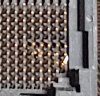
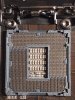
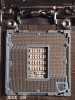
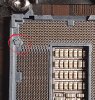
here I took a picture of the socket and closeup of the portion that looks bent to me what do you think?
 

Attachments

  • 20190820_210741 (2).jpg
    20190820_210741 (2).jpg
    141.7 KB · Views: 33
  • 20190820_210741.jpg
    20190820_210741.jpg
    765.2 KB · Views: 36
  • 20190820_210741_LI.jpg
    20190820_210741_LI.jpg
    764.6 KB · Views: 33
It also looks like you damaged it here as well (not sure if the crushed plastic bent any of those pins near it):

33.jpg
 
If it is a Z77 board it is likely out of warranty even if the pins weren't bent. I would recommend buying a new board, or have him go with a full ryzen 3k system 😀
 
After viewing the images I'd say you killed it. Just in case you get the nerve to do something similar in the future you don't really need to remove the cpu to clean off the old TIM. Next time try putting a very small amount of rubbing alcohol on a coffee filter and gently rub it away. Depending on the TIM you might not even need any alcohol at all.

Does the bottom of the cpu look like it's burnt?
 
You physically damaged the motherboard socket. I have used LGA since 2009. I was AMD before that. You can bend the pins on an AMD CPU (PGA) too. Of course, I heard about bent pins on LGA boards before I switched to them. It wasn't that big of a deal. You just orientated the CPU wrong. There's an arrow so you know what corner to place the cpu in. The notches should also only work one way. You don't force the cpu in. You gently place it according to the arrow and the notches. Then, when you have your cpu properly orientated, you lock the cpu in place with the lever. You have to pretty much do the same thing with AMD.
 
We've all damaged some stuff through inexperience, enthusiasm and testing. It happens. The plastic damage is trivial, the bent pins in the lower right quandant are, well... brother needs a new board now. Sorry bud, that's just too much damage for someone else's machine even if you got it working.

Anyone mind if I hijack this thread a little for a PSA since Google? I ask, because I looked and couldn't find anyone who did the ASRock BIOS for NVME so I was wary. I'm running the Z77Extreme6 beta 2.90A for NVME support. It works beautifully. Took about 6 power cycles after the UEFI update (bios) and then it came back humming.

It's like finding out your old John Deere has support for a turbo, very pleasing.
 
We've all damaged some stuff through inexperience, enthusiasm and testing. It happens. The plastic damage is trivial, the bent pins in the lower right quandant are, well... brother needs a new board now. Sorry bud, that's just too much damage for someone else's machine even if you got it working.

Anyone mind if I hijack this thread a little for a PSA since Google? I ask, because I looked and couldn't find anyone who did the ASRock BIOS for NVME so I was wary. I'm running the Z77Extreme6 beta 2.90A for NVME support. It works beautifully. Took about 6 power cycles after the UEFI update (bios) and then it came back humming.

It's like finding out your old John Deere has support for a turbo, very pleasing.

Yeah but it only goes one way, just using his eyes he should have been able to figure that out. I always wonder how some people screw up boards so bad on ebay, now I can see first hand how it's done!
 
Back
Top